

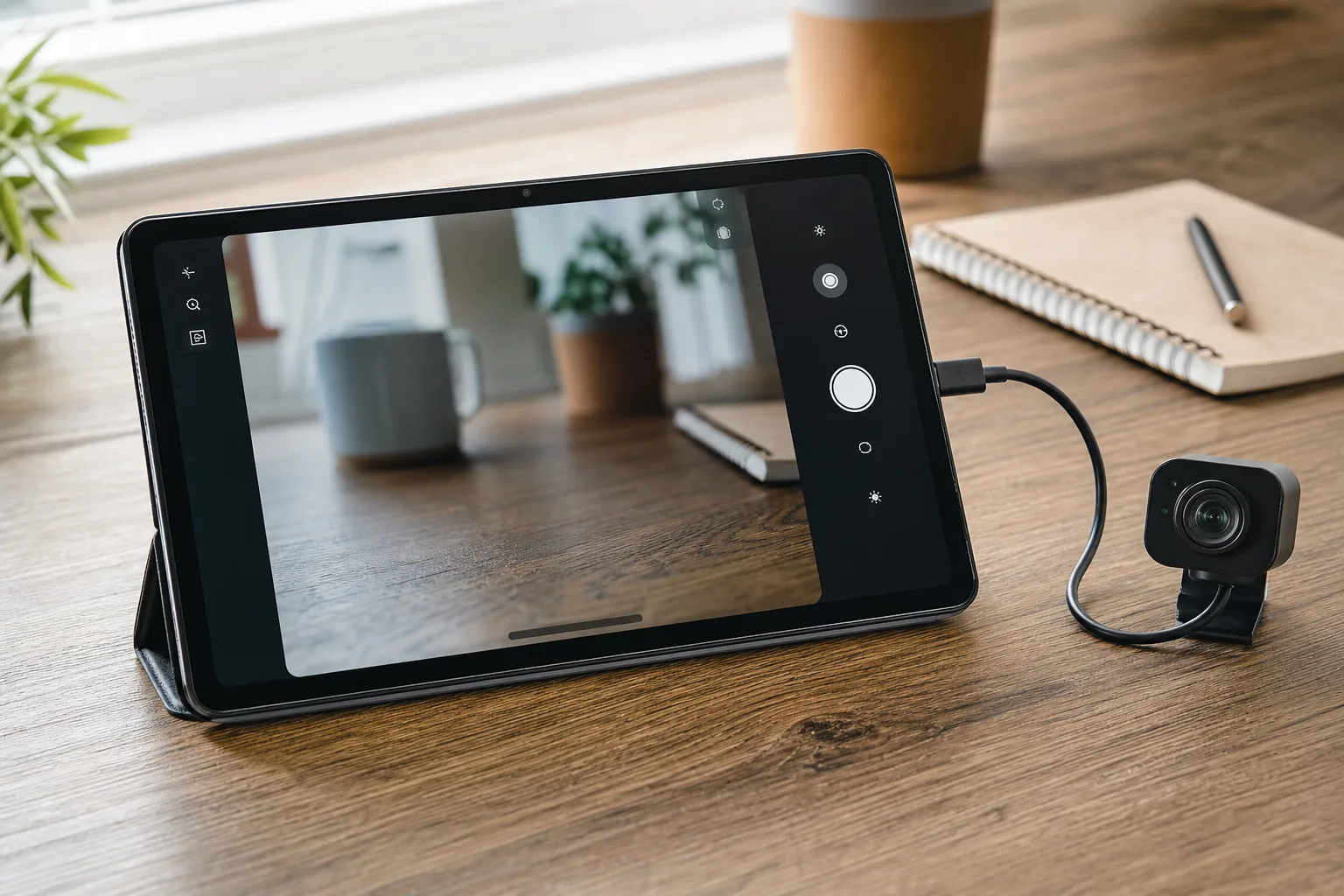
- The Desktop Camera app Play listing now reveals a finished interface designed for tablets, laptops, and desktop-style screens.
- Google’s Desktop Camera app includes USB webcam switching, document scanning, QR recognition, and controls tailored for mouse and keyboard use.
- The visual design closely resembles Pixel Camera on the Pixel Tablet, suggesting Google wants a familiar experience across larger devices.
- A dedicated camera utility could help Googlebook feel less like a stretched Android tablet and more like a practical computer.
Table of Contents
Desktop Camera app points to a real big-screen strategy
A camera app probably isn’t the feature anyone circles on a launch-day spec sheet. Yet the newly refreshed listing for Google’s Desktop Camera app may be one of the clearest clues we’ve seen about how the reportedly forthcoming Googlebook hardware is meant to work in daily life. Google appears to be treating the camera as a desktop utility, not merely a phone app blown up onto a larger display.
The updated Google Play materials replace earlier placeholder imagery with what looks like a finished product: a blue, softly graded app icon and a camera interface built for landscape use. The listing describes the software as the official way to “Capture every moment clearly,” then makes the more interesting promise: it is designed for “larger screens, tablets, and desktops,” with touch, mouse, and keyboard input all in mind.
That last bit matters. Android has spent years trying to become more convincing on tablets, foldables, Chromebooks, and external displays. The app ecosystem has improved, but plenty of interfaces still feel as though someone took a phone screen and put it under a magnifying glass. A purpose-built Desktop Camera app suggests Google knows that problem and, at least here, is trying not to repeat it.
The reported Googlebook name should still be handled carefully. Google has not publicly announced a product under that branding, and the company’s broader hardware plans can change quickly. Even so, the listing’s timing and its unusually specific large-screen language line up with reports that Googlebook could arrive in laptop and tablet-style forms later this year.
A familiar camera layout, adapted for a desk
Based on the published screenshots, the Desktop Camera app borrows heavily from the visual language of Pixel Camera on the Pixel Tablet. The main controls sit down the right side in landscape orientation, while the photo and video selector occupies the lower-right corner. A gallery shortcut sits beneath the shutter control, and extra options appear along the left.
That arrangement is sensible rather than flashy. On a laptop-sized display, a bottom-centered shutter button would force users to reach across the screen or drag a cursor through the middle of a viewfinder. Keeping core controls on the edge is closer to the way people naturally hold a tablet, and it also leaves the image preview mostly unobstructed.
Frankly, Google should reuse the Pixel Camera muscle memory here. People don’t need a fresh camera metaphor every time their screen gets bigger. They need to find the shutter button immediately, switch modes without hunting through menus, and get on with the call, scan, or photo they were trying to make. That’s the sort of boring design decision that makes software feel finished.
USB webcams and scanning are the real story
The more consequential feature list is not about taking prettier snapshots. The Desktop Camera app is said to support external USB webcams, allowing users to plug in and switch between cameras. It also includes machine-learning-assisted document scanning with automatic cropping and enhancement, plus QR-code scanning.
External webcam support is the kind of feature that separates a large-screen device from a big phone. Built-in cameras on tablets and thin laptops are often serviceable at best. Give users the option to connect a proper Logitech, Elgato, or conference-room USB camera, though, and the device becomes much more credible for work calls, streaming setups, classroom use, and basic content creation.
Here’s the practical caveat: support on paper and support in the messy world of USB accessories are two different things. Anyone who has connected an oddball webcam to Android knows compatibility can become a small weekend project. The CameraX platform tools, however, are separate from the user experience, which will come down to how reliably this app identifies cameras, switches feeds, handles microphones, and survives docks and adapters.
Document scanning may prove even more useful. Think receipts, signed forms, school worksheets, whiteboards, and the endless pile of paperwork that somehow survives the supposedly paperless office. Auto-cropping and image cleanup are table stakes in mobile scanning now, but putting those tools front and center on a laptop or tablet means users may not need to pull out a phone simply because they need a decent scan.
Why Google needs the Desktop Camera app
My read is that the Desktop Camera app is less about photography than it is about giving Googlebook a coherent reason to exist. If Google is pursuing a hybrid device, it cannot rely on a hardware form factor alone. We’ve watched that movie before: novel hardware arrives, the software feels unfinished, and customers reasonably ask why they didn’t just buy a conventional laptop or iPad.
A native camera utility can make the larger device feel capable in small but meaningful moments. Scan a document directly into a workflow. Use an external webcam without installing a strange third-party utility. Open a QR code from a monitor during setup. These are not headline-grabbing tricks, but they are exactly the chores that expose weak platform integration.
There’s also a quiet competitive angle. Apple’s Continuity Camera turns an iPhone into a Mac webcam, while Microsoft has pushed Windows camera effects and mobile-device integration. Google’s apparent answer is different: make the device itself more flexible as a camera hub. If the software works cleanly with standard USB hardware, that could be a more universal approach than requiring buyers to own a particular phone.
The biggest question is whether Google follows through
The finished-looking listing makes the Desktop Camera app seem closer to release than its earlier placeholder state, but screenshots are not a shipping product. We still do not know which devices will support it, whether it will be exclusive to Googlebook hardware, or how much of the feature set will reach existing Android tablets and Chromebooks.
Google also has a habit of showing sharp product ideas and then losing interest after the first wave of attention. Remember when Stadia’s technology was widely praised, right up until Google killed the service? A camera app is obviously a much smaller commitment, but the lesson remains: platform features matter only if Google maintains them.
Right now, this looks like a promising signal. The Desktop Camera app suggests Google understands that a computer-sized Android experience needs computer-sized utilities. Whether Googlebook becomes a serious new category or another intriguing side road will depend on how many of those utilities arrive with it.

