

Table of Contents
As editors at Squaredtech.co, we track how streaming giants like Spotify balance audio purity with visual trends. Spotify Video Toggles mark a pivotal shift. Users now disable video entirely, addressing long-standing complaints from audio-focused listeners. This update arrives amid Spotify’s heavy push into video since 2018. The company reports over 70 percent of users want more video, yet it acknowledges a key minority prefers music without visuals. Spotify Video Toggles empower choice, preventing the app from becoming a TikTok clone. We analyze this feature’s rollout, controls, history, and implications below.
Spotify Video Toggles: Locate and Use the New Controls
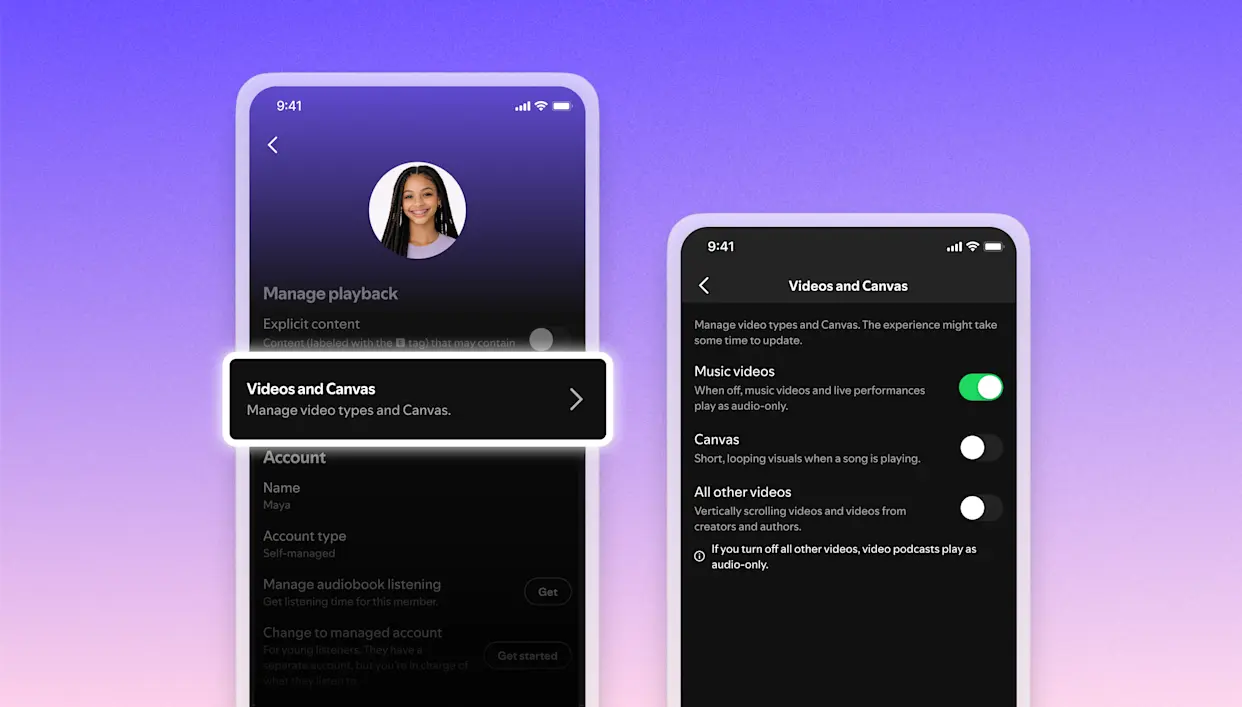
Spotify Video Toggles appear in a straightforward menu. Users open the app and tap Settings. They select Content and display from the list. Three switches greet them there. The first handles Canvas, those short video loops on the Now Playing screen. Spotify introduced Canvas in 2018 to replace static album art. Artists upload 3-8 second clips that loop during playback. Canvas aimed to boost engagement by mimicking Instagram Stories. Yet many users found it distracting, especially on small phone screens or during drives.
The second switch targets music videos. Spotify rolled out music videos in 2024 across 11 countries. High-profile artists like Travis Scott and Nicki Minaj featured clips from labels like UMA and WMG. Users in those regions accessed full-length videos tied to premium tracks. The US waited until late 2025 for this rollout. Spotify Video Toggles now let users block these videos globally. This matters because music videos autoplay in playlists, interrupting flow for listeners who prioritize lyrics or podcasts.
The third switch, labeled “all other videos,” covers everything else. Video podcasts fall here, a format Spotify launched in 2020. Podcasters upload episodes with visuals, appealing to fans of shows like Joe Rogan. Vertically scrolling feeds, tested as “Discover” in a TikTok-style format, also qualify. Artist clips join the mix too. These 30-second vertical videos let creators share direct messages. Fans receive them in feeds, blending promotion with intimacy. Spotify Video Toggles bundle these into one off-switch, simplifying management.
Preferences sync across devices. Android, iOS, desktop, and web all respect your choices. Family plan managers gain extra power. They adjust Spotify Video Toggles for every member, ideal for households with kids or elders who avoid video overload. This universal application prevents fragmented experiences. From our analysis, such cross-platform consistency sets Spotify apart from rivals like Apple Music, which offers less granular video controls.
Spotify Video Toggles: A Response to Video’s Rapid Expansion
Spotify Video Toggles counter years of video integration. The journey began with Canvas in January 2018. Spotify tested loops on select tracks, then expanded globally. Data showed higher listener retention, as visuals held attention during songs. By 2020, video podcasts arrived amid a pandemic surge. Remote work and lockdowns spiked audio consumption. Spotify invested billions in podcasts, acquiring studios like Gimlet. Video added replay value, letting viewers watch hosts’ expressions.
Music videos followed in 2024. Spotify partnered with labels for official clips, starting outside the US to test markets. Premium users in Europe and Latin America streamed videos in landscape mode. The US launch in late 2025 brought full access, with playlists like RapCaviar featuring video rows. Artist clips debuted via Spotify for Artists. Creators film short teasers on phones, upload them, and target fans. These clips drive streams, as 30 seconds often hook listeners into full tracks.
This buildup created tension. Spotify surveys claim 70 percent of users favor more video. Younger demographics, aged 18-24, engage most, mirroring TikTok habits. Videos boost session times by 20-30 percent, per industry reports. Yet audio purists resist. Older users or commuters report frustration. Screens light up unbidden, draining batteries and diverting focus. Spotify Video Toggles address this divide. They let users opt out without losing core features.
Compare to competitors. YouTube Music buries videos behind audio tracks, but lacks toggles. Apple Music integrates Apple TV clips without easy disables. Tidal offers high-fidelity audio with minimal video. Spotify Video Toggles position it as the most customizable. From Squaredtech.co’s view, this move retains loyalists while chasing video growth. Spotify’s MAU hit 675 million in Q1 2026, with video contributing to premium upgrades.
Why Spotify Video Toggles Matter for Users and Spotify’s Future
Spotify Video Toggles reveal smart user-centric design. They apply instantly, with no restart needed. Battery savings emerge quick; videos consume 2-3 times more power than static art. Data usage drops too, crucial for mobile plans in regions like Pakistan. Family controls prevent disputes, as managers enforce audio-only for shared accounts.
We predict broader impact. Spotify Video Toggles test user tolerance for video saturation. If opt-outs stay low, expect vertical feeds in every market. AI could personalize further, suggesting videos based on habits. Yet high disable rates might slow video pushes. Spotify’s ad revenue ties to engagement; pure audio sessions yield less. Premium subs, at $10.99 monthly, fund this flexibility.
Critics call Spotify a “TikTok-ified” app, but toggles refute that. They preserve music’s essence while offering visuals to enthusiasts. Accessibility improves; visually impaired users mute distractions. Drivers stay safe without popping clips.
Squaredtech.co sees this as industry leadership. Streaming wars intensify with Amazon Music’s live streams and Deezer’s spatial audio. Spotify Video Toggles differentiate by choice. Over 70 percent video fans get their fix; the rest reclaim pure playback.
Users enable Spotify Video Toggles today. Update your app, dive into Settings, and flip switches. Music streaming returns to basics, on demand.
Stay Updated: TechNews

