


Table of Contents
SquaredTech has followed the development of AI creative tools for years, and few announcements signal a major shift like the new Adobe Photoshop ChatGPT integration. Adobe has confirmed that Photoshop, Adobe Express, and Adobe Acrobat now work directly inside ChatGPT at no cost. This move gives everyday users direct access to features that previously required full desktop software. It also signals a deeper shift in how creative tools reach people. The Adobe Photoshop ChatGPT connection shows how AI chat interfaces now act as the primary workspace for many users.
Adobe states that hundreds of millions of people already use ChatGPT daily, which makes the Adobe Photoshop ChatGPT rollout a direct step into the habits of modern digital work. SquaredTech views this integration as one of the most important creative updates of the year because it lowers the entry barrier for image editing, animation, document control, and PDF management.
This article expands every part of the announcement with full detail. It explains what Adobe Photoshop ChatGPT features offer, how Adobe Express works inside ChatGPT, how Adobe Acrobat manages PDF content, and why Adobe’s strategy could influence the future of creative software. This expanded coverage helps readers understand the technical benefit, the user experience, and the bigger impact on creative workflows.
How Adobe Photoshop ChatGPT Integration Changes Image Editing
The Adobe Photoshop ChatGPT connection works in a simple but powerful way. A user uploads an image to ChatGPT and writes a natural language request such as Adjust the brightness levels on Photoshop. ChatGPT sends this instruction to Photoshop. Photoshop processes the request and returns the edited image inside the chat window. This direct flow gives users a fast and responsive editing experience.
The Adobe Photoshop ChatGPT integration supports many familiar tasks. Users can lighten photos, correct contrast, fix exposure, or change the overall look of an image. Sliders appear inside ChatGPT so users can manually adjust brightness, contrast, or exposure with precision. This mirrors the real Photoshop workflow, but the user does not need to learn menus or advanced toolbars. Adobe built this process so people can apply high quality adjustments through simple language.
Another important advantage appears when the user makes a descriptive request instead of a technical one. The Adobe Photoshop ChatGPT system can identify visual elements automatically. For example, a person can say Apply a charcoal drawing style to this entire image except for the dog in the corner. Photoshop identifies the dog, isolates it, applies the effect to the rest of the scene, and returns a completed image.
The Adobe Photoshop ChatGPT link also supports multiple artistic effects. Users can ask for glitch, glow, tritone, halftone, dither, mosaic, or motion blur. ChatGPT displays the final output along with effect specific controls so the user can fine tune the visual result. If the user needs inspiration, the request Apply effects to this image produces several previews. Each preview shows a different Photoshop effect that the user can select or modify.
Another major ability inside the Adobe Photoshop ChatGPT workflow is the option to continue editing inside the full Photoshop environment. A button labeled Open in Photoshop launches the web based version instantly. All adjustment layers applied inside ChatGPT transfer to the full app. This gives users a direct path to deeper work without losing progress.
We views this integration as a major step for creative access. Adobe Photoshop ChatGPT tools allow beginners to create polished edits while giving professionals a new way to make fast corrections. The combination of natural language control and slider based refinement provides a flexible experience for all skill levels.
How Adobe Express Expands Creative Output Inside ChatGPT
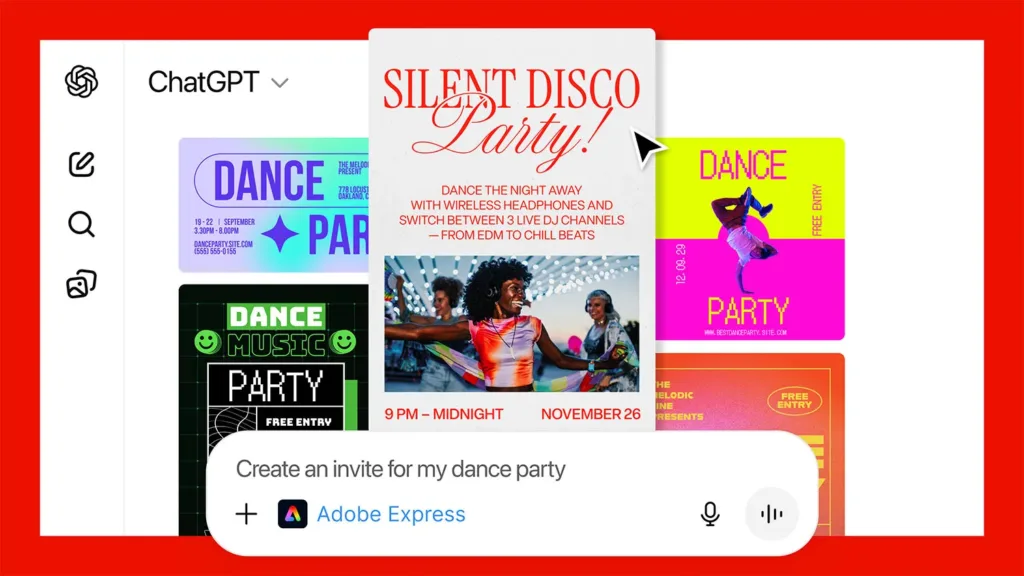
The Adobe Photoshop ChatGPT release is not the only major part of this update. Adobe Express also joins the ChatGPT environment. Adobe Express focuses on graphics, templates, animated content, and quick design assets. It gives people ready made layouts that work for invitations, social posts, posters, cards, and event designs.
The Adobe Express integration starts with simple language. A user can write something like Use Adobe Express to give me some ideas for a Happy Birthday card for my niece who is turning 9. She likes space themes, robots, and purple. Adobe Express provides several card concepts built from its professional design library. Each layout follows the description. The tool selects space themes, robots, and purple colors automatically.
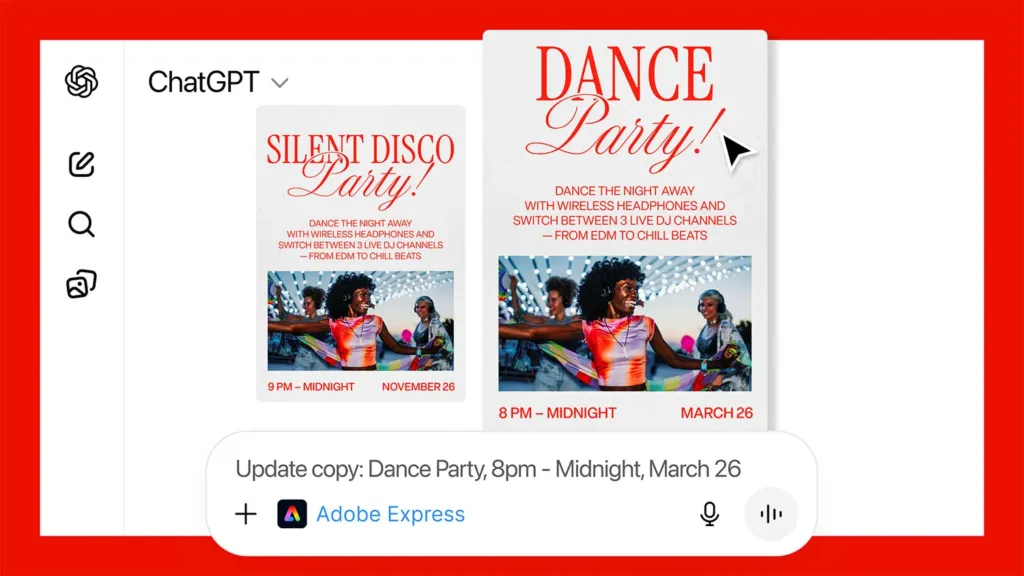
Once the user selects a favorite layout, the Adobe Express ChatGPT environment supports specific modifications. If a user writes Make the robot bigger and change the purple tones to dark red, Adobe Express applies each adjustment in sequence. ChatGPT shows the updated graphic after every change so the user always sees progress.
Another important feature is animation. A user can write Can you animate this design with a popping animation and Adobe Express generates animated versions. The output appears inside ChatGPT with several animation styles to choose from.
Users who want deeper control can open the project inside a full web based version of Adobe Express. This version presents a fully layered file where each element can be adjusted exactly as in the main application. Our team notes that this flexibility makes Adobe Express a strong partner to Adobe Photoshop ChatGPT features. Photoshop manages image edits while Adobe Express manages layouts and design assets.
This gives users a creative pipeline inside ChatGPT. They can edit a photo in Photoshop, move it into an Express template, animate it, and export it without leaving the chat interface.
How Adobe Acrobat Works Inside ChatGPT

The Adobe Photoshop ChatGPT update also includes Adobe Acrobat. This addition focuses on text editing, PDF organization, and document preparation. Users can upload any PDF to ChatGPT and modify the text with the same tools available in the full Acrobat environment. They can rewrite sentences, adjust formatting, fix spacing, or organize layout details.
Users also gain access to multi file PDF operations. They can merge several PDFs by writing Merge these PDFs using Acrobat. ChatGPT opens an interface where users drag and reorder files. Once the files are arranged, the system creates a single PDF.
The Adobe Photoshop ChatGPT system also supports text extraction. Users can pull text from a PDF, copy data, or collect information from scanned documents. Some users may want smaller file sizes, and Acrobat inside ChatGPT supports compression. Others may want a final print ready version, and Acrobat supports full quality export.
This integration gives users the full cycle of PDF control inside a simple conversation. We views this as important because it removes technical barriers. People often struggle with PDF tools, but Adobe Acrobat inside ChatGPT presents direct commands, clear adjustments, and fast processing.
Why Adobe Photoshop ChatGPT Integration Matters for the Future
Adobe states that this update reflects a larger goal. The company believes agent based interfaces now represent a major way people complete tasks. Adobe also believes users want creative features inside the platforms they already use daily. The Adobe Photoshop ChatGPT partnership matches this trend.
The company also notes that the ChatGPT environment holds more than 800 million users. Offering Photoshop, Adobe Express, and Acrobat inside this space gives Adobe a massive reach. It also allows Adobe to show beginners what its tools can do without asking them to install software.
Adobe also confirms that this release is only the first stage. The company plans to expand features inside ChatGPT in the coming weeks. This means Adobe Photoshop ChatGPT tools will likely gain new effects, new layer controls, improved object detection, and deeper integration with Adobe’s cloud environment.
This marks a significant shift for creative access. Adobe Photoshop ChatGPT tools show how software can move into conversational spaces. This helps users create professional content through clear natural language. It also supports learning because users can experiment without needing technical knowledge.
Conclusion
The Adobe Photoshop ChatGPT integration brings Photoshop, Adobe Express, and Adobe Acrobat into a single conversational system. It gives users free tools for image editing, design creation, animation, PDF control, and document organization. The Adobe Photoshop ChatGPT connection also reflects Adobe’s strategy to meet people inside the tools they already use daily.
SquaredTech sees this update as a major milestone in creative access. The Adobe Photoshop ChatGPT partnership expands what users can produce through simple language. It also makes creative work faster, clearer, and more accessible for a wide range of needs.
For more Updates: Artificial Intelligence – Editors Pick

