

Samsung Home Up, the Good Lock module dedicated to home screen and recents menu customization, has picked up two features that Galaxy users have been quietly wanting for years. Multi-finger gesture support — including the three-finger swipe-down screenshot that OnePlus fans have been evangelizing for ages — is finally coming to One UI 9 devices, alongside a long-overdue set of dock customization tools.
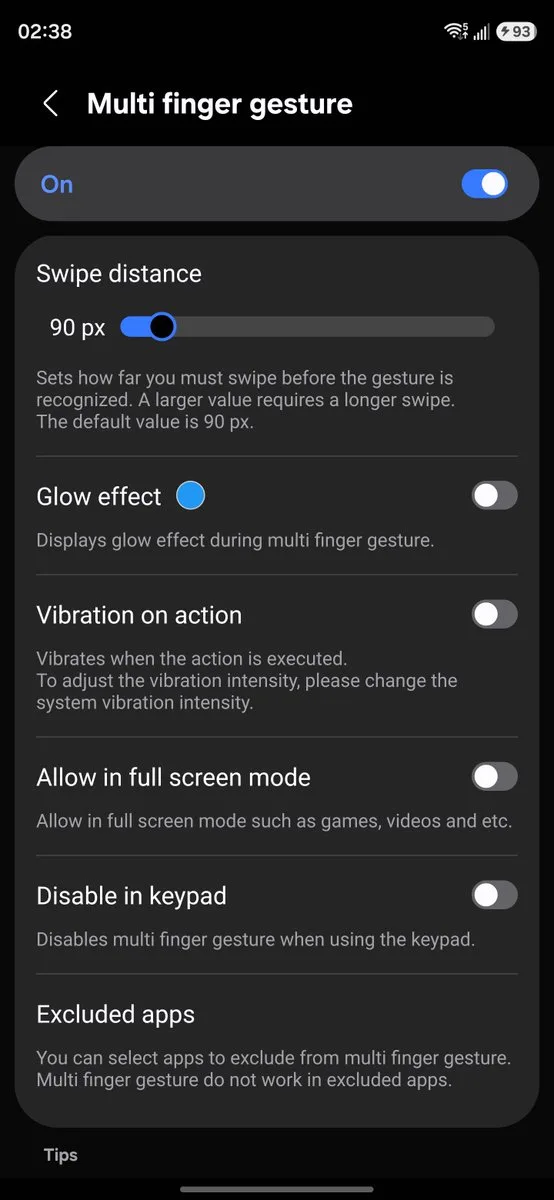
- Samsung Home Up now supports multi-finger gestures using up to five fingers, assignable to actions like screenshots and app switching.
- Samsung Home Up is adding dock customization options including background colors, blur effects, and adjustable corner radius.
- The three-finger swipe-down screenshot gesture will feel instantly familiar to anyone switching from OnePlus or other Chinese Android brands.
- Both features are exclusive to Galaxy devices running One UI 9, part of Samsung’s broader Good Lock expansion.
Table of Contents
What’s Actually New in Samsung Home Up
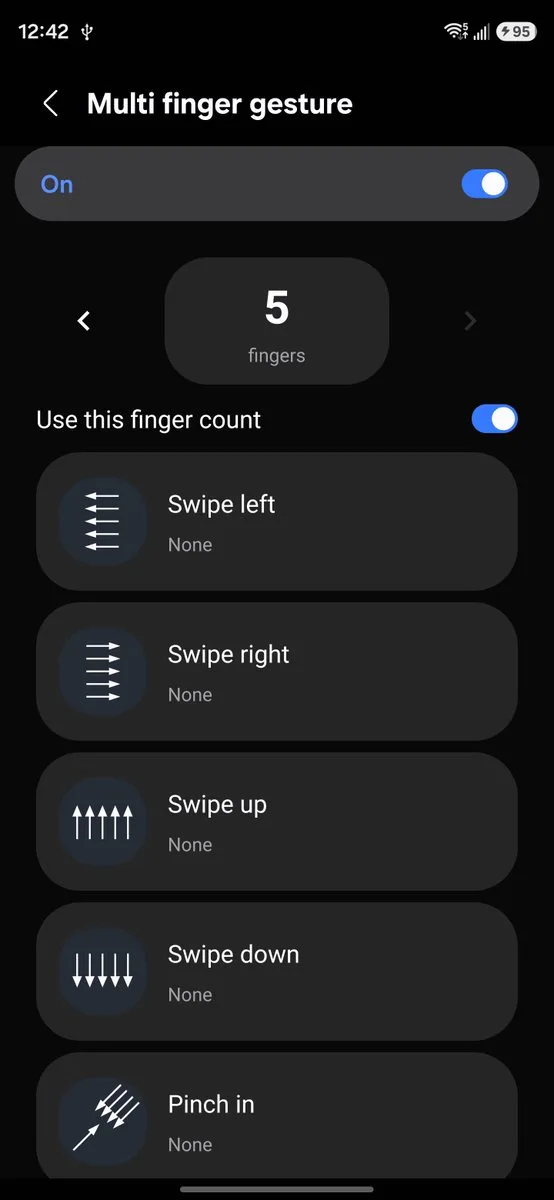
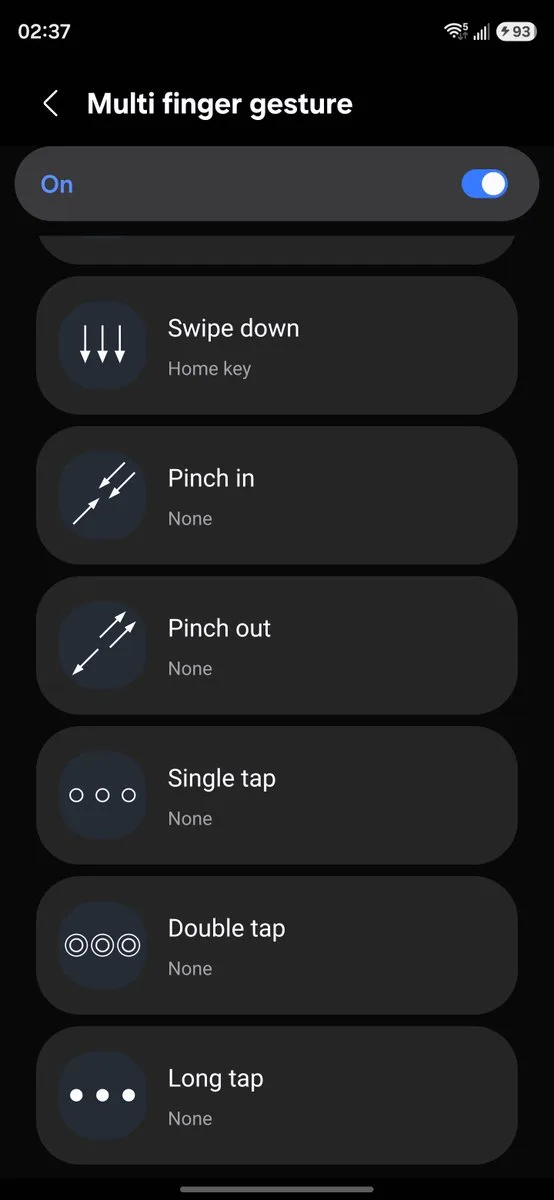
The headline addition is multi-finger gesture support. Samsung Home Up now lets you map custom gestures — using up to five fingers — to a range of system actions. You can trigger a screenshot, jump to the recents menu, switch between apps, or head straight to the home screen, all from a single gesture. The discovery was first spotted and shared by GalaxyTechie on X, who posted screenshots showing the full gesture configuration screen inside the updated app.
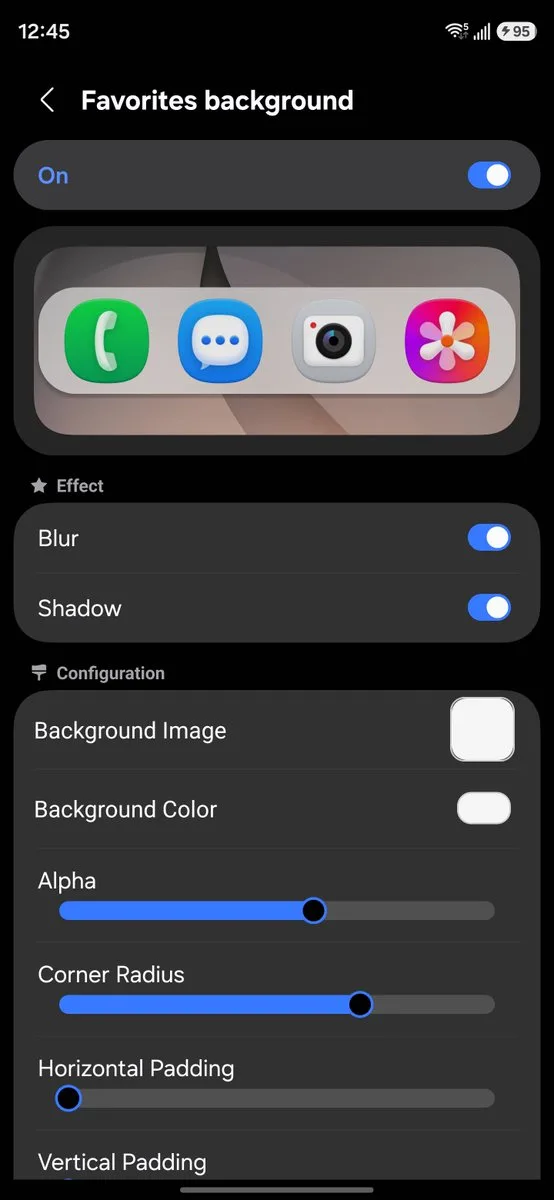
The second addition is dock customization. Samsung Home Up now gives you meaningful control over the app dock that sits at the bottom of your home screen — something that’s been largely untouchable in One UI outside of basic icon swaps. You can change the background image or color, toggle blur and shadow effects on or off, and dial in the corner radius to match your aesthetic. It’s the kind of granular control that third-party launchers like Nova have offered for years, and it’s good to see Samsung building it directly into the platform.
Why the Screenshot Gesture Matters More Than It Seems
Of all the new gestures available, the three-finger swipe-down for screenshots is the one that’s going to generate the most chatter. Samsung has long defaulted to a palm swipe — a gesture that works fine in theory but requires an awkward flat-hand motion across the screen that feels clunky compared to a quick three-finger drag. Anyone who’s ever used a OnePlus phone knows exactly how much smoother the multi-finger approach feels in practice.
And it’s not just OnePlus. Xiaomi, OPPO, realme, and most other major Chinese Android manufacturers have shipped three-finger screenshot gestures as a default for years. For a massive chunk of the global Android market — especially in Asia — this interaction pattern is just how you take screenshots. Samsung sticking with palm swipe as its primary gesture has always felt like an odd holdout, and it’s cost the company some friction among users switching ecosystems.
Now, with Samsung Home Up, those users don’t have to retrain their muscle memory. That’s a small quality-of-life win, but in the world of daily-driver smartphones, those small wins compound fast.
Samsung Home Up and the Bigger Good Lock Picture
These additions don’t exist in isolation. Samsung has been steadily expanding Good Lock’s capabilities with each major One UI release, turning what started as a modest customization app into a genuinely powerful suite of tools. Samsung Home Up is just one module in that ecosystem — sitting alongside Sound Assistant, Camera Assistant, QuickStar, and others — and the pattern has been consistent: each One UI generation brings meaningful new options to multiple modules at once.
The existing Samsung Home Up feature set is already substantial. You can customize app folder appearance, adjust the home screen grid size, modify the share menu layout, change widget sizing, and unlock a level of free-form home screen layout control that even dedicated launcher apps struggle to match. The new gesture and dock features slot naturally into that toolkit rather than feeling bolted on.
What’s interesting from a competitive standpoint is the target this signals. Apple’s iOS remains famously locked down when it comes to home screen customization — the widget and grid changes introduced in iOS 14 and incrementally expanded since feel modest next to what Samsung Home Up can do. Google’s Pixel Launcher is more flexible than iOS but still relatively conservative. Samsung is clearly betting that deep personalization is a genuine differentiator, not just a niche enthusiast feature.
One UI 9 Availability — What You Need to Know
Both features are tied to One UI 9, which means older Galaxy devices or phones that haven’t yet received the update won’t see them in the Samsung Home Up app. Samsung hasn’t published a complete One UI 9 rollout schedule for all supported devices, so if you’re on a mid-range Galaxy or an older flagship, your timeline may vary. The features are present in the app now for compatible devices — no separate download or side-loading required beyond having Good Lock and Samsung Home Up installed.
As Samsung continues rolling out One UI 9 across its device lineup, it’s reasonable to expect the rest of the Good Lock suite to receive similar attention. Camera Assistant in particular has felt stagnant compared to the camera customization options competitors like Google have baked into Pixel phones at the system level. If the pace of Samsung Home Up’s updates is any indication, more is coming — and for Galaxy users who’ve spent years customizing around the platform’s limitations, that’s genuinely good news.

