


- A pre-commit secret scanner stops exposed API keys before they ever enter git history or leave your machine.
- GitHub’s built-in secret scanning only triggers after a push — by then, bots may have already harvested your credentials.
- env-guard ships with 54 detection rules covering Stripe keys, AWS credentials, database strings, and private keys.
- The tool installs as a git hook with a single command, making secret scanning automatic on every commit.
Table of Contents
The Problem With Finding Out Too Late
Every developer who has ever worked with real APIs has a version of this story. A pre-commit secret scanner might have prevented one developer’s particular nightmare: accidentally pushing a .env file — containing a live Stripe test key — to a public GitHub repository. Caught within minutes. Key rotated. Damage, apparently, contained. But that word “apparently” does a lot of heavy lifting when your credentials have spent even 90 seconds exposed on a public repo.
That experience led to the creation of env-guard, a Python CLI tool that scans for secrets and installs directly into your git workflow as a pre-commit hook. The concept is straightforward — block the commit before anything sensitive can travel anywhere. No push, no exposure, no anxious credential rotation at midnight.
Why GitHub Secret Scanning Isn’t Enough on Its Own
To be clear: GitHub’s Secret Scanning is genuinely useful. It covers dozens of credential formats, integrates directly with major providers, and will send you an alert when it finds something suspicious in your repository. Nobody’s arguing it shouldn’t exist.
But it has one structural flaw that no engineering effort can fully paper over: it runs after you push. And in that gap — between the moment your code lands on GitHub’s servers and the moment an alert reaches your inbox — a lot can happen that you won’t find out about until it’s too late.
Automated bots scrape public GitHub repositories constantly. Security researchers have documented response times measured in seconds, not minutes. By the time GitHub flags your exposed AWS access key, that key has already left your machine, traveled across the internet, landed on GitHub’s infrastructure, and potentially been indexed. You’re not preventing a breach at that point — you’re doing damage control and hoping for the best.
The flow without a pre-commit secret scanner looks like this: you write code, commit, push, GitHub scans, you get an alert, and the secret is already out. With a pre-commit secret scanner in place, the commit gets blocked entirely, you fix it locally, and you push clean code. The secret never enters git history at all. There’s nothing to rotate, nothing to audit, and nothing to lose sleep over.
What env-guard Actually Does
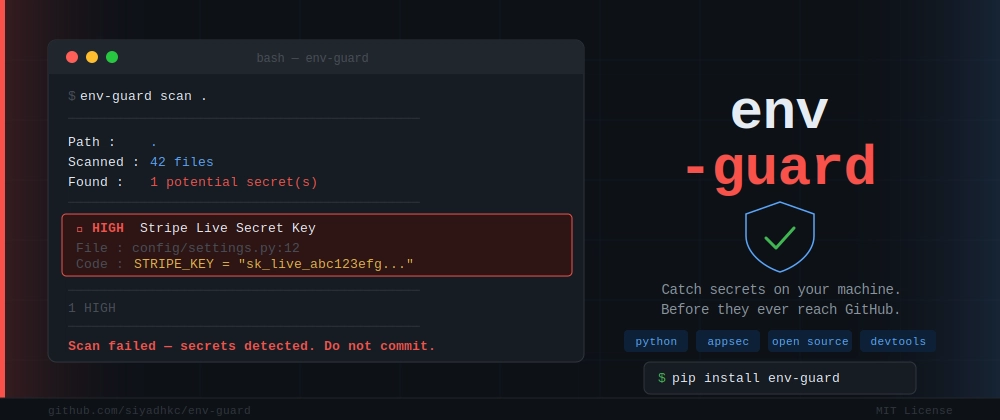
env-guard ships with 54 detection rules covering the full range of credentials you’d encounter in a typical backend or fullstack project. That includes API keys for services like OpenAI, Stripe, and Twilio; cloud credentials like AWS access keys and GCP service accounts; database connection strings for PostgreSQL, MongoDB, and Redis; and private keys in RSA, EC, and OpenSSH formats.
Each rule carries a severity rating — HIGH, MEDIUM, or LOW — so you’re not staring at a flat wall of undifferentiated warnings. A live Stripe secret key flags as HIGH. A generic token assignment that merely looks suspicious might come back as MEDIUM. The output tells you the file, the line number, what was found, and the severity level. There’s no ambiguity about where to go or what to fix.
Running a pre-commit secret scanner manually is a single command:
- env-guard scan . — scans your current directory and reports findings
- env-guard scan . –severity HIGH — surfaces only critical findings
- env-guard scan . –format json — machine-readable output for scripting and CI pipelines
- env-guard scan . –no-fail — reporting mode that doesn’t block the process, useful for initial audits
That last flag deserves attention. If you’re introducing a pre-commit secret scanner to an existing large codebase, the last thing you want is to immediately surface 50 findings and grind development to a halt. The –no-fail flag lets you run in reporting mode first, triage what’s real versus a false positive, set up your ignore file, and then switch to enforcement mode once you’re confident in the configuration.
Pre-Commit Secret Scanner as an Invisible Safety Net
Ad-hoc scanning is useful for one-off audits. The real value, though, comes when the pre-commit secret scanner becomes invisible infrastructure — something that just runs every time you commit without requiring any conscious effort.
Installing the git hook takes one command run inside your repository: env-guard install-hook. After that, every git commit triggers an automatic scan before anything gets written to history. If nothing suspicious is found, the commit proceeds normally and you won’t even notice it ran. If something is flagged, the commit is hard-blocked with a clear message pointing you directly to the problem.
There’s an escape hatch — git commit –no-verify — and it’s intentional. Sometimes a test fixture contains a fake credential that happens to match a pattern. Sometimes you genuinely know that what’s being flagged isn’t a real secret. The option to override exists, but it requires a deliberate choice. That friction is by design. Accidental overrides are much harder than accidental leaks.
Handling False Positives Without Breaking Your Workflow
Every pre-commit secret scanner deals with false positives. SHA-256 hashes that structurally resemble API keys. Documentation examples with placeholder values. Unit test fixtures containing fake credentials specifically designed to look real for testing purposes.
env-guard handles this with a .envguardignore file in your project root — same concept as .gitignore, one pattern per line. You can exclude specific files, entire directories, or file extensions. Because it’s a committed file, everyone on your team automatically gets the same exclusions without any per-developer configuration. That matters in practice. A team-wide ignore file that lives in version control is dramatically more maintainable than individual developer configs scattered across machines.
The Broader Problem This Solves
Credential leaks through public repositories aren’t rare edge cases. They’re one of the most consistently documented causes of cloud account compromise. The 2023 Verizon Data Breach Investigations Report identified stolen credentials as a factor in the majority of breaches, and public code repositories remain one of the most common vectors for that theft.
The developers who leak secrets aren’t careless beginners. Senior engineers with years of experience make this mistake regularly, often because the tooling around secret management is fragmented, inconsistent, and — critically — mostly reactive. You get alerts after the fact. You rotate keys after the fact. You audit logs after the fact.
Tools like env-guard represent a different approach: shift the detection left, all the way to the developer’s local machine, before the code touches any shared infrastructure. It’s the same philosophy behind static analysis and linting — stop the problem where it’s cheapest to fix, which is before it exists in any shared context at all. Adopting a pre-commit secret scanner is one of the lowest-effort, highest-impact security decisions a development team can make.
Installing env-guard requires Python 3.8 or higher and takes a single pip command. It’s lightweight, it’s local, and it doesn’t require any cloud service or external dependency to do its job. For solo developers, that means no account setup, no API keys for the scanner itself (which would be grimly ironic), and no ongoing cost. For teams, it means something even more valuable: a consistent, enforced baseline that doesn’t depend on any individual developer remembering to run a check.
GitHub’s secret scanning will keep getting better. More patterns, faster alerts, tighter integrations with credential providers. But the architectural reality won’t change — it will always run after the push. A local pre-commit secret scanner and a platform-level scanner aren’t competitors. They’re layers. And right now, for most development teams, that first layer is missing entirely.

