

If you’ve ever had a long back-and-forth with ChatGPT, Claude, or any other AI assistant and noticed the responses getting subtly worse — more contradictory, less accurate, oddly forgetful — you’ve already bumped into the AI context window problem. It’s one of the most misunderstood limitations in modern AI, and it affects everyone from casual users to enterprise developers building on top of these models.
- The AI context window is a hard memory cap — once full, models quietly drop or ignore earlier parts of your conversation.
- Every AI context window has a ‘lost in the middle’ problem: models pay less attention to content buried between the start and end.
- Re-sending the full conversation history every single turn means hitting the context limit also means escalating token costs.
- Simple prompt habits — restating constraints, trimming documents, using system prompts — can meaningfully extend usable context.
Table of Contents
What the AI Context Window Actually Is
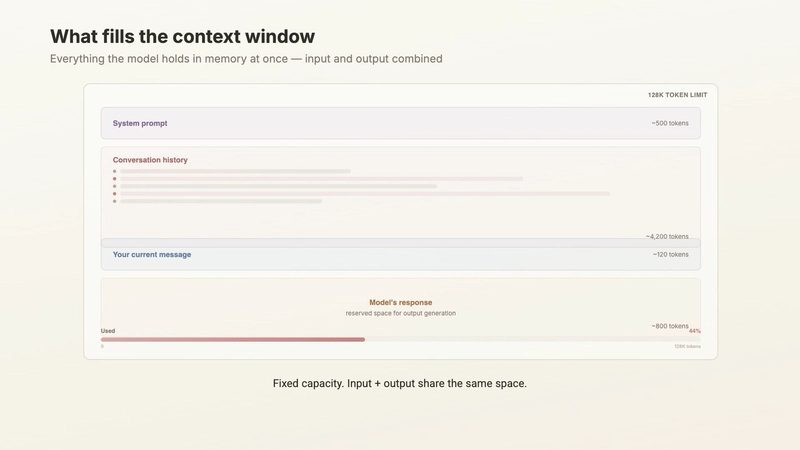
Every large language model has an AI context window: a fixed amount of information it can actively hold and process at one time. Think of it as a desk. Everything the model needs to think about — your question, the document you pasted in, the entire conversation history, and the system instructions configured behind the scenes — has to fit on that desk simultaneously. There’s no overflow drawer. There’s no back-of-the-mind storage. If it doesn’t fit on the desk, it doesn’t exist for the model in that moment.
The size of that desk is measured in tokens, which are roughly three-quarters of a word on average. Older models like early versions of GPT-3 worked with an AI context window of around 4,000 tokens — about 3,000 words, or six printed pages. That was tight. Today’s leading models have expanded dramatically: GPT-4o supports 128,000 tokens, Anthropic’s Claude 3 models go up to 200,000, and Google’s Gemini 1.5 Pro has been demonstrated at one million tokens or more. That’s the equivalent of several novels, or an entire mid-sized software codebase.
But here’s the part that vendors don’t advertise loudly: a bigger AI context window doesn’t mean the model pays equal attention to everything inside it. It just means more fits. Whether the model actually reads every page with the same care is a different question entirely — and the answer isn’t encouraging.
The Hidden Cost of Long Conversations
Most people assume AI assistants work like humans — they remember what you said earlier and carry it forward passively. That’s not how it works. By default, there’s no persistent memory in the model itself. Every single time you send a message, the model re-reads the entire conversation from the very beginning. Your first message, its first reply, your second message, its second reply — the whole transcript gets fed back in on every turn, all the way down to whatever you just typed.
The token math adds up fast. A typical user question might run 50 tokens. A moderately detailed model response might be 300 tokens. That’s 350 tokens per exchange. Twenty exchanges gets you to 7,000 tokens. If you’re working through a complex problem with detailed questions and long answers, you can burn through 20,000 to 30,000 tokens in a single afternoon session — and that’s before you paste in any documents.
What makes this doubly expensive is that you’re not just consuming memory — you’re re-paying for the entire conversation history on every single API call. Tokens are simultaneously the unit of memory and the unit of cost. Hit the AI context window limit and you’ve got two problems at once.
Lost in the Middle — A Real Research Problem
Even before you hit the hard ceiling of the AI context window, something subtler is already degrading quality. Researchers have documented what they call the “lost in the middle” phenomenon — a consistent pattern where models pay the most attention to content at the very beginning and very end of a long input, while the material in the middle gets significantly less focus.
It mirrors how humans read a long email thread. You remember how the conversation started. You remember the most recent message. But that specific point someone made on Tuesday at 2pm, buried fourteen replies deep? That’s the part that gets lost. For AI models, the same cognitive compression applies — except the model doesn’t flag it. It keeps answering with the same confident tone whether it’s working from a sharp, well-focused prompt or drowning in context it can barely process.
This is why a twenty-page legal contract stuffed into a prompt can yield a confident, completely wrong answer about section 7. It’s not necessarily hallucination in the traditional sense. It’s attention dilution. The surrounding noise swamps the signal, and the model grabs the nearest plausible-sounding answer rather than the correct one.
The worst part? Most models won’t warn you. They’ll stay confident and fluent as quality degrades. An Anthropic Claude Opus user recently noted in a developer thread that the model actually flagged when it felt the conversation was getting too long — raising its hand, essentially, and saying things had been going a while. That’s the exception. Most models fail silently, and understanding your AI context window is the only reliable defence against that silent failure.
Proven Strategies to Work Within the Limits
Understanding the AI context window problem is only useful if you change how you work with these tools. Here’s what actually makes a difference.
Match the model to the job
If you’re routinely hitting context limits, the first move is choosing a model with a larger AI context window. Claude 3 Opus, GPT-4o, and Gemini 1.5 Pro all handle substantially longer inputs than their predecessors. But remember — a bigger window reduces the problem, it doesn’t eliminate it. The lost-in-the-middle effect still applies at 128K tokens. Bigger desk, same attention dynamics.
Stop pasting everything
If your question is about section 3 of a document, give the model section 3. Not the whole document. Every token of irrelevant text you include is a token competing for the model’s attention against the content you actually care about. Less noise means better signal, and it’s one of the simplest optimisations most people never make. Keeping inputs lean is one of the most effective ways to get reliable performance from any AI context window size.
Summarise first, then ask
For situations where you genuinely need to work with a long document, consider a two-call approach. First prompt: ask the model to summarise the document. Second prompt: ask your real question against the summary. You’re spending two API calls instead of one, but the second call operates on focused, compressed context rather than a wall of raw text. The tradeoff is worth it — just verify the summary didn’t drop anything critical before you rely on it.
Put the important stuff at the edges
Given the lost-in-the-middle research, structure your prompts accordingly. Your most important question should go at the very end of the prompt. Your most critical context should go at the very beginning. Don’t bury the thing you actually need in the middle of a long block of reference material. This is a small structural change that pays dividends across almost every complex AI context window prompt.
Restate what matters as you go
If you told the model something critical in message one and you’re now fifteen messages in, say it again. It costs a handful of tokens and meaningfully reduces the chance the model has let that constraint drift to the back of its attention. Long conversation threads have a way of making early instructions feel ancient to the model — a quick restatement brings them back to the foreground.
Use system prompts for stable rules
Platforms like ChatGPT (via custom instructions), Claude.ai (via projects), and Amazon Bedrock (via the system prompt field) all offer a dedicated space for persistent instructions that frame every interaction. Put your stable rules there in clear, unambiguous language — your role, the format you want, any consistent constraints. It keeps your actual AI context window cleaner and ensures those instructions start every turn at the top of the context rather than drifting toward the forgotten middle.

Where This Is Heading
The AI context window is one of those technical constraints that the industry is attacking from multiple directions simultaneously. Longer native windows are one approach — and context lengths have expanded roughly tenfold every couple of years. But architectural solutions are also emerging: retrieval-augmented generation (RAG) lets models pull relevant chunks from an external knowledge base rather than loading everything upfront, effectively sidestepping the window entirely for certain use cases. Memory layers that persist user context across sessions — like OpenAI’s memory feature in ChatGPT — add another dimension of continuity that doesn’t depend on cramming everything into one window.
None of these approaches fully solve the attention problem. Bigger windows and smarter retrieval reduce how often you hit the wall, but the underlying dynamic — models that attend unevenly to long inputs — is a harder problem than simply expanding capacity. As AI assistants get embedded deeper into workflows, from legal document review to software development to customer support, the gap between what users assume these models remember and what they actually process reliably is going to matter more, not less. The developers and teams that understand the AI context window today are the ones who’ll build the most reliable systems tomorrow.

