

Table of Contents
Apple Invites: a more social layer for planning in Apple’s ecosystem
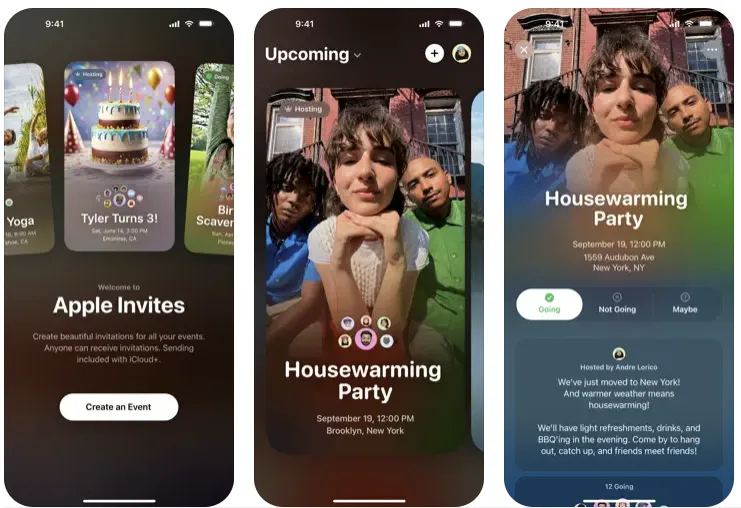
Apple has launched Apple Invites, a new app intended to make organizing gatherings, parties, and meetings feel less like sending a calendar notice and more like setting the tone for an occasion. That distinction matters. Traditional event invitations are good at putting a time and place on someone’s schedule, but they are rarely particularly inviting. Apple Invites is aimed at the planning that happens around the basic logistics: the visual identity of an event, the message from the host, the music, the photos, and the conversation among guests.
The central idea is straightforward. Users can create, customize, and share invitations, using their own photos or Apple’s Image Playground to generate event images. Writing Tools, powered by Apple Intelligence, can assist with invitation messages. These features do not change the fundamentals of event planning, but they address the small frictions that often make people fall back on a quick group message and a vague plan.
There is a meaningful difference between making an invitation functional and making it feel personal. A calendar invite usually communicates obligation: here is the meeting, here is the location, here is the time. An invitation for a dinner, birthday, party, or informal gathering carries a different expectation. The host may want the message to sound warm, funny, direct, or polished; the image may be part of the event’s personality. Apple Invites is clearly designed around that more expressive use case.
Planning without losing the calendar
Apple has not treated Apple Invites as a replacement for its Calendar app. Instead, the app integrates with Calendar, so event details can sit alongside the rest of a person’s schedule and sync with other Apple services. That is the practical foundation beneath the more playful presentation. An attractive invitation is useful only if guests can still see when and where they need to be.
This approach also reflects a familiar Apple instinct: build a focused experience around services people already use rather than asking them to manage another disconnected destination. The app integrates Weather and Maps, giving guests directions and weather updates on the day of the event. Those details are modest individually, but they are exactly the information people tend to search for shortly before leaving. Bringing them into the invitation can reduce the last-minute back-and-forth that surrounds even simple plans.
Apple Invites supports up to 100 participants per event. That makes it suitable for a wide range of gatherings without positioning it as a tool for large-scale ticketing, public event promotion, or formal registration. The emphasis is on invitations among people who are already being brought together, not on turning an event into a marketplace or a public feed.
There is also an important access boundary. Only users with a paid iCloud+ subscription can create invitations. Anyone can RSVP via the web, regardless of whether they own an Apple device. That choice gives Apple a way to tie hosting to a paid service while avoiding one of the biggest problems with ecosystem-bound social tools: an invitation is not very useful if friends and family outside the ecosystem cannot respond.
For hosts, the iCloud+ requirement may be a clear dividing line. For guests, web-based RSVP access makes Apple Invites more practical than an Apple-only social feature would be. It acknowledges the reality that most event groups are mixed. The person organizing a gathering may use Apple services closely, while invitees may use different devices and platforms.
Shared memories are part of the product
Apple Invites goes beyond the moment an RSVP arrives. Guests can contribute photos and videos from the event to a Shared Album, creating a place for memories after the gathering has taken place. That gives the invitation a longer life than a conventional calendar entry, which usually becomes irrelevant as soon as the event ends.
The Shared Album feature also addresses a common problem with group events: photos are scattered across individual phones, message threads, and social platforms, if they are shared at all. A collective album is not a new social idea, but it is a sensible fit here. The invitation becomes a shared record rather than a disposable notice.
Collaborative Apple Music playlists take a similar approach. Attendees can help curate the event’s soundtrack, turning guests into participants before they arrive. For some gatherings, that may be a small extra. For others, it is a natural part of the planning. Either way, the feature suggests Apple Invites is trying to capture the social texture around an event, not simply the administrative task of coordinating it.
That ambition recalls older social media features that made event organization simple and interactive. Those tools worked because they combined logistics with participation: people could respond, see who else was involved, share material, and feel part of a gathering before it happened. Apple Invites applies that basic model in a more focused environment, with the added advantage of direct ties to Calendar, Maps, Weather, Shared Albums, and Apple Music.
Privacy controls matter more in social planning than they first appear
Apple Invites is built with privacy in mind. Hosts can choose whether to share their address in the invitation, and guests have control over how their information appears to others. Those controls are not flashy, but they are essential in an app built around real-world gatherings.
An event invitation can contain sensitive context: a home address, a guest list, personal photos, and plans that may not be intended for broad circulation. Giving hosts a choice over address sharing recognizes that a location is not always information to distribute freely. Giving guests control over their own information is just as important, particularly when an event brings together people who do not know one another.
Apple’s privacy framing fits the app’s broader role. The company is not merely offering another way to send a date and location. It is packaging planning, communication, media sharing, and participation into a single experience. That can be more engaging than a traditional calendar invite, but it also means the product needs clear boundaries around what is visible and to whom.
A focused alternative to the group chat
Apple Invites will not eliminate group chats, informal messages, or standard calendar invitations. Those tools remain fast and familiar, especially for simple plans. Its value lies in offering something more structured when an occasion calls for it, without making the process feel formal or burdensome.
The app’s strongest idea is that event planning does not end when a host sends an invite. There is anticipation beforehand, coordination on the day, and shared memories afterward. By combining custom invitations, Apple Intelligence-assisted image generation and messaging, Calendar integration, Shared Albums, collaborative Apple Music playlists, Maps, Weather, and web RSVPs, Apple is making a case for a more complete social-planning experience.
Whether that experience becomes a habit will depend on whether people see enough benefit to create events through iCloud+ rather than relying on the tools they already have. Still, Apple Invites has a coherent place in the company’s services lineup. It makes the ordinary act of gathering people feel more intentional, while keeping the basic mechanics of scheduling within reach.
Related reading: Why Are iPhone App Subscriptions More Expensive Than Android?, published on January 16, 2025, at SquaredTech.
Stay Updated: Tech News – Editors Pick

