


If your team is still passing API keys around in Slack messages or burying database credentials in .env files committed to Git, Infisical secrets management might be exactly the wake-up call you need. It’s an open-source, end-to-end encrypted platform built to replace the chaos of ad-hoc secret sharing — and unlike HashiCorp Vault, which has steadily moved toward a business-model that stings smaller teams, Infisical stays genuinely free to self-host.
- Infisical secrets management is a free, open-source platform for syncing encrypted app secrets across teams and environments.
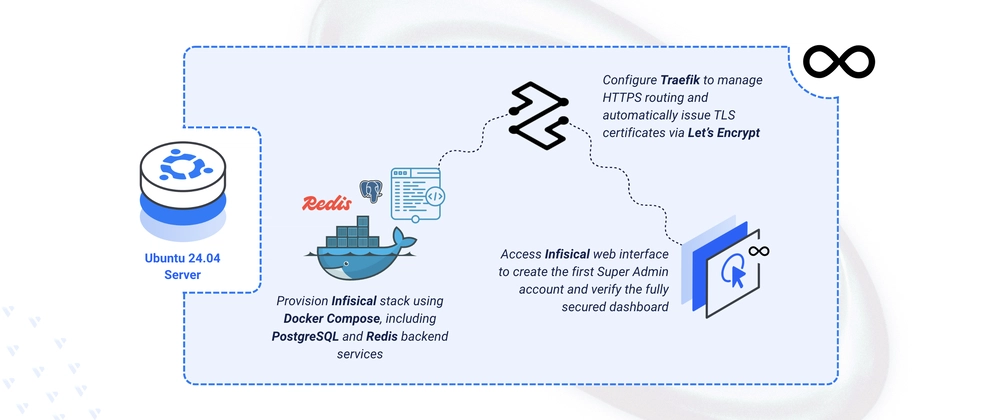
- Deploying Infisical secrets management on Ubuntu 24.04 takes under 30 minutes using Docker Compose and Traefik for automatic HTTPS.
- The stack uses PostgreSQL 16 for persistent storage and Redis 7 for caching, keeping the architecture simple and familiar.
- Once running, teams can rotate secrets, enforce access policies, and integrate directly with CI/CD pipelines via the Infisical CLI.
Table of Contents
Why Infisical Secrets Management Is Worth Your Attention
The secrets management space has been in flux. HashiCorp’s 2023 pivot to the Business Source License (BUSL) sent a lot of infrastructure teams scrambling for alternatives, and Infisical secrets management has been one of the clearest beneficiaries. The project describes itself as a platform for “storing and syncing application secrets across teams and environments” — which sounds simple, but the execution matters enormously when the wrong credential leak can mean a full production breach.
What sets Infisical secrets management apart from a glorified password manager is its architecture. It uses end-to-end encryption as a first principle: secrets are encrypted on the client before they ever touch the server. The platform also ships with secret versioning, audit logs, role-based access controls, and native integrations with GitHub Actions, Kubernetes, and a growing list of cloud providers. That’s a feature set that would have cost a team serious money in SaaS fees even three years ago.
The self-hosted Infisical secrets management instance runs on a stack most backend developers already know well: PostgreSQL for persistence, Redis for caching, and Docker for containerisation. There’s no proprietary runtime to learn, no vendor-specific toolchain to adopt. That familiarity is a strategic choice — it lowers the barrier to adoption and keeps operational complexity manageable for lean engineering teams.
What You Need Before You Start
The deployment covered here targets Ubuntu 24.04 LTS, which is the current long-term support release and the sensible default for any new server workload in 2024. You’ll need a VPS or bare-metal box with at least 2GB of RAM — the Infisical secrets management footprint is modest, but PostgreSQL and Redis both want breathing room. You’ll also need a domain name pointed at your server’s IP, because Traefik’s automatic HTTPS relies on Let’s Encrypt’s HTTP challenge, which requires a publicly reachable domain.
Docker and Docker Compose should be installed and up to date. If you’re on a fresh Ubuntu 24.04 instance, the official Docker repository is the cleanest way to get a recent version — the packages bundled with Ubuntu tend to lag behind. Once Docker is running, add your user to the Docker group to avoid prefixing every command with sudo:
- Run sudo usermod -aG docker $USER to add yourself to the group
- Apply the change immediately with newgrp docker
Generating Keys and Structuring the Project
Infisical secrets management requires two cryptographic values before it’ll start: an encryption key and an auth secret. These aren’t optional niceties — they’re the root of your security model. Generate them with OpenSSL rather than reaching for a random string generator online:
- ENCRYPTION_KEY: a 16-byte hex string generated with openssl rand -hex 16
- AUTH_SECRET: a base64-encoded 32-byte value from openssl rand -base64 32
Keep these values out of version control. The moment they’re committed to a repository — even a private one — your threat model changes in ways that are hard to recover from. Store them in your password manager of choice and treat them with the same weight as a root CA private key.
The project directory structure is minimal: a root ~/infisical folder with three subdirectories for the database data (db), Redis persistence (redis), and Let’s Encrypt certificate storage (letsencrypt). All configuration lives in a single .env file at the project root, which Docker Compose will read automatically. The key variables you’ll set are the domain, the Let’s Encrypt email address, both cryptographic keys, and the PostgreSQL credentials.
The Docker Compose Stack Explained
The docker-compose.yml defines four services. Understanding what each one does — rather than copy-pasting blindly — makes debugging significantly less painful when something inevitably goes sideways.
Traefik is the reverse proxy and TLS terminator. It watches the Docker socket for containers with specific labels and automatically provisions Let’s Encrypt certificates for them. Critically, it’s configured to redirect all HTTP traffic on port 80 to HTTPS on port 443, so you’re not accidentally serving secrets over plaintext. The ACME certificates are stored in a local acme.json file, which Traefik manages itself.
PostgreSQL 16 Alpine handles all persistent data. The Alpine variant keeps the image small without sacrificing anything functional for this use case. The database files are bind-mounted to the local db directory, which means your data survives container restarts and updates — a detail that’s easy to overlook in development but critical in production.
Redis 7 Alpine provides the caching layer. Infisical secrets management uses Redis for session management and rate limiting, among other things. This service is intentionally kept simple in the Compose file — no exposed ports, no external access, just internal communication over Docker’s default network bridge.
Infisical itself is where the labels get interesting. Traefik discovers the service through Docker labels rather than a static config file, which means adding HTTPS routing is as simple as annotating the container. The labels define the routing rule (match on the configured domain), specify the HTTPS entrypoint, enable TLS with the Let’s Encrypt resolver, and tell Traefik that the Infisical secrets management container is listening on port 8080 internally. The depends_on directive ensures the database and cache are running before Infisical tries to connect.
Deploying and Verifying the Stack
With both the .env and docker-compose.yml files in place, launching the entire stack is a single command: docker compose up -d. Docker pulls the images, creates the network, and starts all four containers in the correct dependency order. On a fresh server with a fast connection, this typically takes two to three minutes.
Verify that all services are healthy with docker compose ps. You’re looking for every container to show a running state. If the Infisical secrets management container shows as restarting, the most common culprits are a malformed database connection URI in the .env file or a PostgreSQL container that hasn’t finished initialising before Infisical’s first connection attempt — giving it another 30 seconds usually resolves the latter.
Once the stack is stable, navigate to your configured domain in a browser. Traefik will have already negotiated a Let’s Encrypt certificate, so you should land directly on an HTTPS-secured page without any certificate warnings. The first-run experience prompts you to create a Super Admin account — use a strong, unique password and store it in a password manager. This account has full platform access, so it’s worth treating it like a root credential.
What You Can Do With Infisical Secrets Management After Setup
The initial deployment is really just the starting line. Infisical secrets management is most valuable when it’s embedded directly into your development workflow rather than used as a one-off lookup tool. The Infisical CLI lets developers inject secrets as environment variables at runtime without ever writing them to disk — a meaningful improvement over .env files that tend to get copied, shared, and forgotten in the wrong places.
The platform supports multiple environments per project out of the box: development, staging, and production can each hold different values for the same secret key. Teams can enforce which engineers have read or write access to production secrets without blocking access to development credentials — a granularity that’s surprisingly rare in simpler tools.
For CI/CD integration, Infisical secrets management publishes native integrations for GitHub Actions, GitLab CI, Jenkins, and CircleCI, among others. Secrets can be pulled at pipeline runtime rather than stored as CI environment variables, which reduces the blast radius if a pipeline configuration is ever exposed. The audit log records every read and write event with timestamps and actor information, giving security teams the visibility they need for compliance workflows.
Secret rotation — automatically cycling credentials on a schedule and pushing the new values to connected services — is available for a growing list of integrations including AWS IAM, MySQL, and PostgreSQL itself. It’s the kind of feature that used to require a dedicated secrets management service contract, and Infisical secrets management now makes it available to any team willing to run their own instance on a $10-a-month VPS.
That’s the broader story here. As the line between startup-tier and enterprise-tier tooling continues to blur, platforms like Infisical are making formerly expensive security practices accessible to teams of any size. The question isn’t whether you can afford to manage secrets properly anymore — it’s whether you can afford not to.

