


Apple’s WWDC keynote earlier this month led with a splashy reinvention of Siri — but the iOS 27 AI features that will probably matter most to everyday iPhone users aren’t the ones on the big stage. They’re the ones quietly tucked inside the apps you already open a hundred times a day.
- iOS 27 AI features embed Apple Intelligence directly into everyday apps like Messages, Calendar, and Passwords.
- The new iOS 27 AI features include automatic password updates after data breaches, requiring no manual action from users.
- Apple’s bill-splitting tool uses a photo of a receipt to divide costs through Apple Cash, including tax and tip.
- Shortcuts gets a natural-language interface in iOS 27, opening powerful automation to non-technical iPhone users for the first time.
Table of Contents
Apple’s Quiet Strategy: AI Everywhere, Not AI Up Front
There’s a deliberate philosophy running through the iOS 27 AI features Apple announced at WWDC this month. Rather than demanding that users change their behaviour — launching a new app, learning a new interface, or consciously choosing to ‘talk to AI’ — Apple is threading Apple Intelligence into software people already use instinctively. Messages. Mail. Passwords. Phone. Calendar. Shortcuts. The bet is that the best AI is the kind you don’t notice, because it’s already doing something useful before you think to ask.
It’s a contrast worth drawing against the wider industry. Google has poured enormous energy into making Gemini a destination — a place you go to get AI help. Microsoft turned its Copilot push into a near-constant presence across Windows and Office, sometimes whether you wanted it or not. Apple’s approach is more surgical. The iOS 27 AI features arrive in context, surface only when they’re relevant, and then disappear. No chat interface required.

iOS 27 AI Features Worth Getting Excited About
Splitting the Bill, Finally Done Right
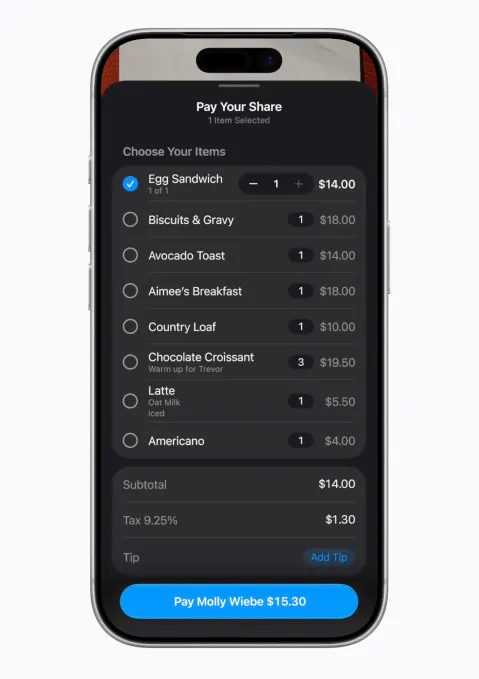
Anyone who has ever stood awkwardly outside a restaurant trying to figure out who owes what will appreciate this one. In iOS 27, Apple Cash gets a receipt-scanning bill-splitting tool powered by Apple Intelligence. You photograph the receipt — or upload an existing photo — and the system extracts everything: itemised orders, quantities, tip, total. From there, you select your own items and fire off a Messages request to the group. Everyone else picks their share, down to a half-portion if needed, and settles up with the standard Apple Cash double-click gesture.
What makes it work isn’t just the AI parsing — it’s the integration. It surfaces inside Messages and Apple Cash, apps people already have muscle memory for. It doesn’t ask you to download a Venmo competitor or sign up for yet another split-payment service. And because Apple Intelligence handles the tax-and-tip allocation automatically, you’re not doing back-of-napkin maths. It just handles it. Third-party apps like Splitwise have owned this space for years; Apple’s version won’t have the same social graph, but for users already inside the Apple ecosystem, it’s probably good enough to make them stop reaching for another app.
Passwords That Update Themselves
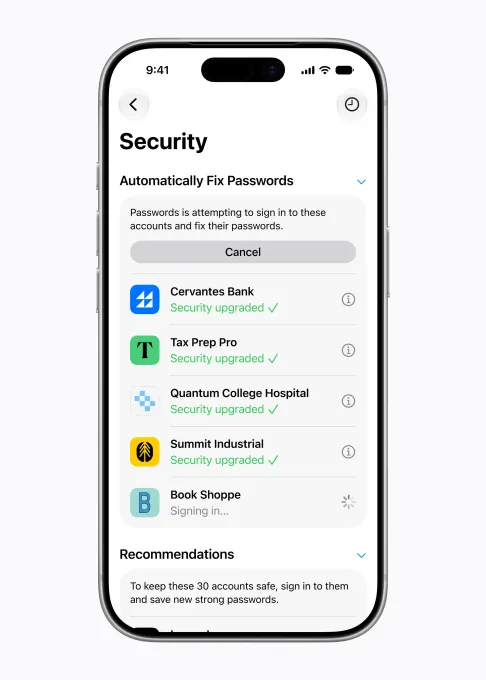
This might be the most practically significant of all the iOS 27 AI features announced so far. Password managers — Apple’s own Passwords app, or third-party tools like 1Password, Dashlane, and Bitwarden — have done a solid job getting people off ‘password123’. But strong passwords aren’t immune to data breaches. Your credentials get stolen not because they were weak, but because a company you trusted got hit. That’s a problem no amount of complexity solves on the user’s end.
Apple’s answer is agentic: Apple Intelligence identifies compromised or weak passwords and then autonomously navigates to the relevant websites, logs in, and rotates the credentials to new, stronger ones — entirely on-device. You don’t have to do anything. That ‘on-device’ detail matters enormously. The feature doesn’t send your passwords to Apple’s servers to process; it runs locally, which is exactly the kind of privacy architecture Apple needs to maintain trust in a feature this sensitive. Among the iOS 27 AI features that touch security, this one sets a new bar.
One-Tap Suggestions in Messages
Remember when iOS introduced the ability to automatically surface an SMS verification code right above the keyboard? That feature felt almost magical the first time it worked. Apple is going for a similar ‘how did I live without this’ moment with one-tap suggestions in Messages. Using Apple Intelligence, the app reads the context of your conversation and surfaces contextually relevant actions — adding a reminder when someone asks you to bring something, suggesting the right photos to share when someone asks for them, or prompting you to create a Calendar event when a dinner or meeting is being arranged.
The key design decision is restraint. These suggestions don’t take over your chat or interrupt the flow. They sit there, available if you want them, invisible if you don’t. That’s a harder thing to build than it sounds — over-eager suggestions would be more annoying than helpful — and it’s where a lot of Android alternatives have historically stumbled. One-tap suggestions are a good example of how iOS 27 AI features are designed to assist without intruding.
Call Context: Your Info, Right When You Need It
Calling airline customer service with your confirmation code buried somewhere in an email is a small but genuine aggravation. iOS 27’s Call Context feature fixes it. When you dial a number associated with a business, Apple Intelligence scans your Mail for relevant information and surfaces it directly on the call screen — your booking reference, account number, whatever applies. No digging, no switching apps, no reading numbers aloud from a tiny email on a screen you’re trying to hold to your ear simultaneously.
Critically, the entire process happens on-device. Your emails aren’t being sent to a server for analysis. And unlike a lot of AI features that require you to ask for help, Call Context runs passively — the information just appears. That passive, frictionless design is a running theme through the best iOS 27 AI features.
Natural Language Calendar Events
Apps like Fantastical have offered natural-language event entry for years — type ‘lunch with Jamie at Nobu Friday at 1pm’ and it creates the event correctly. Apple is now building that same capability natively into Calendar. Apple Intelligence extracts the contact names, locations, and times from a plain-text description and fills in the appropriate fields automatically. It’s not a flashy feature, but it’s the kind of thing that removes the small cognitive overhead of switching between fields in a form. Fantastical users won’t abandon their app over this, but for the millions of people using Apple’s default Calendar, it’s a meaningful quality-of-life upgrade — and a clear illustration of how iOS 27 AI features target everyday friction rather than showcase moments.
Vibe Coding Your Shortcuts
Shortcuts has always been one of the most powerful apps on iPhone and, simultaneously, one of the most underused. Building a useful automation traditionally meant understanding how actions chain together, hunting through galleries, or watching YouTube tutorials just to get something basic working. The result was that Shortcuts was essentially a power-user feature dressed up as a general one.
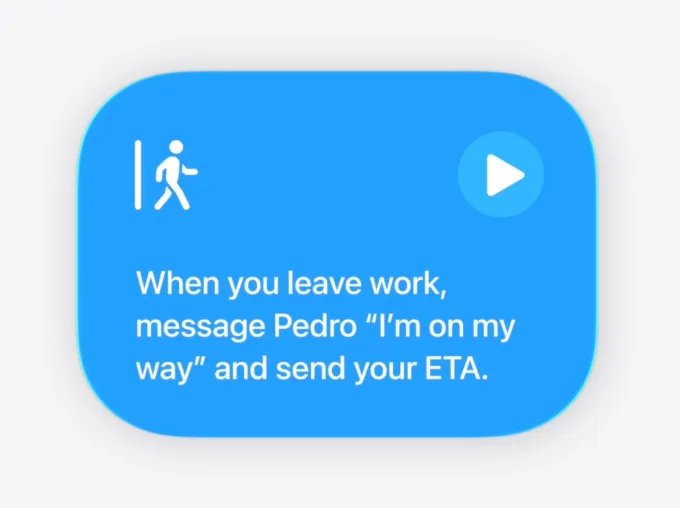
iOS 27 changes that with natural-language Shortcuts creation. Describe what you want your iPhone to do, and Apple Intelligence builds the Shortcut for you. The ‘vibe coding’ framing Apple has used — borrowing a term that’s gained traction in software development circles, where developers describe intent to an AI and let it write the code — is apt. You don’t need to know the technical steps; you just need to know the outcome you want. That’s a meaningful democratisation of a genuinely useful tool, and it could push Shortcuts adoption well beyond its current niche. Natural-language automation ranks among the most forward-looking iOS 27 AI features in the entire release.
The Bigger Picture for Apple Intelligence
None of these individual iOS 27 AI features are headline-stealing on their own. Apple knows that. The strategy is accumulation — a phone that feels meaningfully smarter in aggregate, through dozens of small moments across a day where the software anticipated what you needed. It’s a different kind of AI story than the one OpenAI or Google tends to tell, and arguably a more durable one. Consumer habits are stubborn. People don’t want to learn new interfaces; they want the tools they already trust to get better. That’s what iOS 27 is trying to deliver.
The developer beta is live now, with a public beta following shortly and the full release expected this autumn. The real test will come when hundreds of millions of users start running these features in the wild — because Apple Intelligence, however well-designed, is still being trained against the full complexity of real human context. The bill-splitting AI that misreads a handwritten receipt, or the password agent that gets confused by a site’s unusual login flow, will matter just as much as the features that work perfectly. Apple’s credibility here depends on reliability as much as capability. If these iOS 27 AI features do what they promise, quietly and consistently, that might be more impressive than anything that happened on the WWDC main stage.
Frequently Asked Questions
When will iOS 27 AI features be available to the public?
iOS 27 AI features are currently live in the developer beta and will arrive in the public beta shortly. The general public release is expected later this fall.
Does the iOS 27 password update feature send your passwords to Apple’s servers?
The source notes that the Call Context feature runs entirely on-device for privacy, but does not specify where the password update feature processes data. It uses Apple Intelligence to identify weak or compromised passwords and navigates websites to update them securely.
How does the iOS 27 bill-splitting feature work with Apple Cash?
You take or upload a photo of a restaurant receipt, and Apple Intelligence extracts the items, quantities, tip, and total. You pick your items, share a request via Messages, and others select theirs. Payment uses the standard Apple Cash double-click flow.
Do you need to use Siri to access the new AI features in iOS 27?
No. Most of the new iOS 27 AI features work passively in the background inside existing apps like Messages, Mail, Passwords, and Phone. You don’t need to invoke Siri or interact with any AI assistant directly to benefit from them.

