


- Project Indigo AI adds experimental object removal, creative transformations and written editing prompts to Adobe’s iPhone camera application.
- Project Indigo AI also critiques photographs and suggests retakes, making the app a potential coach rather than another editing tool.
- Adobe is testing Google’s Nano Banana model with a limited group before deciding whether the Playground becomes a paid feature.
- The experiment raises a familiar question: when AI reconstructs a photo, where does photography end and illustration begin?
Table of Contents
Project Indigo AI turns a camera app into a creative lab
Phone cameras have spent years learning to make a shot look good before you ever press the shutter. Adobe’s Project Indigo AI experiment is taking the next, much messier step: helping decide what the picture should become afterward. Its new AI Playground brings generative editing, preset visual treatments and photographic advice into Project Indigo, the company’s experimental iPhone camera app.
That matters because Indigo arrived with unusually serious camera credentials. The app was developed by an Adobe team that includes two people behind the Pixel Camera app. Indigo’s original pitch was less about fake drama and more about capture fundamentals: manual controls, multi-frame processing and an HDR approach with roots in Google Camera’s HDR+ work.
Project Indigo AI is now testing a set of tools that can erase things, restyle scenes, generate missing details and tell users why their photo did not quite work. It’s free for a small share of Indigo users for a few weeks, according to Adobe, which says it will study the results before making decisions about a broader release or a possible paid tier.

My read is that Adobe is being smart by calling this an experiment. Generative image tools can look magical in a controlled demo, then fall apart when handed a dim restaurant photo, a complicated group portrait or a dog sprinting through tall grass. A camera app is where people keep their memories. That raises the bar considerably.
What Adobe’s Project Indigo AI Playground can actually do
The first feature is object editing. Users can select broad categories of unwanted elements for removal, or use a text instruction through an option Adobe calls Custom Edit. The basic appeal is obvious: clear a stranger from a vacation photo, remove visual clutter from a product shot, or ditch a rogue trash can that wandered into an otherwise good street scene.
But the more revealing examples go well beyond cleanup. Adobe has shown Custom Edit removing fog that obscures the Golden Gate Bridge, then generating the rest of the bridge and parts of San Francisco behind it. That is not restoration in the conventional sense. It is a plausible invention based on the model’s learned understanding of the world.

This distinction deserves to be plain, not buried in marketing language. If you use Project Indigo AI to remove a power line or a distracting person, the result may still feel like an edited version of a photograph. Ask it to remove weather and rebuild an entire skyline, and you have crossed into synthetic imagery. Neither use is automatically wrong. But a user posting that result as documentary evidence would be making a category error, whether they mean to or not.
The Playground also includes Photo Styles, with options such as “Pen and Ink,” “Ink line with color wash,” and “Golden hour lighting.” These presets are familiar territory for generative imaging, though Adobe’s advantage may be putting them beside a camera workflow rather than treating them as an isolated web trick. A photo can become an illustration; an illustration can be turned toward a photographic look; even a statue can be rendered as a person. It is creative play, but it can also be a remarkably effective way to lose the provenance of an image.
The most interesting feature may be the one that changes nothing
For my money, Photo Guidance is the most promising part of Project Indigo AI. Rather than merely applying a fix, it assesses a shot and offers advice on how to reshoot it or edit it toward a stronger result. Adobe says it is also working on crop and composition recommendations.
That sounds almost quaint next to removing fog from the Bay Area. Yet it may be much more useful. Most people do not need another button that turns every sunset into a copper-and-purple postcard. They need help noticing that the subject is backlit, the horizon is crooked, or the portrait would improve if they took two steps closer. The difference is like having a GPS redraw your route versus learning the neighborhood well enough to stop needing it.
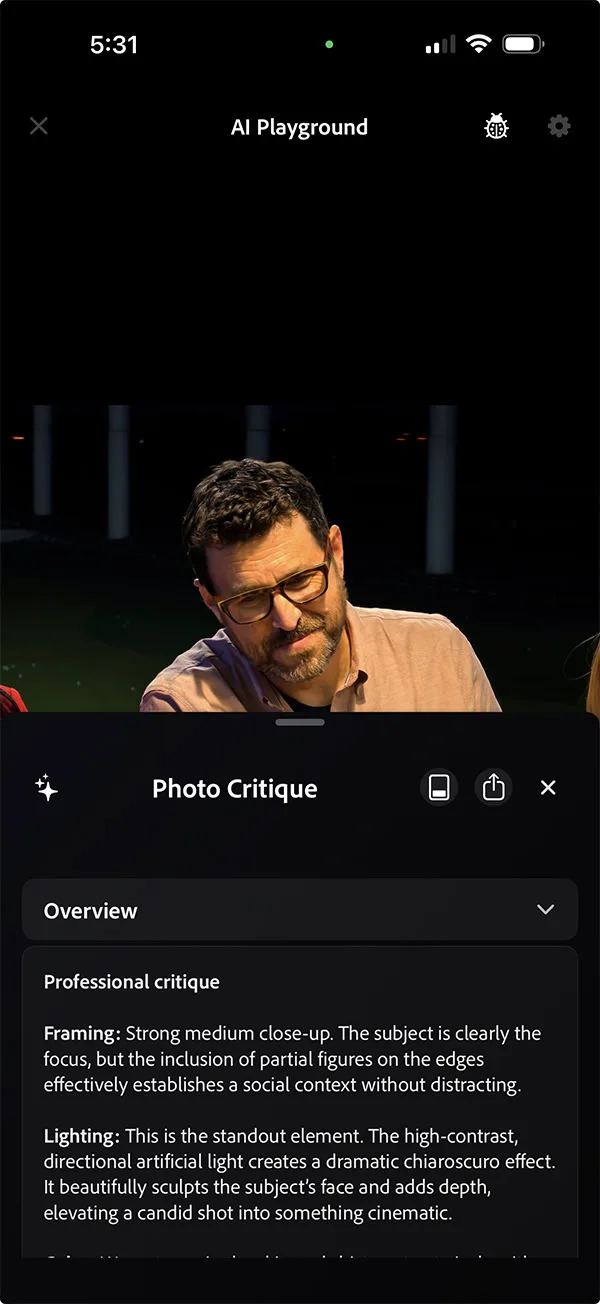
Apple, Google and Samsung already offer layers of computational help in their camera apps, from scene detection to automatic portrait effects and AI-assisted cleanup. Google’s Pixel line in particular has made photography advice and post-capture manipulation part of its broader AI story. Adobe’s opening is that it has credibility with people who care about images, from casual iPhone shooters to Creative Cloud subscribers, while Indigo’s camera foundation gives it a reason to exist before the AI arrives.
Adobe is wisely keeping its model options open
Adobe says the initial Playground relies on Google’s Nano Banana model, while leaving room to swap models or test different systems with different groups. For Project Indigo AI, that choice says a lot. The model layer is becoming a commodity faster than many app makers expected; the real product differentiation may be the interface, the image pipeline, the safety rules and the trust a company earns when its edits alter reality.
Adobe’s wider imaging and AI work is laid out on the company’s official AI page, but Indigo is a particularly useful test case because it puts these choices in someone’s pocket. A desktop editor signals intent. A camera app is impulsive. You take a photo, spot a flaw, tap once, and the version that never happened can become the one everyone sees.
Adobe also has to answer a commercial question. It has not committed to charging for AI Playground, but it has said a paid version is possible. Frankly, that would not be shocking: generative inference costs money, and Adobe has already built a business around creative software subscriptions. The challenge will be avoiding the familiar bait-and-switch where a promising free camera app gradually becomes a toll booth for its best features.
Project Indigo AI will succeed if Adobe treats it less like an image slot machine and more like a capable assistant: transparent about what it generated, restrained when the original photograph matters, and genuinely helpful when a user wants to improve. The fog-removal demo is flashy. The coaching feature may be the part people keep.

