

The Article Tells The Story of:
- Priority Notifications Transform Alerts – Apple’s AI now automatically surfaces your most important notifications while suppressing less urgent ones, ensuring critical messages always get attention.
- European Rollout After Regulatory Hurdles – Following delays due to EU compliance requirements, Apple Intelligence has officially launched across Europe with full language support.
- Vision Pro Upgraded with AI Tools – The mixed reality headset gains powerful new capabilities including AI writing assistance and image generation features.
- Bonus Features and Hidden Upgrades – Discover new creative tools, an intelligent recipe assistant, enhanced privacy controls, and additional emojis in this comprehensive update.
Apple Intelligence Grows Smarter: Key Updates Explained
Apple continues to refine its AI-powered features with new enhancements in its latest software rollout. The company has introduced Priority Notifications, expanded Apple Intelligence to the EU, and added fresh creative tools in Image Playground. These updates arrive with iOS 18.4, iPadOS 18.4, and macOS Sequoia 15.4, bringing smarter AI interactions to millions of users worldwide.
Apple Intelligence now supports nine additional languages, including French, German, Italian, Portuguese (Brazil), Spanish, Japanese, Korean, and Chinese (simplified). Localized English variants for Singapore and India are also now available, making AI tools more accessible globally.
Read More About Our Article of Apple Faces Lawsuit Over Delayed Apple Intelligence Features: What Went Wrong? Published on March 22, 2025 SquaredTech
Breaking Down the Biggest Apple Intelligence Upgrades
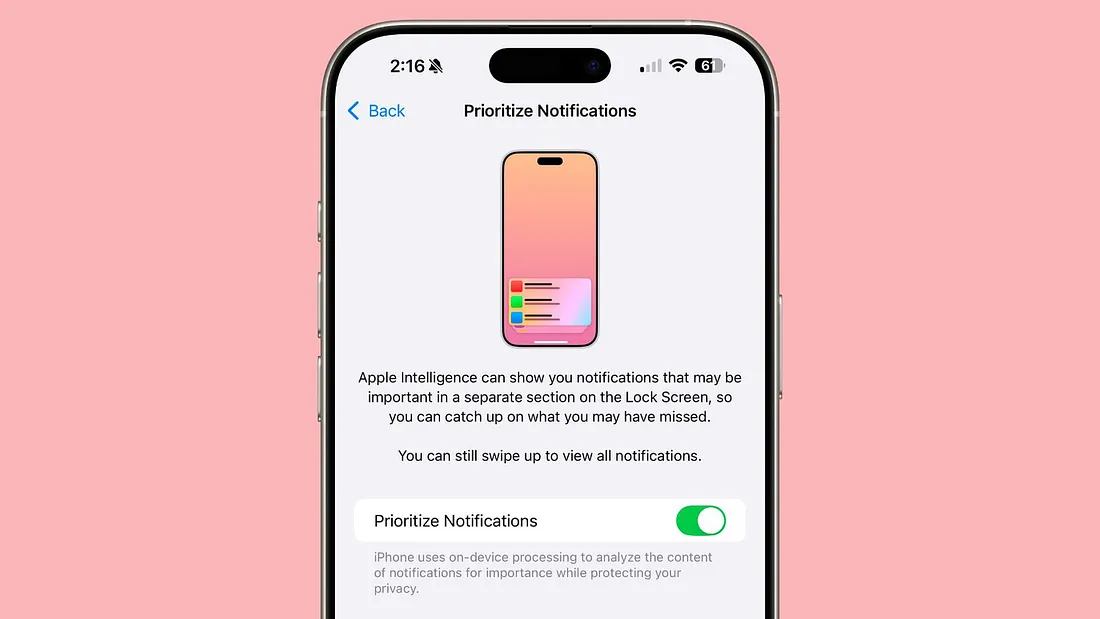
1. Priority Notifications: Never Miss an Important Alert Again
One of the most practical additions is Priority Notifications, which uses AI to identify and surface urgent messages. Instead of manually checking multiple notifications, users will now see time-sensitive alerts at the top of their notification stack.
How It Works:
- Apple’s AI scans notifications in real-time.
- Important messages (like calendar reminders, urgent emails, or missed calls) get priority placement.
- Less critical alerts (promotional emails, social media updates) remain in the standard list.
This feature aims to reduce notification overload while ensuring users never overlook crucial updates.
2. Image Playground Gets More Creative Tools
Apple’s AI-powered Image Playground now includes a new Sketch style, allowing users to generate detailed, academic-style drawings from text prompts.
New Features in Image Playground:
- “Memory Movie” Creation (Mac Only): Users can type a description, and AI generates a short video montage.
- Enhanced Sketch Mode: Better line accuracy for diagrams, doodles, and technical illustrations.
- Expanded Customization: More control over lighting, composition, and artistic styles.
These upgrades make AI-generated visuals more useful for work, education, and creative projects.
3. Apple Intelligence Finally Launches in the EU
After months of delays due to EU Digital Markets Act (DMA) compliance, Apple Intelligence is now available across Europe.
What EU Users Get:
- Full access to Writing Tools, Genmoji, and Image Playground.
- Priority Notifications and other AI-driven enhancements.
- Support for local languages (French, German, Italian, Spanish).
This expansion means millions of iPhone, iPad, and Mac users in Europe can now use Apple’s latest AI features.
4. Apple Vision Pro Gains AI Capabilities
The Apple Vision Pro headset now supports Apple Intelligence in U.S. English, unlocking features like:
- AI Writing Tools (rewrite, summarize, proofread text).
- Genmoji (instant custom emoji generation).
- Image Playground (create AI art in mixed reality).
This update makes Vision Pro a more powerful productivity and creativity tool.
Bonus Additions: New Emojis, Apple News+ Food & More
Apple News+ Food: Your New Recipe Assistant
The Apple News+ Food feature launches today, offering:
- Step-by-step recipe guides.
- Meal planning suggestions.
- Smart grocery lists (syncs with Reminders).
5 New Emojis Arrive in iOS 18.4
The latest update introduces fun new emojis, including:
- 🎨 Paint Splatter (for art & creativity).
- 😪 Tired Face with Bags Under Eyes (perfect for exhausted reactions).
- 🖐️ Fingerprint (security & tech themes).
- 🥔 Root Vegetable (foodies rejoice!).
- 🛠️ Shovel (construction, gardening, or digging jokes).
🔒 Enhanced Privacy & Child Safety Features
Apple has also rolled out new child safety tools, including:
- Improved Screen Time controls.
- Expanded Communication Safety (blurs sensitive content in Messages).
- Smarter Photo Memories filtering (hides unwanted images).
How to Get the Latest Apple Intelligence Features
To access these updates:
- Go to Settings > General > Software Update on your iPhone, iPad, or Mac.
- Download and install iOS 18.4, iPadOS 18.4, or macOS Sequoia 15.4.
- Restart your device to apply all changes.
Final Thoughts: Apple’s AI Strategy Takes Another Leap
Apple Intelligence is evolving with more practical, user-friendly AI tools. The addition of Priority Notifications, EU availability, and Vision Pro support shows Apple’s commitment to smarter, more personalized tech.
With Image Playground upgrades, new emojis, and Apple News+ Food, this update delivers both productivity boosts and fun extras.
Stay Updated: Tech News

