

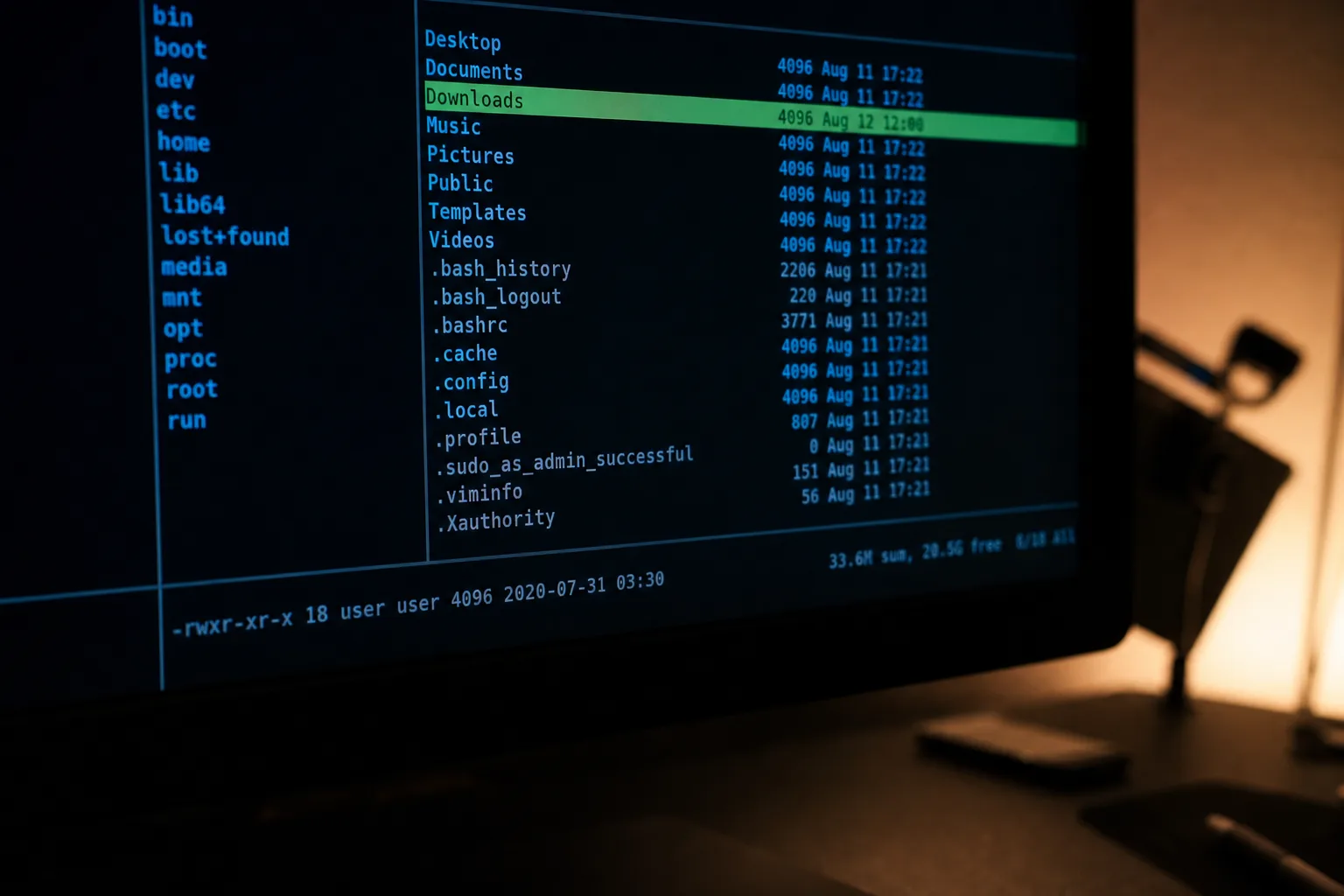
- Peektea is a Bubble Tea terminal file browser built in roughly 140 lines of Go by developer Maneshwar.
- The Bubble Tea terminal file browser uses Charmbracelet’s Elm-inspired architecture to keep all state immutable and predictable.
- Planned features include in-terminal image previews, file opening via xdg-open, and fuzzy filtering — all keyboard-driven.
- Lipgloss handles all visual styling, giving directories a cyan tint and the cursor a clear highlight without touching raw ANSI codes.
Table of Contents
A Minimal Tool With an Ambitious Blueprint
The Bubble Tea terminal file browser called peektea might only do one thing right now — let you arrow through directories — but it’s an unusually honest piece of software. Its creator, developer Maneshwar, didn’t set out to ship a finished product. He wanted something closer to ncdu in spirit: fully keyboard-driven, capable of opening files in whatever editor or file manager you prefer, and eventually able to preview images right inside the terminal without your hands ever leaving the keys. That’s a genuinely ambitious goal for a Bubble Tea terminal file browser. So he did something sensible: he started small and used the project as a forcing function to learn Charmbracelet’s Go TUI framework, Bubble Tea.
The result is peektea — roughly 140 lines of Go that let you navigate a directory tree, step into subdirectories, and back out again. That’s the whole feature set at the moment. What makes it interesting isn’t what it does today but how it’s built, and why that architecture makes the roadmap feel believable rather than aspirational hand-waving.
What the Bubble Tea Terminal File Browser Actually Does
Run peektea and you get a clean terminal interface showing your current directory’s contents. Arrow keys or vim-style h/j/k/l navigation moves you through entries. Hit right or enter on a directory and you’re inside it. Hit left and you climb back up to the parent. The cursor follows you intelligently — when you back out of a folder, it doesn’t snap to the top of the parent list. It finds the folder you just came from and lands there. That single detail, which Maneshwar describes as just a small loop over the entries to find the matching name, is the difference between a Bubble Tea terminal file browser that feels natural and one that feels like a prototype.
For now, files are listed but can’t be acted on. That changes next. The roadmap Maneshwar has sketched out includes opening files directly in your editor of choice (vim, VS Code, whatever you’ve set as default), handing off to Nautilus or Nemo or xdg-open for anything else, inline image previews using the Kitty or iTerm2 protocols or a fallback to chafa for terminals that don’t support those, a split-pane file preview on the right side, type-to-filter search using Bubble Tea’s built-in text input component, and a hidden file toggle. Every single one of those features stays keyboard-driven. The mouse doesn’t enter the picture.
How the Elm Architecture Powers This Bubble Tea Terminal File Browser
Bubble Tea is built on the Elm Architecture, a pattern borrowed from the Elm programming language that structures an application around three pure concepts: a Model that holds all state, an Update function that takes events and returns a new model, and a View function that renders the model to a string. Nothing mutates in place. There’s no shared mutable state to reason about. The framework handles the event loop, terminal I/O, and screen redraws — you just describe what the UI should look like at any given moment. This makes the Bubble Tea terminal file browser pattern especially well-suited to tools where state transitions need to be precise and auditable.
For peektea, the entire application state fits in four fields: the current directory path, the list of entries in that directory, the cursor position, and an error value for when something goes wrong. When you navigate into a subdirectory, Update doesn’t modify the existing model — it hands back a fresh one with the new directory, new entries, and cursor reset to zero. Every keypress arrives as a tea.KeyMsg, you pattern-match on it, and return the appropriate next state.
The second return value from Update is a tea.Cmd — a function that runs asynchronously and produces the next message. In peektea’s current form it’s always nil, because everything is synchronous. But Cmd is the mechanism you’d use to read a file in the background without freezing the UI. Maneshwar describes it well: it’s like putting the kettle on and getting pinged when it’s ready, instead of standing there watching it boil. That’s exactly how file previews will work when they land — kick off a read, get a message back, re-render.
Lipgloss and the Details That Make a TUI Feel Polished
Styling comes from Lipgloss, another Charmbracelet library that handles terminal colors and text styles without you writing a single raw ANSI escape code. You define styles once at the package level — a bold magenta cursor style, a cyan tint for directories, a light grey for regular files — and call .Render() anywhere in your View function. Directories get a trailing slash so they’re visually distinct at a glance. The selected row gets a background highlight and a ▶ indicator so there’s never any ambiguity about where your cursor sits. These styling choices are what give this Bubble Tea terminal file browser its polished feel despite its compact codebase.
One architectural choice worth understanding is tea.WithAltScreen(), passed when creating the program. This flips the terminal into the alternate screen buffer — the same mechanism vim, htop, and less use. Your TUI takes over the full terminal window, and when you quit, the shell session comes back exactly as you left it. Without it, the UI output just appends to your scrollback history like any other command. For a Bubble Tea terminal file browser, that would be actively annoying.
Why This Approach to Terminal Tools Is Worth Watching
Peektea isn’t the first keyboard-driven terminal file manager — Ranger, lf, and Yazi are all mature options with large user bases — but the Bubble Tea terminal file browser ecosystem represents something different. Charmbracelet has spent the last few years building a coherent suite of Go libraries for terminal UI work: Bubble Tea for the application model, Lipgloss for styling, Bubbles for reusable components like text inputs and spinners, and Wish for SSH-accessible TUIs. The bet is that Go’s performance characteristics and the Elm Architecture’s predictability make it a genuinely better foundation for terminal tooling than the shell scripts and Python curses wrappers that dominate the space.
What Maneshwar is building illustrates that bet pretty clearly. The entire peektea codebase sits in roughly 140 lines. Adding image preview support or a text filter won’t require restructuring anything — you extend the model struct, handle a new key in Update, and render the new state in View. That’s the complete pattern. For developers who want to scratch a personal itch with terminal tooling, a Bubble Tea terminal file browser dramatically lowers the cost of getting something working and keeping it maintainable as it grows.
The ncdu-style vision Maneshwar is chasing — where you can browse files, preview content, and hand things off to external tools without ever leaving the keyboard — is exactly the kind of workflow that power users have been building piecemeal for years with shell aliases and editor plugins. A single cohesive Bubble Tea terminal file browser that handles all of it cleanly, built on a framework that makes each feature genuinely easy to add, could be more useful than its modest origins suggest. The first cup is pretty thin. But the pot’s just started heating.

