

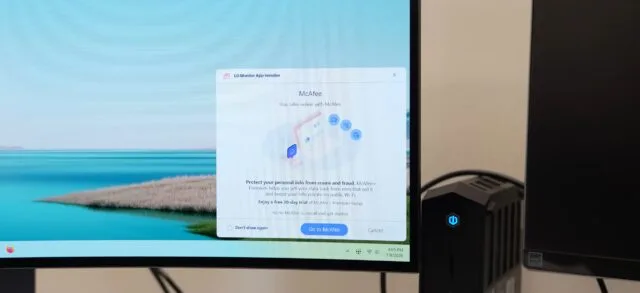
- Microsoft says LG will disable McAfee pop-ups pushed through the LG Monitor App after users documented repeated ads on Windows 11 PCs.
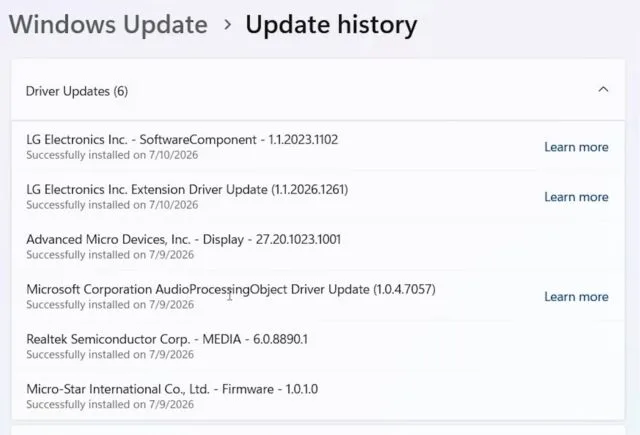
- The LG Monitor App reportedly arrived through Windows Update alongside monitor drivers, blurring the line between hardware support and unwanted bundled software.
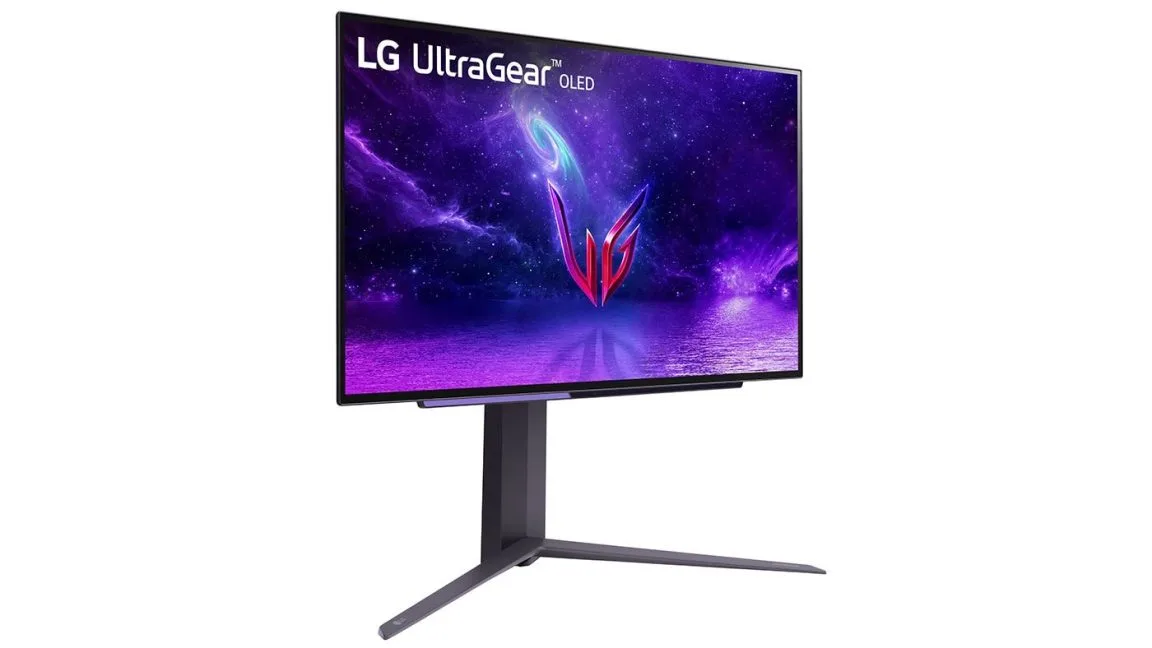
- Gamers Nexus reproduced the advertising behavior on multiple systems using an LG UltraGear 3GX900A-B gaming monitor.
- Removing one McAfee offer does not resolve the larger question of why a display peripheral can install promotional software without clear consent.
Table of Contents
LG Monitor App crossed a line users never agreed to
A monitor should display your work, your games, and perhaps the occasional low-battery warning. It should not quietly become a sales channel. Yet that is the complaint now surrounding the LG Monitor App, a utility reportedly installed through Windows Update alongside LG display drivers and then used to show promotional pop-ups, most commonly for a 30-day McAfee trial.
Microsoft says it has intervened. Pavan Davuluri, Microsoft’s executive vice president for Windows and Devices, wrote that the company had spoken with LG and that LG had agreed to disable the McAfee pop-up as an immediate measure. Davuluri added: ‘We appreciate LG working with us toward a shared goal of a better experience for our mutual customers.’
That is a useful short-term fix. It is also the absolute minimum. My read is that the real scandal is not the particular antivirus ad, nor even McAfee’s long-running reputation as the software trial that seems to turn up everywhere. The problem is that a peripheral vendor appears to have used a trusted operating-system delivery path to install a program that markets other products to people who did not knowingly ask for it.
Windows users have learned to be wary of obvious download traps. They know to decline browser toolbars and uncheck suspicious installers. A driver arriving via Windows Update carries a different implication: this is routine system plumbing. You plug in a monitor, Windows identifies it, and the machine fetches what it needs. Turning that expectation into an advertising funnel is a poor bargain for customers.
How the LG Monitor App reached Windows PCs
Reports indicate that the LG Monitor App was distributed with monitor-related updates through Windows Update. The installer then placed LG’s utility on affected PCs, where users said it surfaced notifications near the lower-right corner of the Windows desktop. In many cases, those notifications promoted McAfee. Other reported promotions included LG Switch, LG Calibration Studio, LG Dual Controller, and LG Channels.
The distinction matters. LG does sell software with plausible uses: calibration tools can matter to photographers and video editors, while screen-sharing and input-sharing utilities can be handy in multi-device setups. But useful utilities need an invitation. A clean setup prompt explaining what the app does, what data it accesses, and whether it will send offers would be defensible. Installing first and advertising later is the digital equivalent of a furniture delivery team slipping coupons into every drawer before leaving.
Gamers Nexus put unusually concrete evidence behind the complaints. Editor-in-chief Steve Burke said the outlet bought an LG UltraGear 3GX900A-B gaming monitor for about $1,200, only to see its price fall to $600 two days later. More relevantly, the team said it reproduced the behavior several times across multiple Windows 11 systems. Burke described a pop-up appearing on every boot after installation, usually serving the McAfee offer.
That repetition is why this story has legs. One stray dialog can be a bug. A reproducible notification arriving through a Windows-delivered peripheral package looks much more like a product decision.
Microsoft’s response fixes the McAfee ad, not the LG Monitor App model
The reason Microsoft’s response matters is simple: Windows Update is central to the trust equation. Microsoft has long positioned the service as the safe, mostly automatic way to receive security patches, drivers, and device support. Its own guidance on updating drivers in Windows directs users toward Windows Update as a standard first stop.
But the company’s statement stops well short of explaining how the LG Monitor App was approved for distribution, what rules governed its behavior, or whether similar vendor packages can send promotional notifications. The practical questions are hard to miss: what exactly can a vendor install, and what can it advertise once it gets there? Windows already has a long history of preinstalled apps, sponsored recommendations, and vendor utilities that feel more like clutter than support. Consumers are tired of buying a device and discovering the software business model afterward.
Frankly, Windows has helped create this environment. Microsoft itself has experimented for years with Start menu suggestions, Edge prompts, OneDrive nudges, and various promotional surfaces. That does not make LG’s behavior acceptable, but it does make the boundary easier for hardware partners to misread. When the platform owner treats the desktop as an occasional billboard, vendors may decide the same real estate is available to rent.
Why a gaming monitor makes this especially awkward
The affected UltraGear model is not a throwaway office display. Gamers and enthusiast PC buyers often pay a premium for high refresh rates, OLED panels, adaptive sync support, and careful image tuning. They tend to be precisely the customers who notice unfamiliar background processes and resent software they cannot justify. Asking that audience to tolerate the LG Monitor App pushing security-suite trials is a baffling bit of market judgment.
There is also a security and privacy angle, even if there is no evidence in these reports of malicious activity. Every extra auto-installed program gives users one more thing to trust, maintain, and eventually remove. The industry’s best instinct over the past decade has been to make hardware increasingly plug-and-play. A monitor driver should move Windows toward that ideal, not reopen the old PC-era ritual of uninstalling manufacturer extras.
For affected owners, the practical advice is simple: check Installed apps in Windows settings for LG Monitor App Installer or related LG utilities, and remove software you do not use. Users can also review driver updates before installation where Windows exposes that choice. That is not a satisfying answer, because consumers should not need forensic habits to use a monitor, but it is the sensible move for now.
The next question belongs to LG and Microsoft
LG disabling the McAfee message will reduce the immediate irritation. Good. But the LG Monitor App controversy will not really be settled until LG explains whether promotional notifications are gone entirely, whether future software offers require explicit consent, and how users can prevent the installer from arriving in the first place.
Microsoft has a responsibility too. If Windows Update packages can install vendor applications that advertise to users, the company needs clearer policy and clearer disclosure. Driver delivery is one of the few parts of modern PC ownership that is supposed to feel boring. It should stay that way. Otherwise, every new monitor, mouse, printer, and webcam becomes another chance for a trusted update to knock on the door with a sales pitch.

