- Python agent logging helped uncover a runaway retry loop projected to cost nearly $200 in a single overnight batch.
- A 71-line black box recorder using JSONL and DuckDB gave developers precise, queryable evidence of exactly what went wrong.
- Without structured logging, debugging AI agents means guessing — the final answer looks fine while the trace is a disaster.
- Python agent logging paired with a cost-and-turn guard can stop a bad run before it escalates into a billing nightmare.
Table of Contents
When Your AI Agent Quietly Burns Your Budget
Python agent logging isn’t glamorous. It’s the kind of thing developers skip when the demo goes well and they move on to the next feature. But that’s exactly the moment it matters most — when the demo is over, the real workflow begins, and one bad retry loop starts quietly billing against your API account while you sleep.
That’s the situation a developer recently documented in a post that’s been making the rounds in the developer community. The setup was a support automation agent: take a user request, search a private document index, summarize the result, hand it to a reviewer. Straightforward stuff. Then one test run got stuck in a retry loop. The actual test cost was small, but the projection was alarming — the same broken loop, left running overnight in a batch job, would have run up close to $200 for a single avoidable failure.
What made it worse? The final answer the agent produced looked plausible. Polished enough to slip past a tired reviewer. The trace behind it told a completely different story: the agent had called the right tool with the wrong input, retried against stale context, summarized outdated results, and kept paying for each turn through the loop. No error was thrown. No obvious alert fired. The money just drained.
The Real Problem With Debugging AI Agents
Normal Python scripts fail in one place. You get a traceback, you fix it, you move on. AI agents fail across a chain — and that chain is exactly what makes them so hard to debug without proper Python agent logging in place.
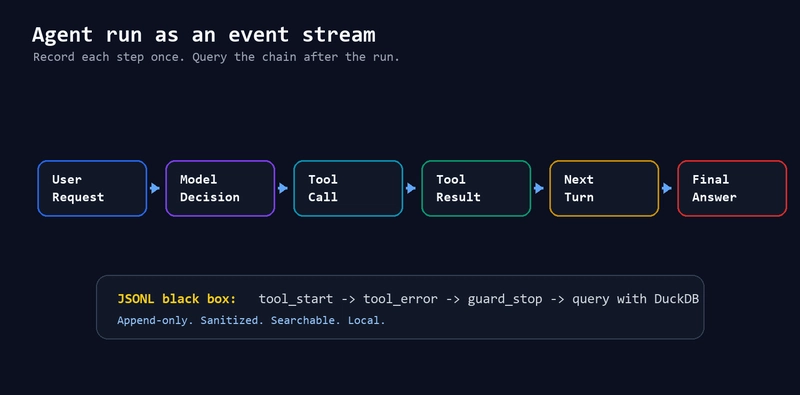
The chain looks something like this: user request feeds a model decision, which triggers a tool call, which produces a result, which informs the next turn, which eventually produces a final answer. If you only log the final answer, you have a diary entry. You know something went wrong, but you have no idea where.
Before structured logging, debugging this kind of agent failure looks like this: the final answer is wrong, so maybe the model hallucinated, or maybe the search tool returned stale data, or maybe the retry loop reused an old message. That’s not debugging — it’s guessing with syntax highlighting, as the original post aptly puts it.
After proper Python agent logging, the same bug looks completely different: turn one called the search tool with the wrong query. The tool timed out after 147 milliseconds. The retry used stale context. A cost guard stopped the run at $0.0124. One query in DuckDB confirms one tool error and one guard stop. Same bug. Much better outcome.
Python Agent Logging in 71 Lines of Plain Python
The solution the developer built isn’t a hosted observability platform, isn’t a paid dashboard, and doesn’t require any new infrastructure. It’s 71 lines of Python and a JSONL file. The goal was to answer seven specific questions after any run:
- What did the agent actually try?
- Which tool did it call, and with what input?
- Did the tool fail?
- How long did each tool call take?
- Did the run cross a cost or turn limit?
- Can you query everything after the fact?
The format is JSONL (JSON Lines), one structured record per event, appended to a flat file. No database required to write. No schema to migrate. Just open the file, read the lines, and load them into DuckDB when you need to query across runs.