


If you haven’t heard about Google’s latest privacy settings update yet, you will soon. The company is currently rolling out a feature called Search Services History globally, and for most users it arrived already switched on. Knowing how to do a proper Google Search AI opt-out is now something everyone who uses Search, Lens, or Google Translate should understand — before it’s too late to matter.
- Google Search AI opt-out is now essential — the new Search Services History feature is switched on by default for most users.
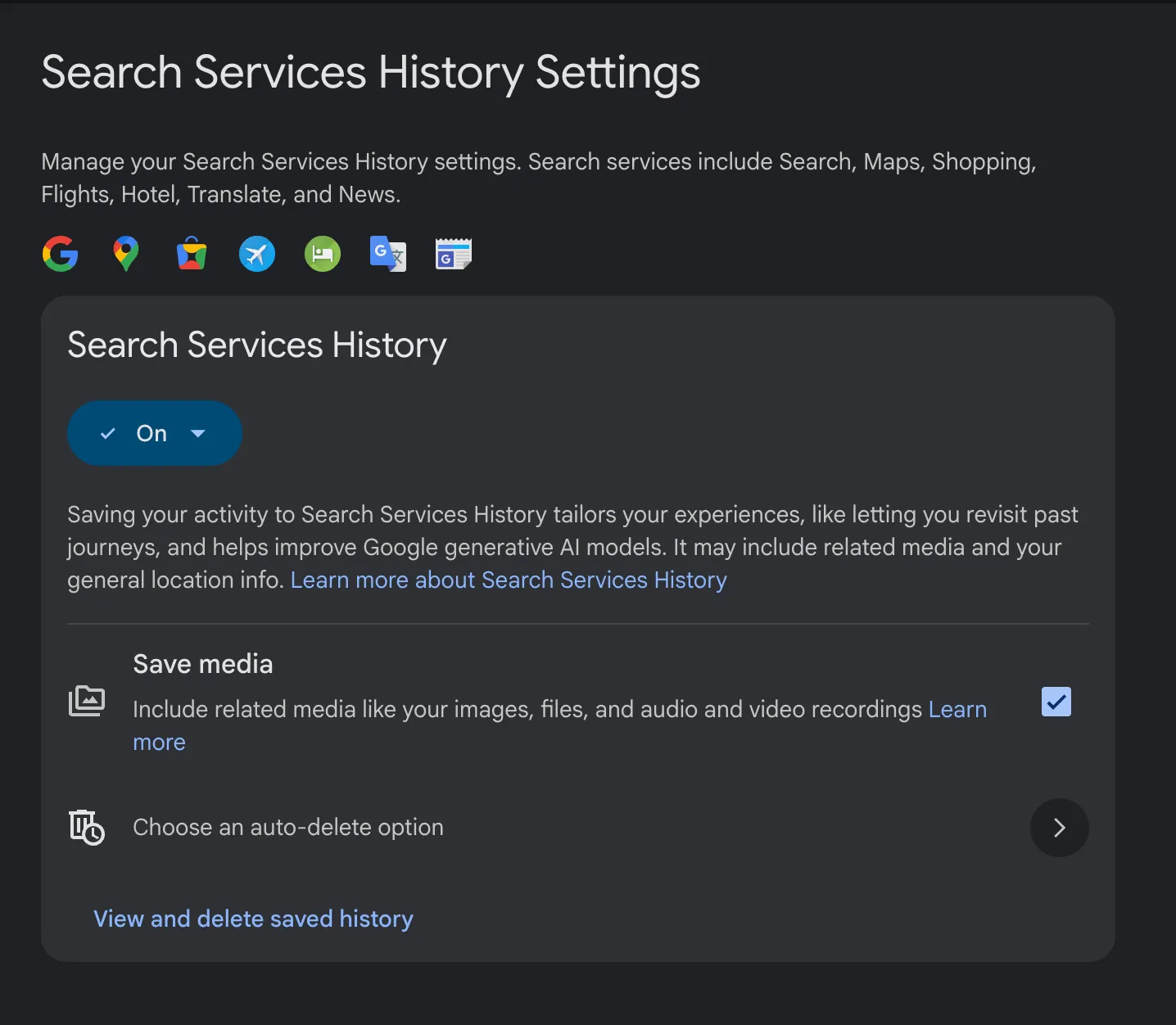
- The Google Search AI opt-out process requires visiting My Activity and unchecking ‘Save media’ to stop image and audio collection.
- Any media already captured for AI training can be retained by Google for up to four years, even after you delete the original activity.
- Privacy advocates argue opt-in consent should be the standard, not a buried setting users must actively hunt down and disable.
Table of Contents
What Google Just Quietly Switched On
Google began sending emails to users in late June with the subject line ‘New privacy settings for Search services.’ The framing was cheerful: the message opened by telling recipients they now have ‘even more control over saved history.’ What the email was less enthusiastic about spelling out was the part where all your uploaded media — images from reverse searches, audio from Translate, voice searches, Google Lens scans — may now be stored in your account and fed into Google’s AI models. For anyone who hasn’t yet performed a Google Search AI opt-out, that process is already underway in the background.
The new setting, called Search Services History, was on by default for the vast majority of users. The only exceptions were people who had previously disabled both Google’s Web & App Activity and Search Personalization toggles — a fairly small, privacy-conscious subset of the user base. Everyone else? Already enrolled.
Google spokesperson Davis Thompson described the rollout in measured terms: ‘These new settings help users get more relevant results and revisit their searches — including visual and voice searches — and they can be turned on or off at any time.’ That’s technically accurate. But it sidesteps an obvious question: why make the Google Search AI opt-out the required action rather than opt-in?
Exactly What’s Being Collected
This isn’t just about your text search queries. Google is explicit that Search Services History captures a much broader range of data. Their own description reads: ‘Your saved media includes your images, files, and audio and video recordings from your interactions with Search services. This includes things like Google Lens images, recordings from Search Live or Translate speaking practice, content you upload, and voice searches.’
Think about what that actually covers in a typical week. A photo of a restaurant menu you scanned with Lens. An audio clip you spoke into Translate while traveling. A voice search you fired off while your hands were full. These are intimate, everyday interactions — and they’re now, by default, candidates for AI training data. That’s precisely why completing a Google Search AI opt-out sooner rather than later makes a practical difference.
This makes strategic sense for Google. Contemporary AI models, especially multimodal ones, don’t improve on text alone. They need images, audio, and video at scale. Google’s position — running Search, Lens, Translate, Maps, and more as a single ecosystem used by billions of people — gives it an almost unparalleled pipeline for exactly this kind of varied, real-world training data.
As Thorin Klosowski, a senior security and privacy activist at the Electronic Frontier Foundation, put it: ‘Google is in a unique spot compared to a lot of the other companies with this. Because they offer so many services that people have been using for so long and have grown pretty comfortable and complacent with the amount of data collected.’ That comfort, arguably, is exactly what makes this kind of default-on rollout so effective.
Google Search AI Opt-Out: Step by Step
Doing a Google Search AI opt-out takes about two minutes, but you need to handle two distinct settings — missing either one leaves a gap.
- Go to Google’s My Activity page (myactivity.google.com) and sign into your account.
- Select the Search Services History tab — this shows you a timeline of what Google has already saved from your Search interactions.
- Toggle off the main setting to stop Google from continuing to record this history going forward.
- Uncheck the ‘Save media’ box — this is the specific control that governs whether your uploaded images and audio are used for AI model training. It’s separate from the main toggle and easy to miss.
- Delete existing activity if you want to clear what’s already been stored in your account.
That last step comes with a significant caveat. When you turn off the Save media function, Google surfaces a pop-up that states: ‘If your saved media is used to train our AI models, it is disconnected from your Google Account. This training data will be kept for up to 4 years, even if you delete the original activity.’ Four years. Your Google Lens photos of random street signs and your half-asleep voice searches could be part of an AI training set until well into the 2020s.
The Google Search AI opt-out process stops future collection, but it can’t undo what’s already been absorbed into the model. That’s the uncomfortable reality here.
The ‘Opt-Out Default’ Problem Is Bigger Than Google
Google isn’t doing anything unusual by tech-industry standards, and that’s precisely the problem. Opt-out defaults for AI training have become the standard playbook — Meta, X (formerly Twitter), Adobe, and others have all introduced similar features with users enrolled automatically. The burden of protecting your own data has been quietly transferred to you, the user, who has to notice the change, understand what it means, and take action before the window to matter closes. A Google Search AI opt-out is just the latest example of a user carrying that burden alone.
Klosowski is direct about what the alternative should look like: ‘I think opt-in is really asking the bare minimum of these companies. Asking their users to consciously choose to enable these features is the least they can do.’ An opt-in model would also force Google to make an actual case for why this is worth enabling — to explain the genuine benefit clearly enough that users would actively choose it. That’s a higher bar, which is presumably why companies don’t set it themselves.
Ben Winters, director of AI and privacy at the Consumer Federation of America, frames the cumulative effect well. ‘It creates this extra layer of math that a consumer has to do about whether they feel comfortable using the tool they’ve been using for a long time.’ Every new opt-out setting adds to a growing cognitive tax — a mental checklist of data deals you’ve been silently enrolled in across dozens of services. Most people, reasonably, can’t keep up.
‘There’s an increasing feeling of powerlessness and hopelessness about even trying to protect your data,’ Winters says, ‘because every little thing is going to be squeezed out of you.’ It’s hard to argue with that characterization. When even a technically sophisticated user has to actively audit their Google account settings to avoid contributing their voice and images to AI training, the system isn’t designed with user control as a genuine priority. Completing a Google Search AI opt-out is one of the few concrete actions available to individuals right now.
How Google Framed the Change — and What It Left Out
The language in Google’s notification email is worth examining. The first line positioned the update as giving users ‘even more control.’ The email then provided concrete, friendly examples of the convenience benefits: revisiting past Lens searches, continuing a Search Live conversation. These examples are real — the feature does enable that kind of continuity.
What the email did not do was offer similar examples or a clear explanation of the AI training implications after mentioning them. The AI training disclosure was present, but it was placed near the end and received no accompanying context or use-case illustration. That’s a deliberate editorial choice, even if Google wouldn’t describe it that way. Notably, the email also did not include a direct link that would let users complete a Google Search AI opt-out immediately upon reading it.
The company’s spokesperson, Thompson, did not respond to questions about why the feature was enabled by default rather than requiring users to actively turn it on. That silence is its own kind of answer.
What This Means Going Forward
The Google Search AI opt-out situation is a preview of what’s coming more broadly. As AI companies compete on model capability, the incentive to collect more, and more varied, real-world data only intensifies. Google has a structural advantage here — its user base spans Search, Gmail, Maps, YouTube, and Android, creating an almost unmatched data ecosystem. The same characteristics that make Google useful make it a particularly potent data collection engine when defaults shift.
What’s likely needed isn’t just individual opt-outs, but regulatory frameworks that make opt-in the legal requirement for AI training on personal data. The EU’s GDPR already pushes in this direction, requiring a lawful basis for processing that typically means explicit consent for this kind of use. In the US, no equivalent federal standard exists, which means the burden remains on users — and on their ability to find and click the right settings before the four-year clock starts ticking. Until that changes, knowing how to execute a Google Search AI opt-out remains one of the most important privacy steps any Google user can take.
Frequently Asked Questions
How do I complete a Google Search AI opt-out?
Go to Google’s My Activity page, select the Search Services History tab, and toggle off the entire feature. Critically, you also need to uncheck the box next to ‘Save media’ separately — that’s the setting that controls whether your image and audio uploads are used for AI model training.
What data does Google’s Search Services History actually collect?
According to Google, it stores images, files, audio, and video recordings from Search interactions — including Google Lens images, recordings from Search Live, Translate speaking practice, content you upload directly, and voice searches.
If I opt out now, will Google delete the data it already has?
Not necessarily. Google states that if your saved media has already been used to train AI models, it gets disconnected from your account but can be retained for up to four years — even if you delete the original activity from your account.
Was Search Services History turned on without my permission?
For most users, yes. The setting was enabled by default. Only users who had previously turned off both Web & App Activity and Search Personalization would have found it already switched off when they first visited the page.
Why is Google collecting more types of data for AI training now?
Modern AI models need diverse training inputs beyond text — including audio, images, and video. Google’s enormous, multi-service user base gives it an unusually large pool of multimodal data to draw from, which could help it iterate faster than competitors.

