

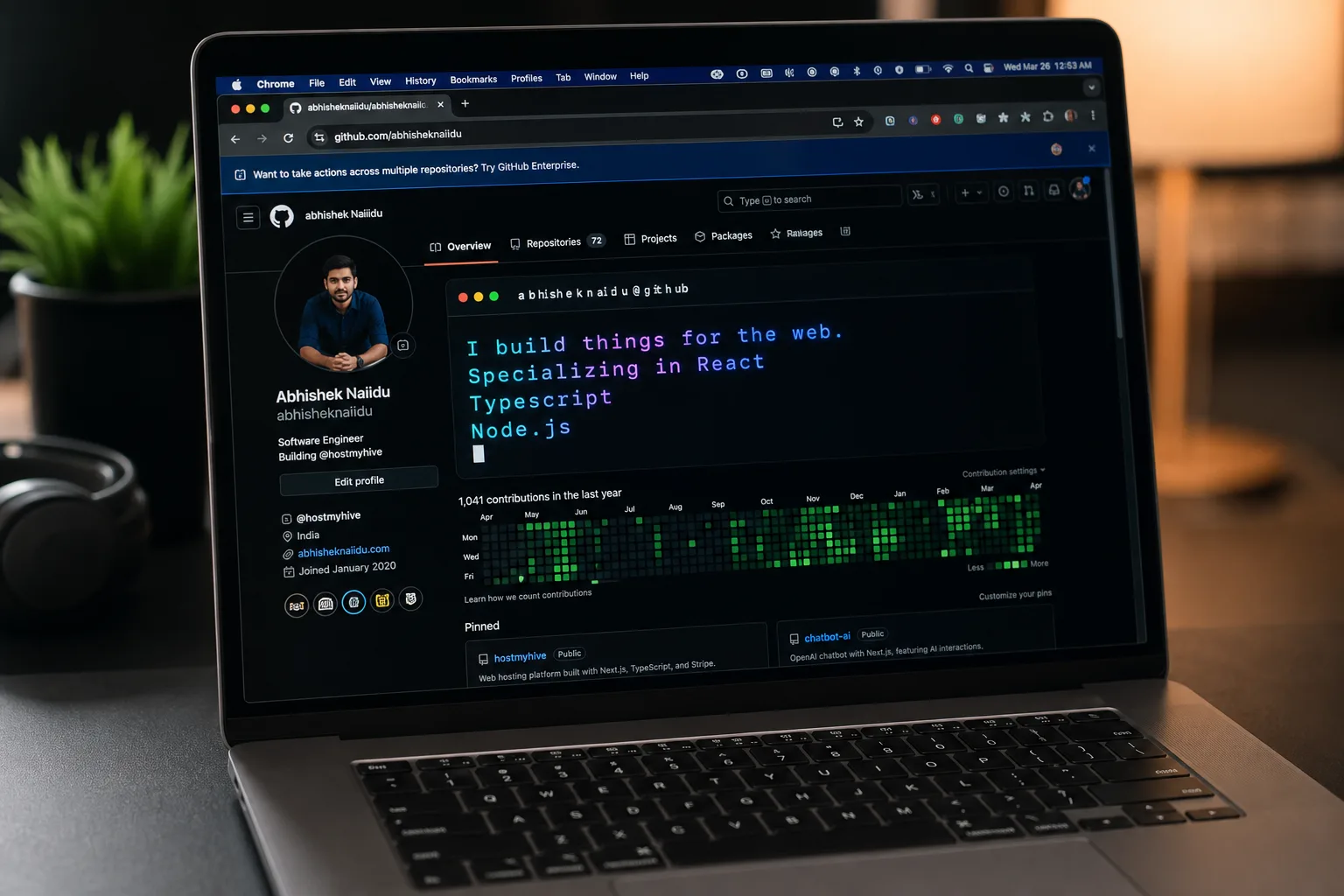
- ScribeSVG is a free GitHub README generator that creates animated typing effects with zero coding required.
- This GitHub README generator overcomes GitHub’s strict image proxy by embedding fonts as Base64 Data URIs inside SVGs.
- Developers can choose from 14 fonts, neon glows, gradients, and macOS-style window layouts for their profiles.
- The tool runs on Next.js Edge Runtime, rendering animations in milliseconds from servers around the world.
Table of Contents
Your GitHub Profile Is Doing You a Disservice
If you’ve spent any time scrolling through GitHub profiles, you already know the problem. Most of them look identical — a flat wall of markdown text, maybe a badge or two, and a stats card that every developer copy-pasted from the same three tutorials. For something that functions as a living, public-facing resume, the average GitHub README is remarkably forgettable. That’s where a good GitHub README generator can make a real difference, and ScribeSVG — a new open-source tool built by developer Dhanush Nehru — is one of the most thoughtful attempts yet to fix the problem.

The core idea is simple: animated typing text, rendered as a self-contained SVG, that you drop into your README with a single line of markdown. But the execution goes well beyond what existing tools like Readme Typing SVG have offered. ScribeSVG adds design sensibility to the equation — neon glows, linear gradients, glassmorphic card layouts, and a curated set of developer-favourite fonts that actually render correctly inside GitHub’s notoriously restrictive image proxy environment. As a GitHub README generator, it raises the bar considerably for what developers should expect from such tools.
Why Building a GitHub README Generator Is Harder Than It Looks
Here’s the thing most developers don’t fully appreciate until they try it themselves: embedding rich visual content in a GitHub README is a genuinely hostile engineering problem. GitHub doesn’t render HTML. It sanitises markdown aggressively. And crucially, it routes all images through its own camo proxy — a security layer that strips external stylesheets, blocks JavaScript entirely, and prevents web font loading via standard @import or link tags.
That last point is what kills most ambitious README projects. You can design something beautiful locally, push it to GitHub, and watch it degrade into Times New Roman the moment the proxy gets involved. For a typing animation that depends on monospace developer fonts like Fira Code or Space Mono, that’s a fatal flaw — and it’s the core challenge any serious GitHub README generator must solve.
Nehru’s solution is technically clever. Rather than trying to reference external font files — which GitHub will simply block — ScribeSVG fetches the font directly from Google Fonts at request time, converts the .woff2 binary into a Base64 Data URI, and injects that URI directly into the SVG’s internal style block. The entire animation, fonts included, is bundled into a single self-contained SVG payload. GitHub’s proxy receives one file with no external dependencies. There’s nothing left to block.
The animations themselves are driven entirely by CSS @keyframes — no JavaScript, no canvas, no external libraries. That’s important, because GitHub strips script tags universally. Pure CSS is the only viable path, and it’s actually the right choice for performance too.
What the GitHub README Generator Actually Offers
ScribeSVG positions itself as a premium design tool rather than a utility, and the feature set reflects that ambition. The GitHub README generator ships with more than 14 developer-oriented fonts — from the ubiquitous Fira Code and Space Mono to the retro-arcade charm of Press Start 2P. That alone separates it from most competitors, which typically offer one or two font choices.
Beyond fonts, there are three distinct layout modes. Raw Text gives you clean, minimal output. The macOS Terminal Frame wraps your animation in a familiar window chrome — title bar, traffic light buttons, the works — which has become something of a visual shorthand for developer credibility online. The Glassmorphic Card option leans into the frosted-glass aesthetic that’s dominated UI design for the past couple of years, giving profiles a distinctly modern feel.
Colour options include linear gradients and neon glow effects — think cyberpunk cyan or the muted purples of Tokyo Night, the popular VS Code theme. These aren’t cosmetic gimmicks; they’re the kind of design choices that signal taste to other developers and make a profile actually worth pausing on.
The infrastructure side is handled by Next.js Edge Runtime deployed on Vercel, which means the SVG is generated and served from the nearest edge node to whoever’s loading the page. For a README that could be viewed by a recruiter in Singapore or a maintainer in Berlin, that global distribution matters. Sluggish image loads undermine the entire effect.
Using ScribeSVG: No Code Required
Nehru was deliberate about making the GitHub README generator accessible to developers who don’t want to read documentation before customising their profile. The visual builder at scribesvg.vercel.app walks you through the whole process: type your rotating text lines, pick a font, choose colours, adjust animation speed, and select a layout. Hit the Markdown tab and you get a ready-to-paste code snippet.
The generated output looks something like this — a single image tag with all the configuration encoded as URL parameters pointing to ScribeSVG’s rendering API. Paste it into your README.md, push to GitHub, and the animation appears immediately, working perfectly through the camo proxy.
That parameter-based approach also means advanced users can hand-edit the URL directly if they want to tweak values without going back to the builder — a small touch, but one that respects developer instincts.
The Bigger Picture: Developer Identity Is Becoming a Design Problem
ScribeSVG exists inside a growing ecosystem of tools aimed at the same problem. GitHub profile READMEs only became possible in mid-2020, when GitHub quietly enabled the feature — create a repo matching your username, add a README, and it appears on your profile page. Within weeks, developers were competing to build the most impressive profiles, and a cottage industry of generators, stats cards, and badge services sprang up almost overnight.
Tools like GitHub Readme Stats by Anurag Hazra have racked up tens of thousands of GitHub stars. Readme Typing SVG has been embedded in countless profiles. But the design quality of most of these tools has lagged behind developer expectations — they were built for functionality, not aesthetics. ScribeSVG is making a deliberate bet that developers increasingly care about both, and its approach as a GitHub README generator focused on visual craft sets it apart from the utility-first competition.
That instinct seems right. As remote work has normalised and hiring has become more competitive, the GitHub profile has quietly evolved from a code repository into something closer to a personal brand. Recruiters at companies like Stripe, Linear, and Vercel are known to browse candidate profiles actively. First impressions matter in ways they simply didn’t five years ago. Choosing the right GitHub README generator has become, for many developers, a genuine career decision.
Whether ScribeSVG becomes the default GitHub README generator for developers who care about presentation will depend on how actively Nehru continues developing it and whether the community around it grows. The open-source model helps — contributions could extend the font library, add new layout presets, or introduce features the original author hasn’t considered. The foundations are solid. The question now is whether the project attracts the momentum it needs to outlast the inevitable wave of imitators.

