

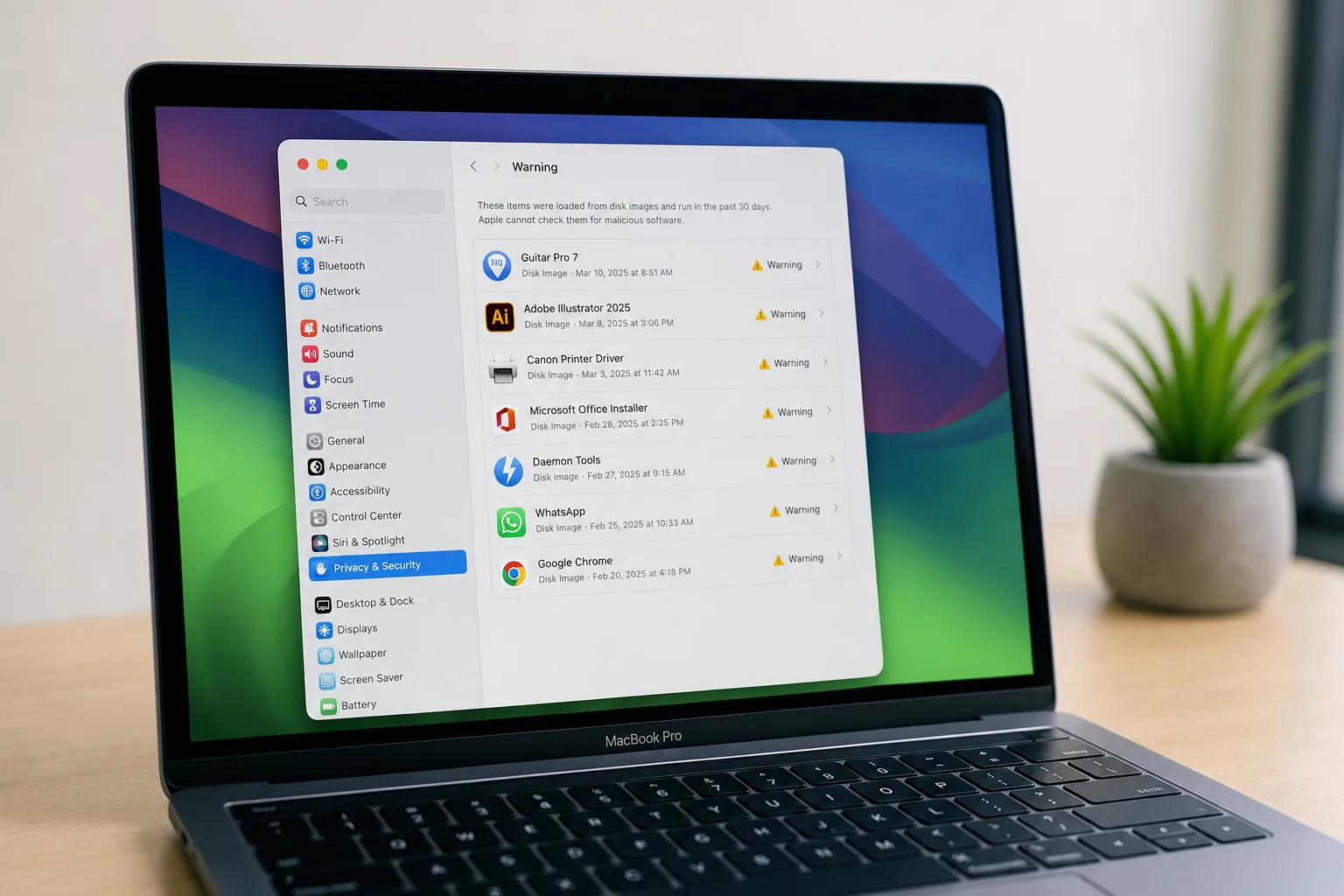
- Mac apps stopping work after macOS Golden Gate will be visible in a new Settings panel listing every affected Intel app.
- Mac apps stopping work is tied to Apple phasing out Rosetta 2, with full removal expected in macOS 28.
- macOS Golden Gate requires Apple silicon — macOS Tahoe was the last release to support Intel-based Macs.
- Authentication plugins and pre-login utilities that rely on Rosetta already fail to load in macOS Golden Gate.
Table of Contents
The Clock Is Ticking on Rosetta 2
If you’ve been ignoring those Rosetta warnings on your Mac, it’s time to pay attention. Mac apps stopping work is no longer a distant hypothetical — it’s a scheduled event Apple has now baked directly into the operating system, with macOS Golden Gate adding a dedicated interface to show you exactly which apps are on the chopping block. The countdown is real, the list is visible, and Apple isn’t going to let you forget it.
Rosetta 2 launched alongside the first Apple silicon Macs. It was a translation layer — software that let your M-series Mac run apps compiled for Intel processors, buying developers time to build native versions. It was, by most accounts, impressively transparent. Many users ran Intel apps through Rosetta for years without noticing any meaningful performance penalty. But Rosetta was always designed as a bridge, not a destination, and Apple is now very clearly dismantling that bridge from one end. Mac apps stopping work as a result of this deprecation is the inevitable conclusion of that process.
What macOS Golden Gate Actually Shows You
The most practical addition in macOS Golden Gate for everyday users is the new Intel-Based Apps list sitting inside Settings > General > About. Tap ‘Details’ next to that entry and you’ll get a full inventory of every app on your machine that’s still running through Rosetta — which means every app that will break when Apple pulls the plug in macOS 28. It’s a straightforward, no-surprises list, and it’s exactly what users needed a version or two ago. Seeing Mac apps stopping work laid out in a single panel makes the scale of the problem impossible to dismiss.
The warning system has also escalated. Where macOS Tahoe began nudging users with occasional alerts, Golden Gate turns that into something closer to a persistent nag: warnings appear every time you restart your Mac and every time you open an Intel app. That’s intentional. Apple is clearly trying to create enough friction that users either contact their app developers or start hunting for alternatives before the hard cutoff arrives.
There’s also a quieter but more immediately disruptive change. macOS Golden Gate no longer installs Rosetta automatically during system setup. Previous versions would detect Intel apps and offer to install the translation layer before you even hit your desktop. Golden Gate skips that entirely. The first time you launch an Intel app after upgrading, you’ll get a short installation prompt. It’s a minor inconvenience for most people, but it signals the direction of travel unmistakably — Rosetta is being treated as a legacy component, not a default feature. Every instance of Mac apps stopping work that users encounter during this period is a deliberate nudge toward native alternatives.
Mac Apps Stopping Work: The Categories Already Broken
Some apps aren’t waiting until macOS 28 to fail. In macOS Golden Gate, authentication plugins and other pre-login utilities that depend on Rosetta already don’t load. This is a meaningful distinction worth sitting with for a moment. It’s not just obscure productivity tools or long-abandoned indie apps at risk. Enterprise environments, in particular, often rely on third-party authentication systems that hook into the macOS login process — the kind of software that IT teams deploy at scale and developers don’t always update on a consumer-facing schedule. Mac apps stopping work at the pre-login stage is especially disruptive because it can lock users out of their machines entirely.
This is where the transition gets genuinely complicated for organisations rather than individuals. A solo user with an Intel version of a photo editor has an obvious path: buy the Apple silicon update, switch apps, or accept the loss. A company running 500 Macs through a legacy login authentication plugin tied to an on-premise directory system has a much harder conversation ahead. Apple’s warnings are well-intentioned, but the lead time for enterprise software procurement and security validation isn’t always measured in months. Mac apps stopping work in critical infrastructure roles requires planning cycles that consumer timelines don’t account for.
Why Apple Is Moving This Fast
Apple sold its last Intel-based Mac several years ago. The entire current Mac lineup runs on Apple silicon — M-series chips that Apple designs in-house and that have, by any honest performance metric, made the Intel era look like a significant bottleneck in hindsight. Keeping Rosetta alive indefinitely carries real costs: engineering maintenance, security surface area, and the implicit message that the Intel ecosystem is still somehow relevant to Apple’s platform strategy.
macOS Tahoe drew the hardware line clearly — it was the final release available to Intel Mac owners, capping that generation of machines before they become entirely unsupported. Golden Gate then draws the software line, making Apple silicon a hard requirement and escalating the Rosetta warnings to a degree that’s difficult to ignore. macOS 28 will then erase the translation layer entirely. It’s a three-act structure, and we’re firmly in act two. Mac apps stopping work permanently lands in act three.
The pace is actually pretty measured when you compare it to Apple’s previous processor transitions. This time around, the Apple silicon transition has been particularly clean technically — the performance parity arrived faster, and developer adoption of native builds was quicker. That arguably justifies a tighter deprecation window, though it won’t feel that way to anyone who discovers their critical workflow tool is now on a countdown timer.
What You Should Do Right Now
The action items here are practical and time-sensitive. Start by pulling up that Intel-Based Apps list in Settings and working through it honestly. For each app on that list, you’ve got roughly one major macOS release to answer a straightforward question: is there a native Apple silicon version, is there a viable alternative, or is this software genuinely irreplaceable in your workflow? Treating Mac apps stopping work as a near-future certainty — rather than a vague possibility — is the mindset shift that will save you from a nasty surprise when macOS 28 drops.
For developers, the message is even more direct. If you’re still shipping an Intel-only binary in 2025, you’re not just leaving performance on the table — you’re actively scheduling your app for deletion from your users’ machines. Xcode has made building universal binaries or native Apple silicon targets relatively painless for most codebases. The developers who haven’t done it by now are either maintaining truly abandoned projects or facing genuine porting complexity, and their users deserve to know which it is.
Apple’s decision to surface this information so prominently in Golden Gate — a full macOS release before the actual cutoff — suggests the company has learned from past transitions. Giving users a named list, persistent warnings, and a clear timeline is considerably more transparent than dropping support and leaving people to discover it the hard way. Whether it’s enough lead time for enterprise environments, legacy creative workflows, and niche professional tools is the real open question as macOS 28 edges closer.
Frequently Asked Questions
How do I check which Mac apps stopping work will affect me in macOS Golden Gate?
Go to Settings > General > About > Intel-Based Apps, then click ‘Details.’ This list shows every app on your Mac that relies on Rosetta 2 and will stop functioning when Apple removes Rosetta support in macOS 28.
When does Rosetta 2 actually stop working entirely?
Apple plans to remove Rosetta 2 in macOS 28. macOS Golden Gate, which is the release before that, still runs Rosetta but issues repeated warnings at restart and when opening Intel apps to push users toward native alternatives.
Does macOS Golden Gate install Rosetta 2 automatically?
No. macOS Golden Gate does not install Rosetta automatically. You will encounter a short installation process only the first time you try to open an Intel-based app after upgrading.
Can Intel Macs run macOS Golden Gate?
No. macOS Golden Gate requires an Apple silicon Mac. macOS Tahoe was the final version Apple made available for Intel-based machines, effectively ending mainstream software support for that hardware generation.

