


- Gemini troubleshooting mode has appeared unexpectedly in the model picker menu for a small number of users.
- The Gemini troubleshooting mode uses interactive widgets alongside text to walk users through diagnosing problems step by step.
- Reddit users report the mode runs at a lower AI temperature, keeping responses focused and free of conversational filler.
- It’s unclear whether this is an accidental production push, an A/B test, or an internal feature that slipped through.
Table of Contents
Google’s Gemini Troubleshooting Mode Just Showed Up Uninvited
A new Gemini troubleshooting mode has started appearing inside Google’s AI assistant for a subset of users — and by all indications, nobody at Google meant to flip that switch yet. The feature surfaced in the Gemini model picker menu, the same dropdown where users choose between Gemini 1.5 Flash, 1.5 Pro, and other variants. Only this time, there was an unexpected addition: a dedicated “Troubleshooting” option sitting right alongside the rest.
The initial sighting came from user testingcatalog on X, who flagged the new entry and shared early screenshots. Shortly after the post went up, other users chimed in to confirm they could see and interact with the mode too. That kind of rapid, scattered confirmation pattern is a classic tell for an accidental feature rollout — the sort of thing that happens when a feature flag gets pushed to production before anyone meant it to.
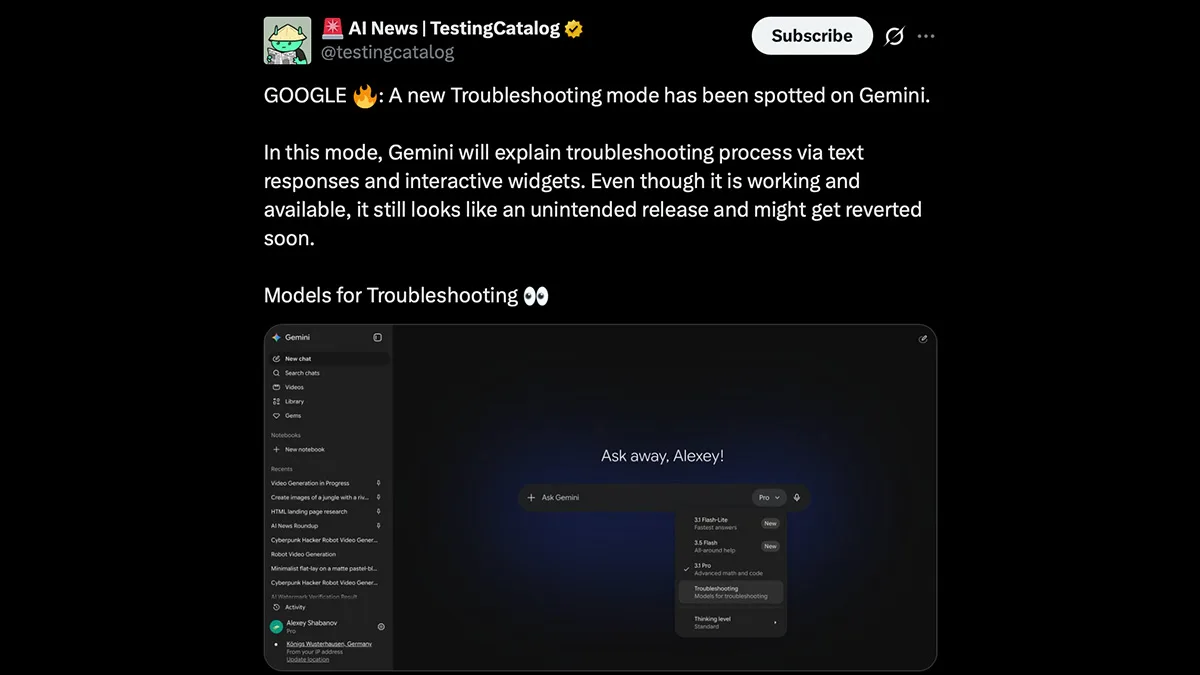
Google hasn’t confirmed anything yet. The company was contacted for comment, and as of now there’s been no response. That silence, combined with the limited and inconsistent availability, strongly suggests this Gemini troubleshooting mode wasn’t supposed to go live — at least not yet.
What the Gemini Troubleshooting Mode Actually Does
So what are users actually getting when they select this mode? Based on early reports and screenshots shared on X, the Gemini troubleshooting mode shifts away from Gemini’s usual conversational style and adopts something far more structured. Instead of a flowing back-and-forth response, it presents a combination of plain text explanations and interactive widgets that guide users through a diagnostic process.
One example making the rounds shows the Gemini troubleshooting mode being used for a very relatable, very non-tech problem: a car that won’t start. Rather than Gemini dumping a wall of general advice, the troubleshooting interface apparently identifies a likely root cause and then offers branching options — the user selects which symptom their car is showing, and Gemini narrows down the advice accordingly. It’s structured more like a decision tree than a chat session.
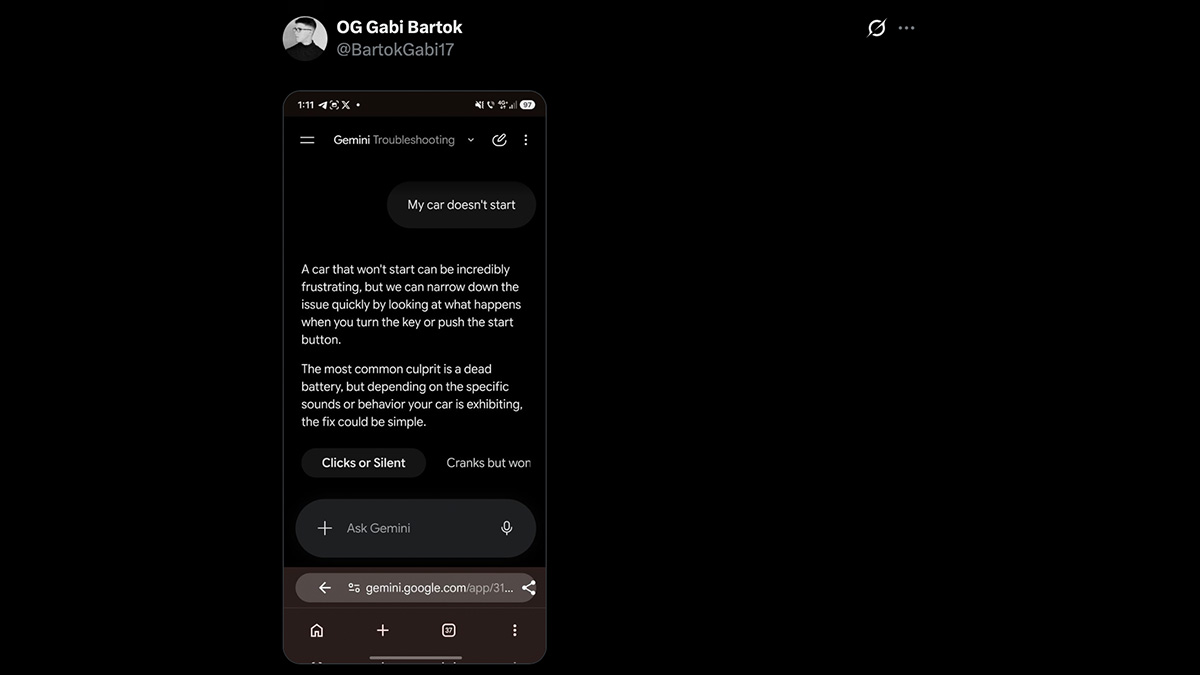
That design choice matters more than it might seem at first. Standard Gemini, like most large language model interfaces, is optimised for open-ended conversation. It hedges, contextualises, and often circles back to caveats. That’s fine when you’re brainstorming a marketing strategy, but it’s actively unhelpful when you’re standing in a cold parking lot trying to figure out why your engine won’t turn over. A focused, branching diagnostic interface is a meaningfully different tool.
Lower Temperature, Less Fluff — The Technical Side
Digging into Reddit discussions around the feature, one consistent detail stands out: the Gemini troubleshooting mode reportedly runs at a lower “temperature” than Gemini’s standard modes. In AI model terms, temperature is a setting that controls how creative — or how conservative — a model’s outputs are. A higher temperature produces more varied, imaginative responses. A lower one keeps the model tightly focused on the most statistically likely, factually grounded answer.
For a troubleshooting context, that’s exactly the right call. You don’t want an AI assistant that gets creative when you’re asking why your Wi-Fi keeps dropping or why your laptop won’t boot. You want it to give you the most probable diagnosis and walk you through fixing it — nothing more, nothing less. The reported absence of conversational filler in this mode suggests Google has deliberately tuned it to be clinically precise, stripping out the warmer, chattier tone that defines Gemini’s default personality.
This approach mirrors what OpenAI has explored with GPT-4 in structured output and function-calling contexts — the idea that an LLM doesn’t have to behave the same way across every use case. Constraining the model’s behaviour for specific tasks can actually make it significantly more useful than letting it roam freely.
Accidental Launch or Calculated Leak?
The big open question here is how this Gemini troubleshooting mode escaped into the wild. There are really three plausible explanations. First, a developer pushed a feature flag to production by mistake — embarrassing, but it happens constantly across the industry. Second, this is a deliberate A/B test where Google is serving the new mode to a small slice of users to observe how they interact with it before a broader rollout. Third — and least likely — it’s a fully accidental overlap from an internal testing environment that wasn’t properly isolated from public-facing infrastructure.

The A/B test theory has some merit. Google routinely runs quiet experiments on Gemini, Search, and its other products before committing to full launches. The fact that the feature appears to be functional and polished enough for multiple users to actually use it — rather than throwing errors or showing placeholder UI — does suggest it’s not completely raw. Something that was merely misconfigured would typically be broken, not working.
Either way, Google can pull it back at any moment. Feature flags work both ways. If this was unintentional, the switch gets flipped off and the Gemini troubleshooting mode disappears from the model picker with no fanfare. Users who’ve been testing it won’t get any warning.
Why This Could Be One of Gemini’s Most Practical Additions
Step back from the accidental-launch drama and ask the more interesting question: does the Gemini troubleshooting mode actually fill a real gap? The answer is probably yes.
Right now, when most people turn to an AI assistant with a technical problem, they get a generic response that covers every possible scenario vaguely rather than their specific scenario precisely. The AI doesn’t know what you’ve already tried. It can’t ask follow-up questions in a structured way. It defaults to covering its bases rather than committing to a diagnosis. That’s a fundamental limitation of the conversational chat paradigm that every major AI assistant — Gemini, ChatGPT, Copilot — has inherited.
A dedicated troubleshooting mode that uses branching logic, interactive inputs, and a constrained response style sidesteps a lot of those problems. It forces the interaction into a shape that’s actually suited to the task. And if Google extends this beyond car diagnostics into areas like software errors, network issues, device setup, or medical symptom checking, the utility scales considerably.
There’s also a competitive angle worth watching. Microsoft’s Copilot has been pushing into productivity and workflow assistance, and Apple is building more structured task-handling into Apple Intelligence. A structured troubleshooting layer in Gemini could become a genuine differentiator — particularly on Android, where Gemini is increasingly the default assistant and users encounter device and app issues that would benefit from exactly this kind of guided help. Whether Google rolls this out deliberately or quietly buries it after this accidental preview, the concept itself has clearly already been built. That alone tells you something about where the AI assistant market is headed.

