

- AirDrop via Quick Share is now live on the OnePlus 15, enabling direct file transfers to Apple devices.
- The OnePlus 15 is currently the only OnePlus device confirmed to receive AirDrop via Quick Share support.
- No major setup is needed — just update Quick Share through the Play Store and you’re ready to go.
- Apple devices must have AirDrop set to ‘Everyone for 10 minutes’ to receive files from Android.
Table of Contents
AirDrop via Quick Share Arrives on the OnePlus 15
Android’s quiet assault on one of Apple’s most jealously guarded features just claimed another handset. AirDrop via Quick Share — the cross-platform file-transfer bridge that Google quietly introduced with the Pixel 10 late in 2025 — is now rolling out to the OnePlus 15. That means OnePlus users can finally beam photos, videos, and documents directly to iPhones, iPads, and Macs without reaching for a cable, a cloud service, or a third-party app.
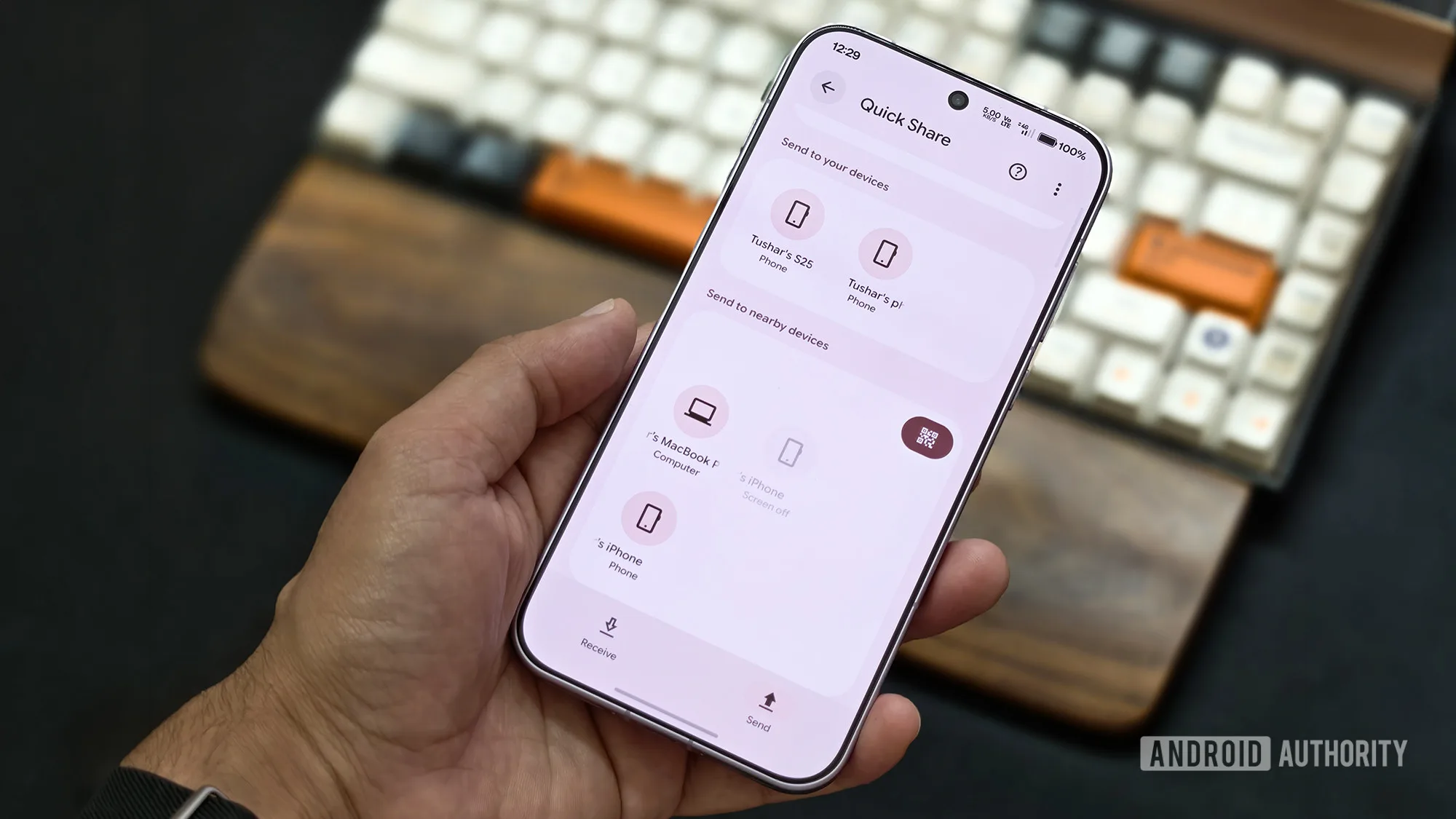
The feature was first spotted in the wild by a user on the OnePlus Community forums, and independent testing has since confirmed it’s live. It’s not a dramatic, settings-heavy unlock — it appears quietly once Quick Share is running its latest build. That’s either reassuringly seamless or slightly anticlimactic, depending on how long you’ve been waiting for Android and Apple devices to actually talk to each other.
How Google Cracked Apple’s Walled Garden
To understand why this matters, it helps to remember how locked-down AirDrop has always been. Apple’s peer-to-peer transfer system uses a combination of Bluetooth and Wi-Fi Direct to move files at speed, but it’s been strictly Apple-to-Apple since its debut in 2011. Android users wanting to share files with iPhone friends have had to rely on workarounds — Google Drive links, WhatsApp, or the increasingly capable but still niche Nearby Share (now rebranded as Quick Share following Google and Samsung’s 2024 merger of their respective transfer tools).
Google’s breakthrough was working with Apple to integrate Quick Share directly into AirDrop’s existing protocol. The result is that AirDrop via Quick Share allows a supported Android phone to show up in an iPhone’s AirDrop menu just like another Apple device would. There’s no app to install on the iPhone side, no pairing ritual — it just works. That’s a meaningful shift, and it’s the kind of interoperability that the EU’s Digital Markets Act has been pushing the industry toward, even if this particular handshake appears to be a voluntary one.
Which Devices Support AirDrop via Quick Share Right Now?
The rollout started with the Pixel 10 lineup and has since spread steadily. The current roster of supported Android devices includes:
- Google Pixel 10 series (original launch devices)
- Google Pixel 9 series
- Google Pixel 8a (though notably, not the standard Pixel 8)
- Samsung Galaxy S25 series and newer Samsung flagships
- OPPO Find X9 series
- Vivo X300 Ultra
- OnePlus 15
The Pixel 8 exclusion is a strange one — it’s only one generation older than the 8a and shares much of the same silicon. Google hasn’t commented publicly on the reasoning, but it’s the kind of arbitrary line-drawing that tends to frustrate users who bought a phone less than two years ago.

Why the OnePlus 13 Being Left Out Is Worth Watching
Here’s where things get a little awkward for OnePlus. The OnePlus 15 is confirmed for AirDrop via Quick Share. The OnePlus 13 — last year’s flagship, a genuinely strong phone — is not on the list. Neither are OnePlus’s Snapdragon Elite-powered tablets. That’s a narrower rollout than you might expect from a brand trying to position itself as a premium Android alternative.
The contrast with sister brand OPPO makes it more pointed. The OPPO Find X8, which is effectively the OnePlus 13’s twin under the skin, is already listed as a supported device. Both brands sit under the same BBK Electronics umbrella. Both phones share hardware DNA. The fact that one gets AirDrop via Quick Share and the other doesn’t suggests the decision is less about technical capability and more about which markets and product lines OnePlus and OPPO are prioritising for feature parity — or perhaps which brand’s software team submitted the integration work first.
It may not be a permanent exclusion. The phrase “at least, not immediately” has been attached to the OnePlus 13’s absence, which leaves the door open for a later update. But ‘later’ is cold comfort if you’re sitting on a perfectly capable flagship that’s been passed over in favour of its successor.
Setting It Up Takes About 30 Seconds
If you’ve got a OnePlus 15 and you want to start using AirDrop via Quick Share to send files to Apple devices today, the process is minimal. Open the Google Play Store, search for Quick Share, and make sure you’re on the latest version. That’s essentially it on the Android side.
On the Apple end, the person receiving the file needs to have AirDrop set to accept transfers from ‘Everyone for 10 minutes.’ That option lives in the iOS Control Centre — swipe in, long-press the connectivity cluster, tap AirDrop, and select the everyone option. It’s not a permanent setting change, which is sensible from a privacy standpoint, but it does mean both parties need to be a little coordinated for the first transfer.
Once that’s in place, the OnePlus 15 should appear in the AirDrop menu on nearby Apple devices exactly as another iPhone or Mac would. Files transfer over the same Bluetooth-and-Wi-Fi-Direct combo Apple has always used, so speeds are solid for most everyday use cases — photos, PDFs, short video clips.
The Bigger Picture for Android-Apple Interoperability
AirDrop via Quick Share landing on the OnePlus 15 is a small data point in a much larger story. The narrative around Android and iOS being permanently, irreconcilably separate ecosystems is slowly unravelling. RCS is now supported on iPhone. Apple opened NFC to third-party apps under regulatory pressure. And now file transfers — one of the most visible and everyday friction points between the two platforms — are getting a genuine fix.
None of this happens in a vacuum. The DMA in Europe, ongoing antitrust scrutiny in the US, and consumer frustration with artificial ecosystem lock-in have all created pressure on both Apple and Google to play nicer. Whether that continues depends partly on regulatory appetite and partly on whether consumers actually reward the companies that open up with their purchasing decisions.
For now, if you’re carrying a OnePlus 15 and your friends are on iPhones, AirDrop via Quick Share has given you a feature that would have seemed borderline impossible a couple of years ago. The question is how quickly the rest of the Android market catches up — and whether Apple ever flips the script and ships a Quick Share client of its own.

