

Twenty-eight years is a long time to work on anything in tech. For most open-source projects, that timeline would suggest either wild success or quiet abandonment. ReactOS is neither — and this week it marked a milestone that’s genuinely worth paying attention to: ReactOS runs Half-Life with 3D acceleration on actual physical hardware, fully in-game, for what appears to be the first time publicly reported.
- ReactOS runs Half-Life with full 3D acceleration on real hardware for the first time in the project’s 28-year history.
- A community user got ReactOS runs Half-Life working on a Dell OptiPlex with an Intel Core i5 2400 and NVIDIA GeForce 8400GS.
- The achievement highlights ReactOS’s slow but persistent progress toward running unmodified Windows binaries without a compatibility layer.
- Half-Life already runs natively on Linux and via Wine, but the ReactOS result carries symbolic weight for the open-source project.
Table of Contents
What Just Happened — and Why It Matters
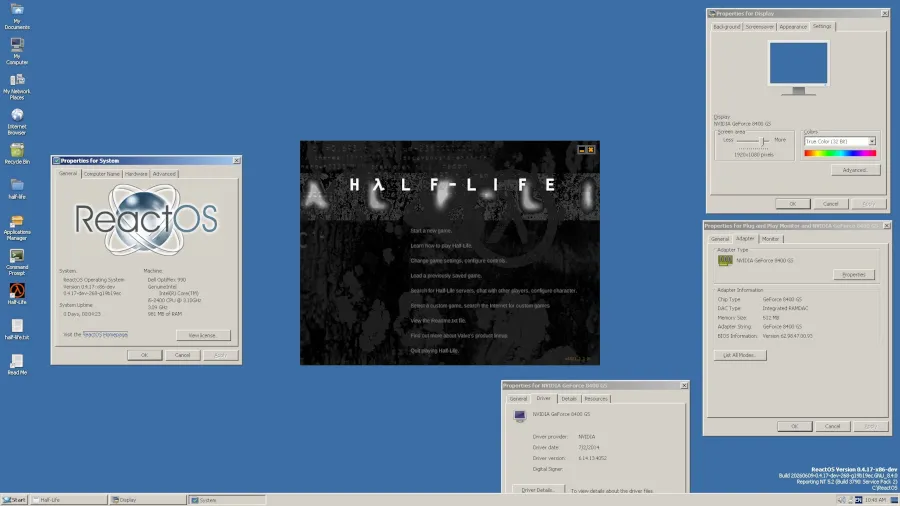
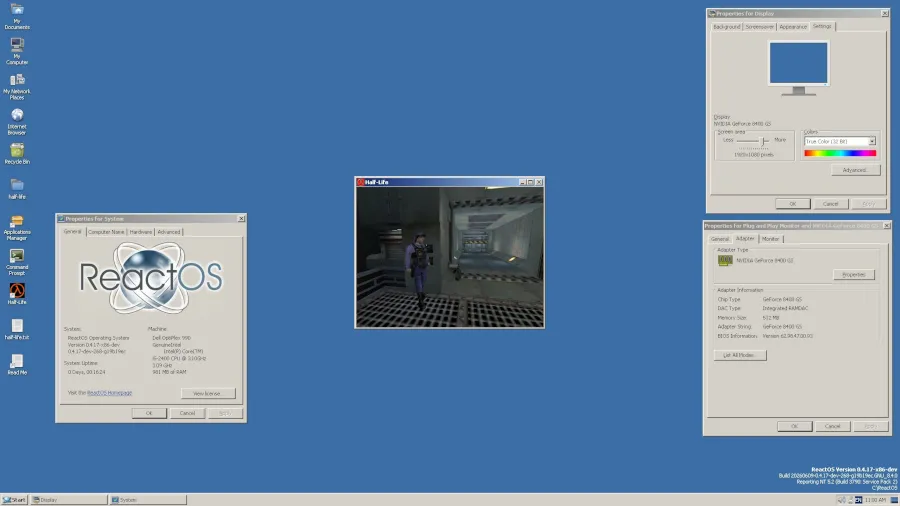
The news surfaced via the ReactOS team’s official X account, where community member ‘Zombiedeth’ demonstrated the feat running on a Dell OptiPlex desktop equipped with an Intel Core i5 2400 Sandy Bridge processor and an NVIDIA GeForce 8400GS GPU. That’s not bleeding-edge hardware — the Sandy Bridge architecture dates back to 2011, and the GeForce 8400GS is positively ancient by GPU standards. But that’s almost the point. Getting a 3D-accelerated game to run correctly on older, real hardware is a more credible demonstration than a carefully controlled virtual machine environment. The fact that ReactOS runs Half-Life on this kind of modest, real-world setup makes the result far harder to dismiss.
Earlier attempts at running Half-Life under ReactOS were limited to partial initialization — the game would start loading and then fall apart. What’s different now is that it actually gets into the game. Menus, rendering, input — the full loop. That’s a meaningful gap to cross. Confirming that ReactOS runs Half-Life end-to-end, rather than just to a loading screen, is what separates this milestone from previous near-misses.
ReactOS Runs Half-Life — But What Is ReactOS, Exactly?
If you’ve never encountered it, ReactOS is one of the most ambitious and quietly underappreciated projects in open-source software. The goal is simple to state and extraordinarily difficult to execute: build a free, open-source operating system that is binary-compatible with Windows, capable of running Windows applications and drivers without modification, and without Windows itself installed anywhere on the machine.
This is fundamentally different from Wine, the compatibility layer that translates Windows API calls on Linux or macOS. Wine sits on top of another OS. ReactOS is the OS. There’s no host system underneath — just ReactOS and whatever hardware you’re running it on. That distinction matters enormously when you’re talking about what it takes to make something like Half-Life work correctly, especially when 3D acceleration is involved. Understanding that distinction is essential context for appreciating why ReactOS runs Half-Life means something Wine running Half-Life simply does not.
The project traces its roots back to 1996, making it older than Windows XP, older than the original Xbox, and older than Google. It has persisted through shifts in the Windows ecosystem that would have made lesser projects irrelevant — the death of Windows 9x, the rise of 64-bit computing, DirectX evolving through a dozen versions. ReactOS has largely tracked Windows NT and Windows XP as its compatibility targets, which keeps it relevant for legacy software but also means it’s not trying to replicate Windows 11.
The Significance of Half-Life as a Benchmark
Half-Life isn’t just any game. Released by Valve in 1998, it was a technical and cultural landmark — and from a compatibility-testing standpoint, it’s a useful target precisely because it’s well-understood, widely documented, and relies on OpenGL for its 3D rendering rather than Direct3D. That said, it still exercises a substantial slice of the Win32 API, filesystem operations, input handling, and graphics driver stack. Getting it running correctly isn’t trivial. When ReactOS runs Half-Life successfully, it exercises all of those subsystems simultaneously, making it a broad-spectrum compatibility test rather than a narrow one.
There’s also a certain poetic irony here. Half-Life already runs excellently on Linux natively, and it’s been playable through Wine for years. Valve’s own Proton compatibility layer — built on Wine — has made running Windows games on Linux almost unremarkable at this point. So from a pure ‘I want to play Half-Life’ perspective, ReactOS offers nothing you can’t get elsewhere more easily.
But that’s the wrong frame. The ReactOS milestone isn’t about providing the best way to play an aging shooter. It’s about what running Half-Life proves about the system’s overall compatibility. If the graphics stack, the input layer, the memory management, and enough of the Win32 surface area are solid enough to run a 3D game in-engine without crashing, that has implications for the entire class of applications ReactOS is trying to support. Every time ReactOS runs Half-Life cleanly on physical hardware, it validates months or years of low-level compatibility work that rarely gets headlines on its own.
Progress That Moves in Geological Time
To outside observers, ReactOS’s pace of development can look frustratingly slow. Version 0.4 launched in 2016, and the project is still firmly in alpha. The team is small, the codebase is enormous, and reverse-engineering Windows behavior — without access to Microsoft’s source code — is genuinely painstaking work. Every system call, every undocumented behavior, every edge case in how Windows handles memory or file I/O has to be independently discovered and implemented correctly.
What ReactOS has managed to do over the decades is quietly accumulate compatibility wins. It can run older versions of Firefox, classic productivity apps, various utilities and tools from the Windows XP era. Each new application that crosses the threshold from ‘broken’ to ‘working’ represents hours or weeks of someone’s time hunting down exactly where ReactOS’s behavior diverges from Windows NT’s. Seeing ReactOS runs Half-Life demonstrated on real hardware is a reminder that those incremental, unglamorous fixes do eventually add up to something visible.
The Half-Life result is one of the more visible wins in recent memory — partly because games push hardware and software stacks harder than most productivity software, and partly because Half-Life has cultural cachet that a working database application doesn’t. It gets people paying attention in a way that ‘ReactOS can now run Winamp 5.6’ simply doesn’t. Saying ReactOS runs Half-Life cuts through in a way that most compatibility announcements never could.
What This Tells Us About the Broader Ecosystem
Microsoft’s dominance of the desktop OS market has never really been threatened by ReactOS, and that’s unlikely to change. But the project serves a different, arguably more interesting purpose: it’s a living insurance policy against Windows becoming the sole arbiter of whether old software can ever run again.
Preservation is an underrated issue in computing. As Microsoft drops support for older Windows versions, businesses and individuals running legacy software face a narrowing set of options. Wine helps. Virtual machines help. But a free, open-source OS that can natively boot on real hardware and run the original binary is a different kind of solution — one that doesn’t require a licensed Windows install or a virtualization host. The moment ReactOS runs Half-Life on bare metal is a proof-of-concept for exactly that kind of long-term preservation story.
The Half-Life demo is a data point that says: ReactOS’s compatibility foundation is solid enough that 3D-accelerated software from the late 1990s can run correctly on a physical machine. That’s not a product announcement. But for the communities — archivists, retrocomputing enthusiasts, organizations clinging to legacy line-of-business software — who have a stake in this project’s eventual success, it’s a meaningful signal that the foundation is holding together.
Twenty-eight years in, ReactOS is still building. The finish line isn’t in sight. But ReactOS runs Half-Life, and that’s not nothing.
Frequently Asked Questions
What does it mean that ReactOS runs Half-Life on real hardware?
It means the open-source Windows clone can now execute the Windows binary of Half-Life on physical hardware and handle it in-game — not just initializing or crashing early. It’s a concrete proof point for ReactOS’s Windows binary compatibility goals.
What hardware was used to run Half-Life on ReactOS?
Community member ‘Zombiedeth’ used a Dell OptiPlex desktop with an Intel Core i5 2400 Sandy Bridge processor and an NVIDIA GeForce 8400GS graphics card — modest, older hardware that nonetheless successfully handled the game under ReactOS.
How is ReactOS different from Wine?
Wine is a compatibility layer that translates Windows API calls on Linux or macOS — it doesn’t replace the OS. ReactOS is a standalone operating system built from scratch to be binary-compatible with Windows, meaning it aims to run Windows software directly without any host OS underneath.
Is ReactOS ready for everyday use?
No. ReactOS has been in development for 28 years and is still not production-ready. Stability, hardware support, and application compatibility remain works in progress, though it continues to make incremental gains in Windows binary compatibility.

