


- Self-hosted GitLab CE gives teams a free, open-source DevOps platform combining source control, CI/CD, and project management in one place.
- Deploying self-hosted GitLab CE with Docker Compose and Traefik takes under an hour and delivers automatic HTTPS via Let’s Encrypt.
- GitLab’s initial root password auto-deletes after 24 hours — you must retrieve and change it immediately after first boot.
- Once running, GitLab CE supports CI/CD runners, SAML/OIDC single sign-on, and SMTP notifications for production-ready team workflows.
Table of Contents
Why Self-Hosted GitLab CE Still Makes Sense in 2024
Running a self-hosted GitLab CE instance might sound like extra work in a world where GitHub, GitLab.com, and Bitbucket all offer generous free tiers. But for a growing number of engineering teams — particularly those dealing with compliance requirements, sensitive codebases, or tight infrastructure budgets at scale — owning your DevOps stack completely is still the right call. Self-hosted GitLab CE is free, open-source, and ships with an almost absurd breadth of features: source code management, CI/CD pipelines, container registry, issue tracking, security scanning hooks, and more. All of it, on your hardware, under your control.
The case got stronger with Ubuntu 24.04 LTS landing in April 2024. It’s a long-term support release, which means stability for production workloads, and it pairs cleanly with the current Docker ecosystem. If you’ve been putting off spinning up your own self-hosted GitLab CE instance because the setup felt daunting, the tooling has genuinely caught up with the ambition. Docker Compose handles orchestration, Traefik handles TLS termination automatically via Let’s Encrypt, and the whole thing can be production-ready in under an hour.
Let’s break down exactly how it works — and why each architectural decision here matters.
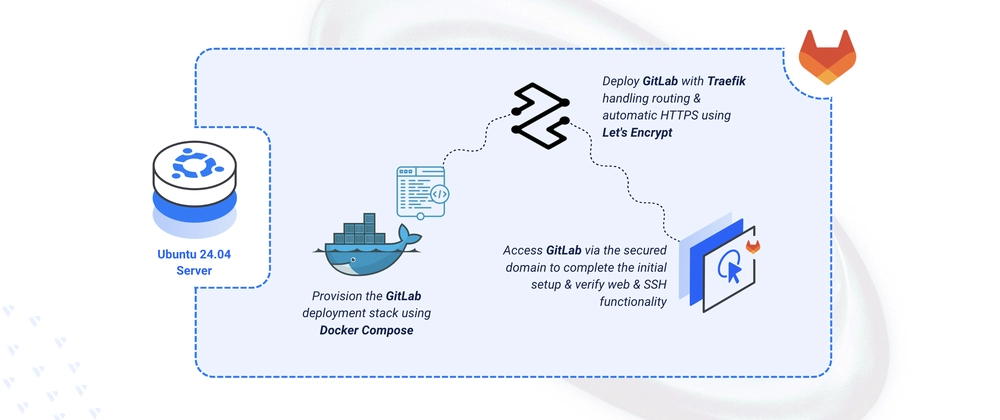
The Architecture: Docker Compose and Traefik as a Stack
The setup pairs two containers: Traefik acting as a reverse proxy and self-hosted GitLab CE itself. This is a smart pairing. Traefik is a cloud-native reverse proxy that watches the Docker socket for container labels and automatically provisions TLS certificates through Let’s Encrypt’s ACME protocol. That means you get valid HTTPS at your domain without touching Certbot, without cron jobs for renewals, and without manually configuring Nginx or Apache in front of self-hosted GitLab CE.
Self-hosted GitLab CE’s own bundled Nginx — part of the Omnibus package — gets configured to listen on port 80 internally without HTTPS, because Traefik handles the TLS layer externally. The forwarded headers (X-Forwarded-Proto and X-Forwarded-Ssl) tell GitLab’s internals that the connection arriving from Traefik is actually secure, which prevents things like mixed-content warnings and broken OAuth redirects. It’s a well-established pattern for containerised self-hosted GitLab CE deployments, and it sidesteps a common pitfall where people try to run TLS inside GitLab’s Nginx and Traefik simultaneously — which creates certificate conflicts and headaches.
SSH access for Git operations gets remapped to port 2222 on the host. That’s intentional: port 22 is almost certainly in use by your server’s own SSH daemon. Remapping means your developers use git@gitlab.example.com:2222 for SSH clones, which is a minor workflow adjustment but far cleaner than trying to wrestle sshd off port 22.
Self-Hosted GitLab CE: Setting Up the Directory and Environment
Before any containers launch, the project needs a clean directory structure. Four subdirectories handle GitLab’s persistent data: config maps to /etc/gitlab inside the container, logs maps to /var/log/gitlab, data maps to /var/opt/gitlab, and letsencrypt stores Traefik’s ACME certificate JSON. Getting these volume mounts right is critical — if you skip them, a container restart wipes your repositories, CI/CD configuration, and user accounts entirely.
A .env file holds two variables: your GitLab domain (e.g. gitlab.example.com) and the email address Let’s Encrypt uses for certificate expiry notifications. Keeping these out of the Compose file itself is good practice — it makes the same docker-compose.yml reusable across environments without editing the manifest directly.
One prerequisite worth flagging: your user needs to be in the Docker group before running Compose commands without sudo. The usermod -aG docker $USER command handles this, but the new group membership only takes effect after you run newgrp docker or start a fresh shell session. Skipping this step and then wondering why docker compose up throws a permission error is a rite of passage for new Docker users — save yourself the confusion.
The Docker Compose Manifest in Detail
The Traefik service configuration is worth reading carefully. The –providers.docker.exposedbydefault=false flag is a security setting — it tells Traefik to ignore all containers by default and only route traffic to those explicitly opted in via a traefik.enable=true label. Without this, any container you run on the same Docker network could inadvertently become publicly accessible through Traefik. It’s a small flag with meaningful security implications.
The ACME HTTP challenge resolver means Let’s Encrypt verifies domain ownership by hitting a temporary file on port 80. That’s why port 80 must be open and the HTTP-to-HTTPS redirect must route through Traefik rather than being enforced at the firewall level before Traefik gets the request. The acme.json file that stores the resulting certificates needs to persist across restarts, which is why it lives in the mounted letsencrypt volume.
On the self-hosted GitLab CE container side, the shm_size: ‘256m’ setting matters more than it looks. GitLab uses shared memory for certain internal processes, and the Docker default of 64MB is too small — you’ll see cryptic errors in the GitLab logs without this bump. The GITLAB_OMNIBUS_CONFIG environment variable passes a block of Ruby-style configuration directly into GitLab’s Omnibus system, which is GitLab’s own configuration management layer. It’s unconventional but it works, and it keeps all runtime config in one place rather than scattered across mounted config files.
The Traefik labels on the self-hosted GitLab CE service are what wire everything together. The Host() rule matches incoming requests for your domain, the websecure entrypoint means only HTTPS traffic gets routed here, and tls.certresolver=le tells Traefik which ACME resolver to use for the certificate. The load balancer port of 80 tells Traefik where to forward traffic inside the container — GitLab’s internal Nginx, listening unencrypted on port 80.
First Boot, Root Password, and What Comes Next
Self-hosted GitLab CE takes several minutes to initialise on first start. The Omnibus system runs database migrations, generates secret keys, compiles assets — it’s a lot. Running docker compose ps will show the container as healthy once it’s ready. Don’t try to hit the web interface until the health check passes; you’ll get Nginx 502s and start second-guessing your config unnecessarily.
The initial root password is written to /etc/gitlab/initial_root_password inside the container. Retrieve it with docker exec and grep. This file auto-deletes after 24 hours — that’s a deliberate security measure, not a bug. If you miss the window, you’ll need to reset the root password via the Rails console, which is a more involved process. Grab it immediately, log in, and change the password to something strong right away.

