- Rosetta 2 support ends permanently with macOS 27 Golden Gate, giving Intel app users one final macOS release before the cutoff.
- Apple confirmed Rosetta 2 support will not carry forward to macOS 28, affecting any Mac user still running Intel-only applications.
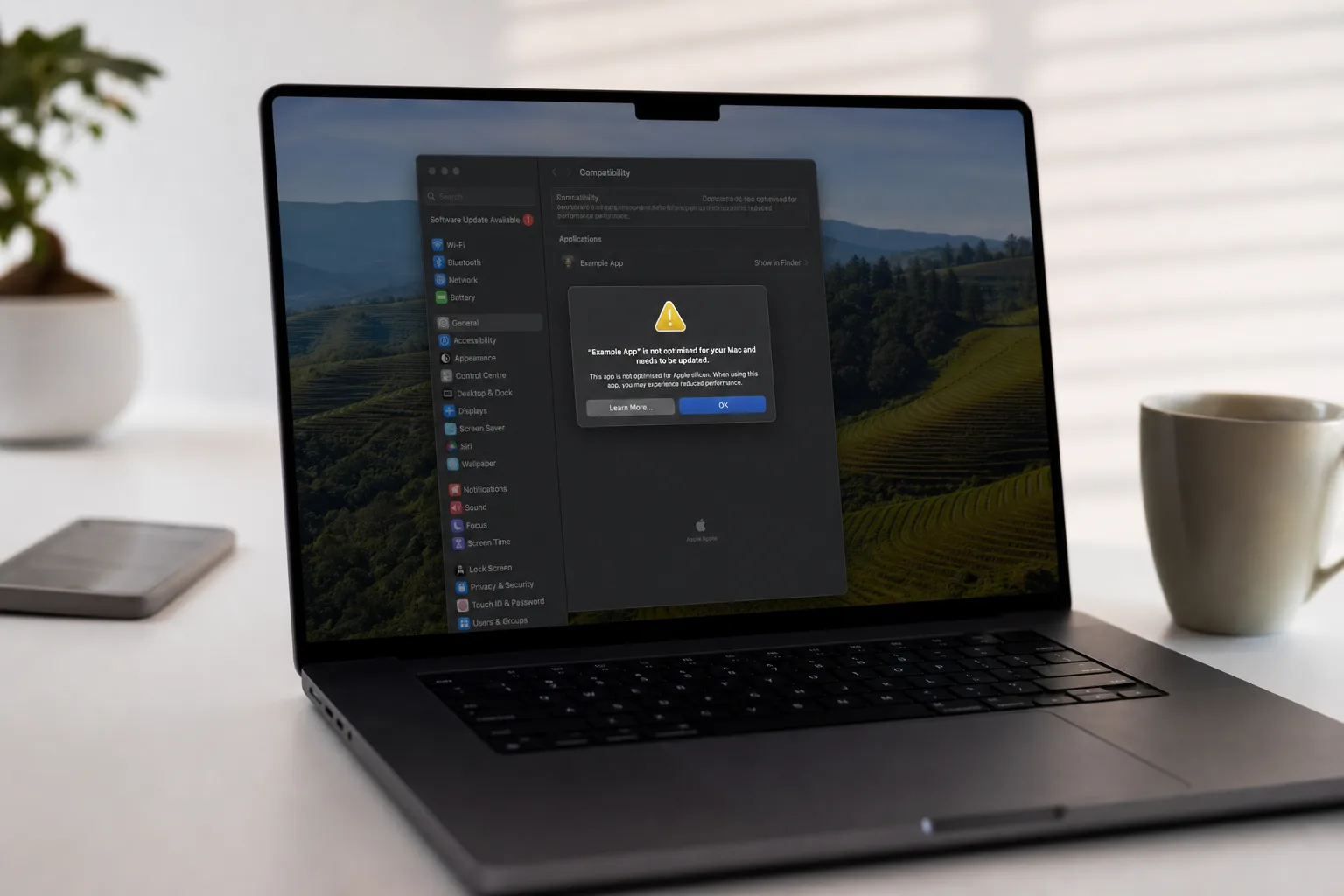
- macOS 26.4 and 26.5 already surface system warnings when Intel-only apps launch, signalling Apple’s push to accelerate migration.
- A limited subset of Rosetta will survive beyond macOS 27, but only for older, unmaintained gaming titles — not general use.
Table of Contents
The Clock Has Run Out on Rosetta 2 Support
With macOS 27 Golden Gate now in developer beta, Rosetta 2 support has entered its final chapter. Apple has confirmed that the translation layer — the invisible bridge that’s kept Intel-compiled apps alive on Apple silicon Macs since 2020 — will not survive into macOS 28. For the millions of Mac users who made the jump to M-series chips, the question is no longer if the floor drops out, but whether the software they rely on will be ready when it does.
Golden Gate is notable for another reason beyond Rosetta 2 support: it’s the first version of macOS that requires Apple silicon. Intel Mac hardware is now officially locked out of the update train, which makes this a particularly symbolic moment. Apple is closing the Intel chapter on both ends simultaneously — no more Intel Macs in production, and soon, no more Intel apps on the Macs that replaced them.
What Apple Actually Said About Rosetta 2 Support Ending
Apple laid out the timeline with unusual clarity at its Platforms State of the Union during WWDC 2025. The company stated plainly: “Rosetta was designed to make the transition to Apple silicon easier, and we plan to make it available for the next two major macOS releases — through macOS 27 — as a general-purpose tool for Intel apps to help developers complete the migration of their apps.”
That’s a notable degree of transparency from a company that typically avoids committing to specific deprecation windows. Apple gave developers a two-release runway, and that runway is now fully consumed. The message is unambiguous: if your app isn’t native Apple silicon by the time macOS 28 ships next autumn, it won’t run.
There’s one exception carved out, and it’s a narrow one. Apple added: “Beyond this timeframe, we will keep a subset of Rosetta functionality aimed at supporting older unmaintained gaming titles, that rely on Intel-based frameworks.” So some decade-old game you can’t update because the developer vanished? It might still work. The enterprise tool your company has been too slow to migrate? Almost certainly won’t.
Why Rosetta 2 Was Such an Impressive Piece of Engineering
It’s easy to take Rosetta 2 for granted at this point, but the original achievement was genuinely impressive. When Apple unveiled the M1 chip in November 2020, it faced the same fundamental problem it had navigated twice before — in 2006 when it moved from PowerPC to Intel, and now again. Developers can’t rewrite their apps overnight. Users can’t wait months for their tools to work.
Rosetta 2 solved that by operating as a dynamic binary translator, converting Intel x86-64 instructions to ARM64 in real time — or in some cases, ahead-of-time at install. The performance penalty was remarkably small. Many Intel apps ran faster on M1 under Rosetta 2 than they had natively on comparable Intel hardware. That wasn’t an accident; it reflected both the raw efficiency of Apple silicon and the sophistication of the translation layer itself.
The original Rosetta, used during the PowerPC-to-Intel transition, was pulled in Mac OS X 10.7 Lion back in 2011 — about five years after that shift began. Apple has given developers roughly the same window this time, with the M1 launching in late 2020 and full Rosetta 2 support expiring around 2027. The consistency is deliberate.
Rosetta 2 Support Ends: Who Actually Gets Hurt?
The honest answer is: not many people, but the ones it does hit will feel it hard. The vast majority of major consumer apps — Adobe Creative Cloud, Microsoft Office, Spotify, Slack — have shipped native Apple silicon binaries for years. For most users, Rosetta 2 support is already a background curiosity rather than a daily necessity.
But enterprise environments are a different story. Large organisations often run bespoke internal tools, legacy line-of-business apps, or third-party software from vendors who have been slow (or completely unwilling) to ship Apple silicon builds. IT administrators managing mixed Mac fleets have been quietly dreading this moment. When Rosetta 2 support disappears, there’s no fallback — either the software gets updated, or those users stay on macOS 27 indefinitely.
Staying on macOS 27 isn’t a trivial choice, either. Apple’s security update cadence has historically dropped off sharply for operating systems more than one or two releases behind current. Organisations that freeze at Golden Gate to preserve Intel app compatibility will eventually be running software that no longer receives full security patches. That’s a real risk, not a theoretical one.
There’s also a smaller cohort of power users and hobbyists who rely on niche Intel-only utilities — older audio plugins, specialist scientific tools, hardware drivers from manufacturers that folded. These users have had six years of warning, but that doesn’t make the loss less real when it arrives.
Apple Is Already Nudging Users Toward the Exit
Apple hasn’t waited for Golden Gate to start applying pressure. Starting with macOS 26.4 and 26.5, users who launch an Intel-only application now see a system alert flagging that Rosetta 2 support will not be available in a future macOS release. The notification is deliberate friction — not enough to block the app, but enough to make the user aware the clock is ticking.
It’s a strategy Apple has used before with deprecated technologies. The goal is to surface urgency not just to developers, but to end users, who can in turn apply commercial pressure on vendors. If thousands of customers are suddenly seeing warnings every time they open your product, that tends to accelerate roadmap conversations. This is Apple using the install base as leverage in the migration push — and it’s effective.
One wrinkle worth flagging: Golden Gate automatically removes Rosetta 2 if it was installed under macOS 26 Tahoe. Users who upgrade and then find they still need Rosetta 2 support for a specific app will have to reinstall manually. Apple still makes it available as an on-demand install in Golden Gate — the system will prompt you when you first try to open an Intel binary — but the automatic uninstall on upgrade is a clear signal about the direction of travel.
What Comes Next for Mac Users Still Holding On
For developers, the message couldn’t be clearer. Apple has provided the toolchain to build universal binaries — apps that run natively on both Intel and Apple silicon — since Xcode 12.2 in 2020. Any developer who hasn’t shipped an Apple silicon build by now is either serving a very niche audience or has been actively choosing to delay. macOS 28 removes the option to keep delaying.
For end users, the practical advice is straightforward. Use the remaining weeks of macOS 26, or the full macOS 27 cycle, to audit every app you rely on. If something doesn’t have a native Apple silicon build, contact the developer, find an alternative, or start planning for the possibility that you won’t be able to upgrade to macOS 28 when it ships. Rosetta 2 support ending isn’t a catastrophe for most — plenty of enterprise environments run a major version behind — but it should be an informed decision, not a surprise.
macOS 27 Golden Gate is expected to launch publicly in September, following the developer beta now underway and a public beta scheduled for next month. The six-year transition from Intel to Apple silicon has been, by almost any measure, the smoothest architecture shift in Mac history. Rosetta 2 support deserves much of the credit for that. But no translation layer lasts forever — and when macOS 28 arrives, Apple will be betting that the platform it built on its own silicon is compelling enough to pull everyone the rest of the way across.
Frequently Asked Questions
When does Rosetta 2 support officially end for Mac users?
Rosetta 2 support ends with macOS 27 Golden Gate. Once macOS 28 ships, the translation layer will no longer be available as a general tool. A narrow subset may persist for older unmaintained games, but everyday Intel-compiled apps won’t run.
Will any Intel apps still work after macOS 27?
Standard Intel-compiled apps will stop running once macOS 28 drops. Apple has indicated only older, unmaintained gaming titles that rely on Intel-based frameworks may retain limited compatibility via a stripped-down Rosetta remnant.
Does macOS 27 Golden Gate uninstall Rosetta 2 automatically?
Yes. If you had Rosetta 2 installed under macOS 26 Tahoe, upgrading to Golden Gate will automatically remove it. Users who still need it for Intel apps will have to manually reinstall it after the upgrade.
What should developers do if their apps haven’t been updated for Apple silicon?
Developers should prioritise building native Apple silicon binaries before macOS 28 ships. Most widely used apps have already been updated in the years since the transition was announced. Organisations still locked to Intel-only tools should either push vendors for updates or plan to stay on macOS 27.