When Google launched Pixel Screenshots alongside the Pixel 9 last year, it made a point of the fact that everything happened locally, on the phone’s Tensor chip, with no data leaving your device. That was a meaningful privacy promise — and one that quietly just got walked back.
- Pixel Screenshots is moving from exclusive on-device AI to a hybrid model that also uses cloud-based processing.
- The Pixel Screenshots update (v1.26.134.11) quietly changes settings language to drop the ‘on-device AI’ guarantee.
- Google is likely using its Private Compute infrastructure to keep screenshot data processed in a secure, isolated environment.
- The rollout hasn’t reached all users yet, but the shift signals Google’s broader push to extend AI features via the cloud.
Table of Contents
What’s Actually Changing in Pixel Screenshots
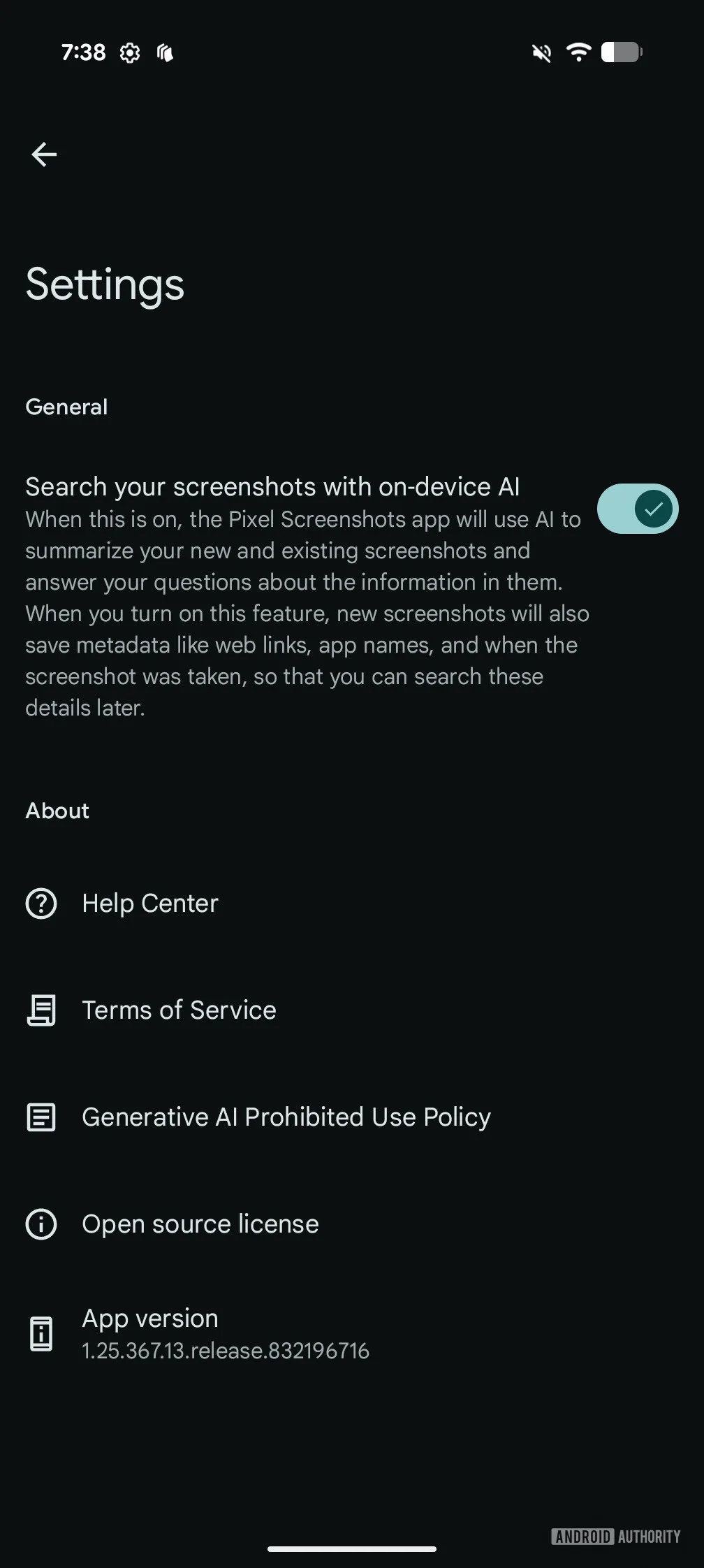
The shift shows up in version 1.26.134.11 of the Pixel Screenshots app, and it’s easy to miss if you’re not paying attention. The previous settings screen read clearly: ‘Search your screenshots with on-device AI.’ The new version strips out ‘on-device’ entirely, replacing it with the much more ambiguous ‘Search your screenshots with AI.’ The accompanying description now explicitly states that data can be processed either on-device or in the cloud.
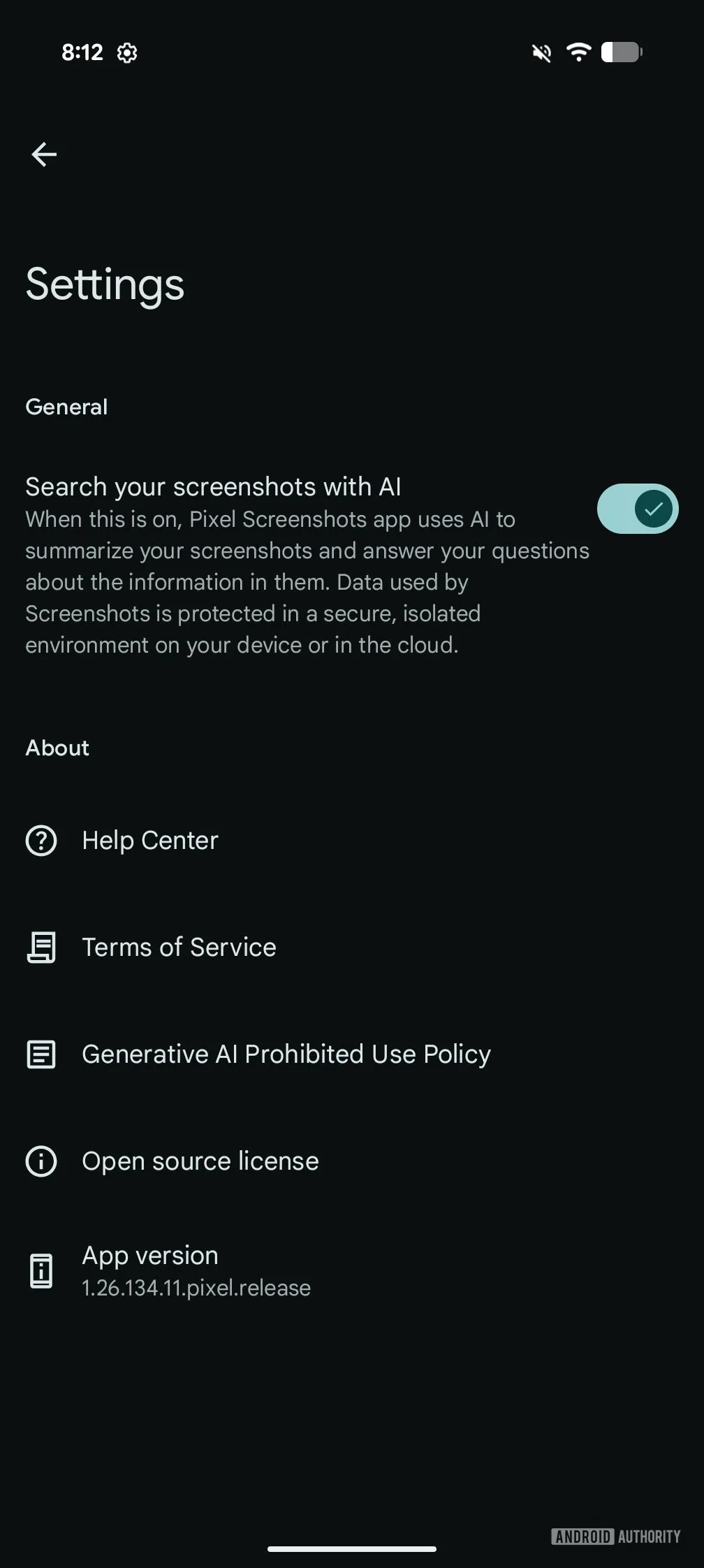
That might sound like a minor copy change, but wording in privacy-sensitive settings is never accidental. The old language was a specific, verifiable claim. The new language is deliberately open-ended — and that’s worth paying attention to, even if the underlying privacy protections turn out to be solid.
Pixel Screenshots and the On-Device AI Promise
To understand why this matters, it helps to remember what made Pixel Screenshots interesting in the first place. Google built it around the idea that your screenshots — which can contain anything from banking confirmations to private conversations — would be organised and made searchable without ever leaving your phone. The Tensor chip handled the AI workload locally, which meant Google itself couldn’t access that data even in principle.
That’s a genuinely strong privacy model, and one that aligned with a broader industry conversation about where AI processing should happen. Apple has pushed hard on this front with its on-device approach in Apple Intelligence, and several Android manufacturers have made similar promises. On-device AI is slower and more resource-constrained, but it keeps sensitive data exactly where it belongs: with the user.
The move to hybrid processing — partly on-device, partly in the cloud — almost certainly reflects the limitations of what even a capable chip like Tensor can do on its own. More sophisticated AI features, especially ones involving contextual understanding across large volumes of screenshots, require more compute than a phone can comfortably deliver. Google apparently decided those features are worth the trade-off.
Private Compute: Google’s Answer to the Privacy Question
Here’s where things get more reassuring, if you’re willing to extend Google some trust. The company says any cloud-side processing will happen in a ‘secure, isolated environment’ — language that almost certainly points to Google’s Private Compute Services, a sandboxed infrastructure specifically designed to bridge on-device and cloud AI without routing your data through Google’s main systems or advertising pipelines.
Google’s own description of Private Compute is that it enables ‘on-device features to perform with extended capabilities while retaining their privacy assurance.’ That’s a carefully worded claim, and it’s one Google has staked real credibility on. Private Compute isn’t just marketing language — it has a published architecture, independent security research behind it, and a track record with other Pixel apps.
In fact, this isn’t the first time Google has quietly shifted a Pixel app toward Private Compute. Both Magic Cue and the Recorder app made the same transition late last year. Recorder gained improved transcription in more languages as a result — a feature that genuinely wasn’t possible with on-device processing alone. Magic Cue started delivering more contextually relevant suggestions. Neither move generated much backlash, partly because the privacy story held up.
What New Features Could This Unlock?
Google hasn’t said explicitly what cloud processing will add to Pixel Screenshots, and the current update doesn’t appear to have shipped new capabilities alongside the settings change. But the direction of travel is fairly readable. On-device AI is good at pattern recognition and basic semantic search — finding a screenshot where you saved a flight confirmation, for instance. Cloud AI opens the door to much richer understanding: cross-referencing content across hundreds of screenshots, generating summaries, identifying trends in what you capture over time, or even proactively surfacing relevant screenshots based on what you’re currently doing on your phone.
That last possibility is particularly interesting given where Google is taking Gemini on Android. If Pixel Screenshots can share context with the broader Gemini assistant layer — again, through a sandboxed, privacy-preserving channel — the feature could become significantly more useful. Think of it less as a screenshot organiser and more as a persistent visual memory system that actually understands what you’ve captured.
Should You Be Worried?
The honest answer is: it depends on how much you trust Google’s implementation of Private Compute, and how much you value the additional capabilities the cloud connection might eventually bring.
If you were using Pixel Screenshots specifically because it was fully on-device, this change is a legitimate reason to reassess. The privacy guarantee has changed, even if the practical risk may remain low. For most users, though, Google’s Private Compute architecture is a meaningful safeguard — not a fig leaf. It was built precisely for situations like this: cases where on-device AI alone can’t deliver the features users actually want, but cloud processing raises justifiable concerns.
The update hasn’t rolled out widely yet, so many Pixel owners won’t see the new settings language immediately. But when it does land broadly, it’ll be worth checking whether there’s a toggle to limit processing to on-device only — and whether Google has been transparent about exactly when cloud processing kicks in versus when the Tensor chip handles things locally.
Longer term, this is a preview of a tension that every AI-forward phone maker is going to have to navigate. On-device AI is a great story, but it has real limits. The companies that find a credible, verifiable way to extend those limits into the cloud — without quietly eroding the privacy promises that made on-device AI appealing in the first place — will be the ones that earn lasting trust from privacy-conscious users. Google is betting Private Compute is that answer. The burden of proof is on them to demonstrate it.