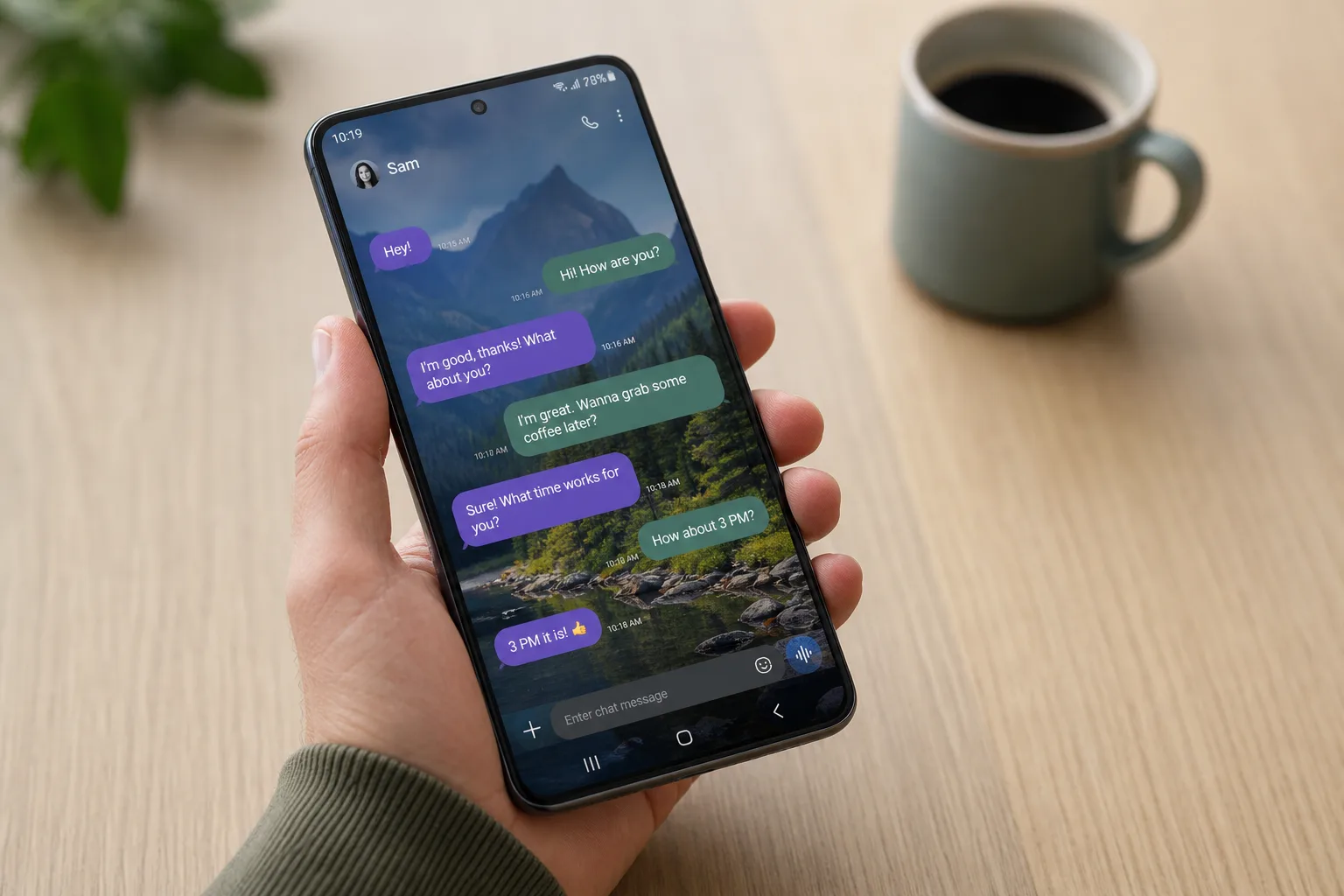
Google’s approach to app development has always been messy in the best possible way — features appear in beta, quietly expand, occasionally vanish, and eventually land in stable. Right now, the new Google Messages features rolling out across beta and stable channels paint a picture of an app finally maturing into something genuinely competitive with iMessage. Between cross-platform encryption, deeper personalization, and a cleaner UI, there’s more happening inside this app than most Android users realize.
- New Google Messages features include Chat themes with nine color options and customizable conversation wallpapers replacing the old ‘Change colors’ tool.
- Google Messages features now include end-to-end encrypted RCS between Android and iPhone users, enabled by Apple’s iOS 26.5 update in May 2026.
- Samsung is discontinuing its own Messages app in the US in July, automatically pushing users onto Google’s RCS client.
- iOS 27 will bring inline quoted replies and emoji photo reactions to Android-iPhone RCS chats when it launches this fall.
Table of Contents
Chat Themes: Real Customization, Finally
Google Messages has long lagged behind iMessage and even WhatsApp when it comes to conversation personalization. That changes with the new Chat theme option, one of the most visible Google Messages features arriving this cycle. It replaces the ‘Change colors’ option that debuted in 2024, and it’s a meaningful step up in ambition.
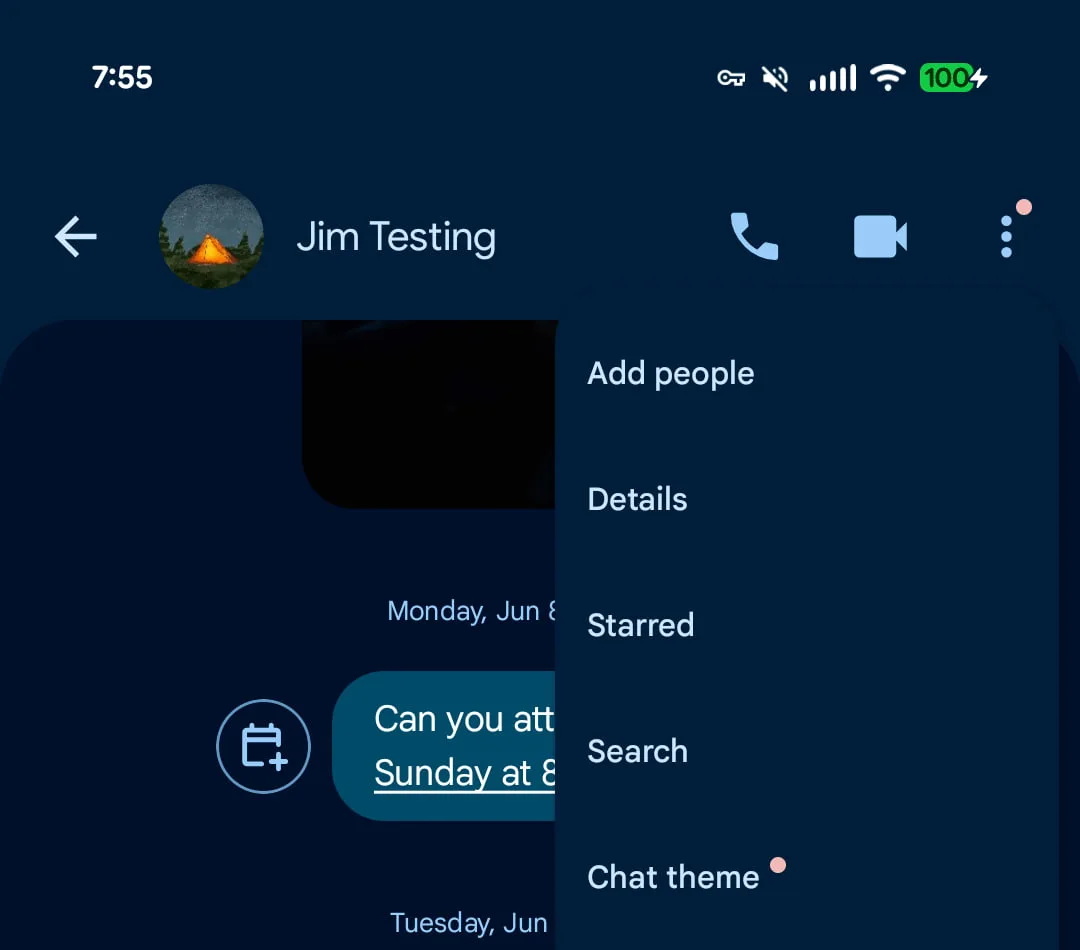
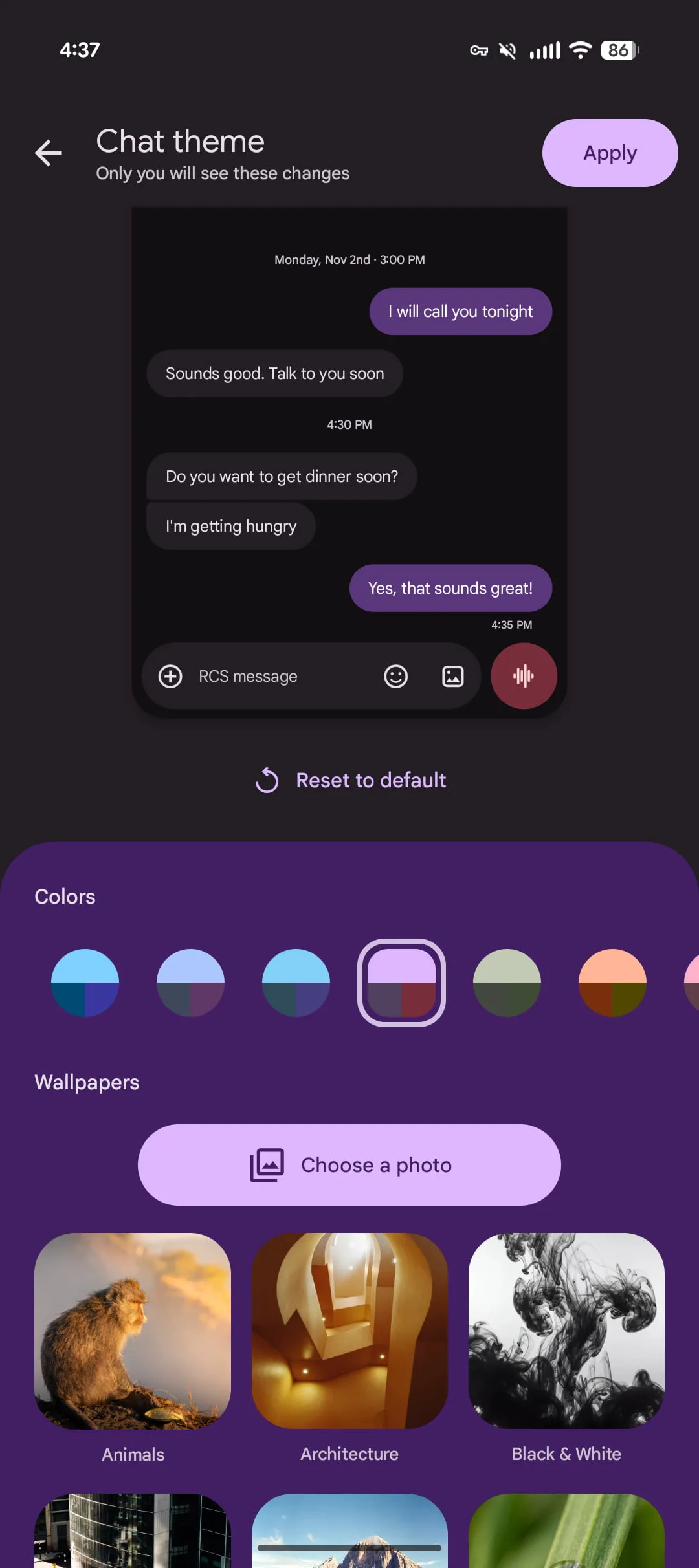
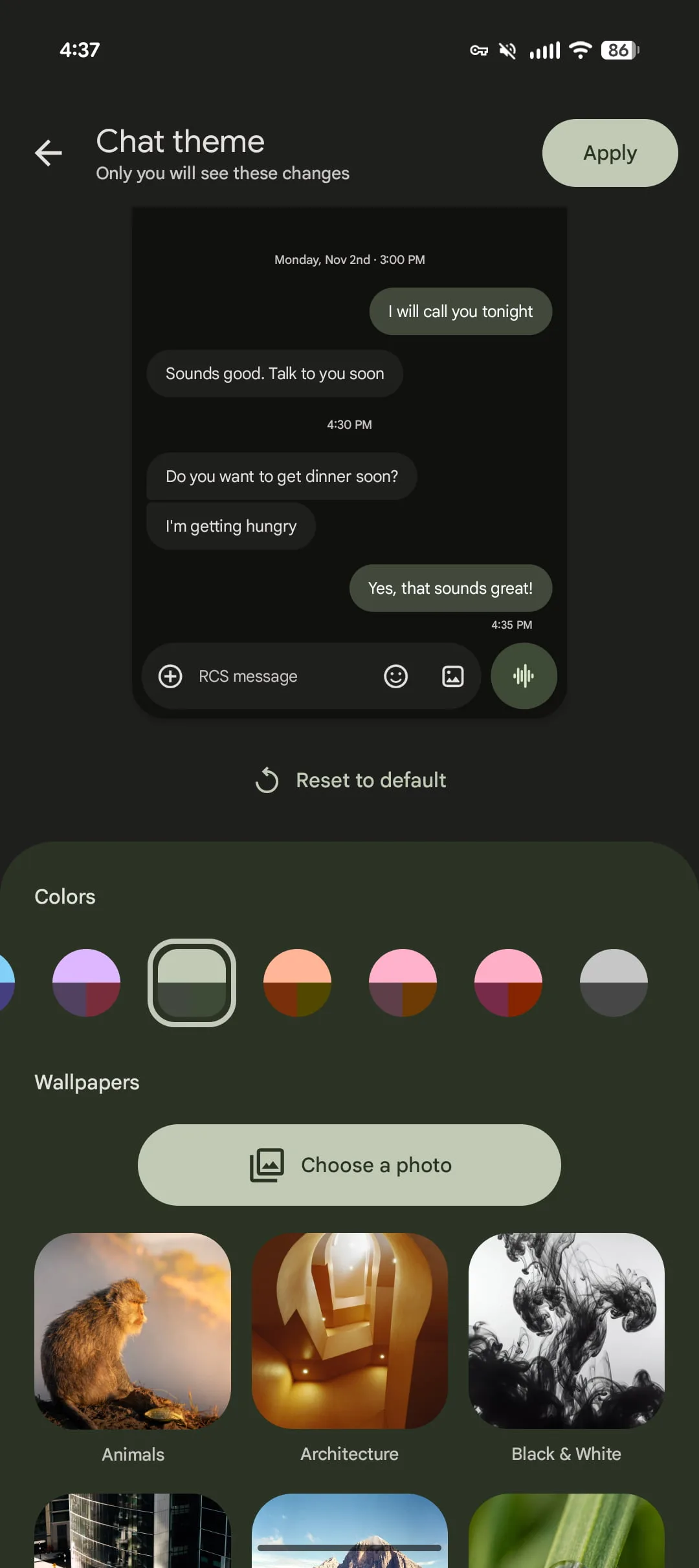
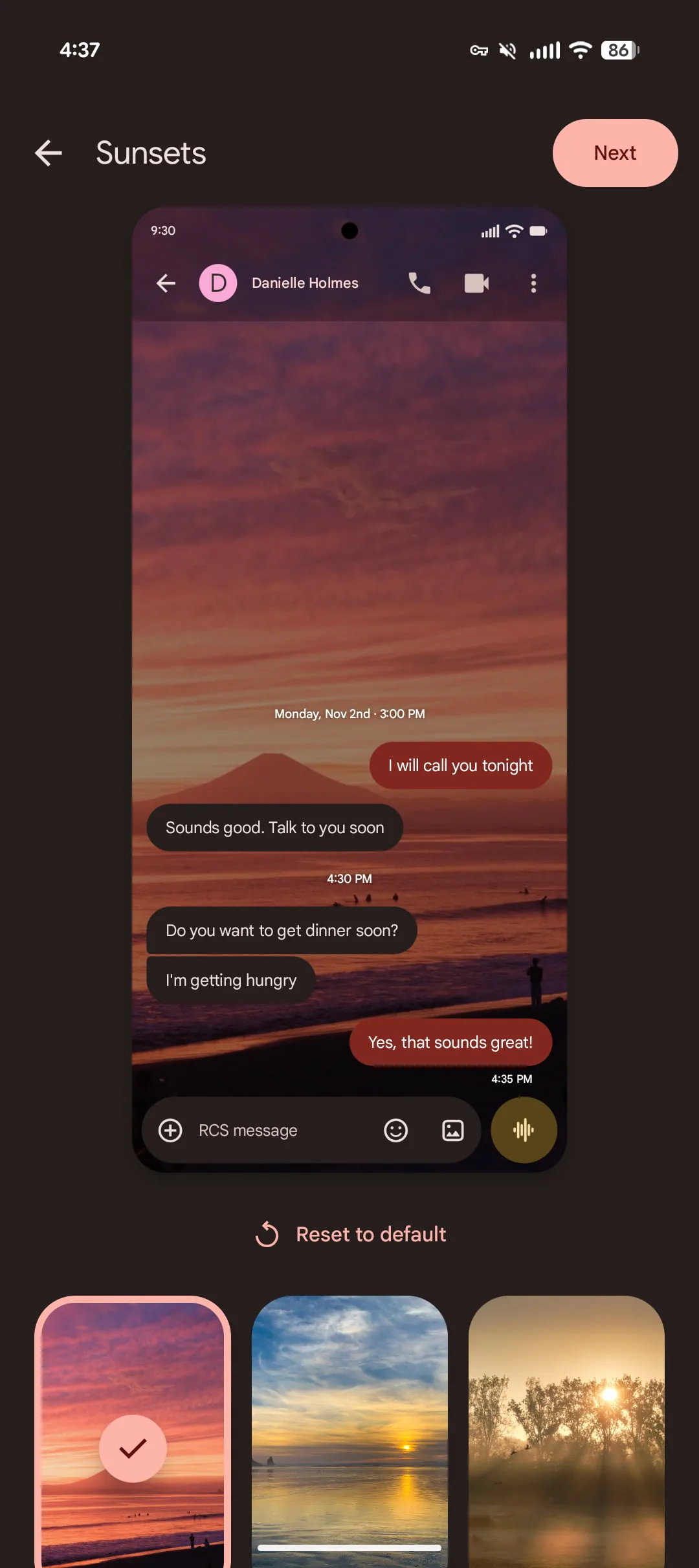
Access it through the three-dot overflow menu in any conversation — Google is marking its arrival with a red badge so you won’t miss it. Inside, there are two layers of customization. First, the Colors carousel themes your message bubbles. There are nine options in total: Dynamic Color adapts in real time based on the conversation’s background, while the other eight are static presets. Second, the Wallpapers option lets you replace the conversation background entirely. You can upload your own image, or pick from Google’s curated collections: Animals, Architecture, Black and White, Cityscapes, Landscapes, Macro, Space, Sunsets, and Textures.
It’s not quite the depth of customization you’d find in Telegram, but it’s a genuine leap from where Google Messages stood even a year ago. More importantly, these Google Messages features are per-conversation, which means you can give your group chats and close contacts their own visual identity without committing to a system-wide theme.
Google Messages Features: Encrypted RCS Is Now Real for Android and iPhone
This is the one that actually matters for the broader messaging landscape. On May 11, Apple shipped iOS 26.5, and buried in that update was something the messaging industry had been pushing toward for years: end-to-end encrypted RCS between Android and iPhone. It means that for the first time, cross-platform chats — the ones that used to show up as green bubbles — are now private in the same way iMessage-to-iMessage chats have been for over a decade.
The implementation is clean. On Android, users will see the same lock icon they’re already familiar with in Google Messages. On the iPhone side, Apple’s Messages app displays ‘Text Message · RCS | 🔒 Encrypted’ in the center of the screen. Apple says encrypted RCS will be ‘automatically enabled over time for new and existing RCS conversations,’ though it’s gated on carrier support. In the US, the list covers the major players: AT&T, Verizon Wireless, T-Mobile USA, Mint Mobile, Cricket, Metro by T-Mobile, Boost Mobile, Consumer Cellular, Visible, Xfinity Mobile, and around a dozen more regional carriers. Encryption ranks among the most significant Google Messages features to emerge in recent memory — even if Google can share only partial credit with Apple for making it happen.
The implication here goes beyond user privacy. It’s a signal that RCS, after years of fragmented rollouts and skepticism, is now a serious messaging standard rather than a half-finished attempt to modernize SMS. Google has been pushing RCS hard for years. Apple’s adoption was the final missing piece, and encryption closes the last credibility gap.
What iOS 27 Adds to Cross-Platform RCS
Encryption was the foundation. iOS 27, expected this fall, builds on it with Google Messages features that make Android-iPhone RCS chats feel more like a first-class experience on both sides. Two additions stand out. First, inline replies that include quoted content — so when you reply to a specific message in a group chat, the context travels with it, just like iMessage threading. Second, photo reactions using the actual emoji rather than a text description. If you’ve ever received a reaction that showed up as ‘❤️ Liked a photo’ instead of the emoji itself, you know exactly why this matters.
Both features are currently in beta inside Google Messages. They won’t go fully live until iOS 27 ships, but it’s encouraging that Google is already testing the Android side of the handshake. The broader trajectory here is clear: with each OS cycle, the gap between iMessage and cross-platform RCS shrinks a little more. Whether that’s enough to pull users away from WhatsApp in markets where it dominates is a separate question — but for US users who’ve never fully abandoned the default messaging app, it’s a significant quality-of-life improvement.
UI Overhaul: Long-Press Menus and Read Receipt Redesigns
Beyond the headline features, several Google Messages features are quietly reshaping how the app feels to use day-to-day. The long-press interaction on messages and images is getting a significant visual refresh. Instead of a toolbar appearing above or below the selected element, a floating menu opens with the background blurred and haptic feedback confirming the action. Google also partially centers whatever you long-pressed on screen, making it easier to read in context while choosing your next action. It’s in wider beta availability right now, though it hasn’t reached a broad stable rollout yet.
Read receipts have gone through two distinct rounds of redesign and are still evolving. The current beta tests a profile icon placed in a circle at the bottom-right corner of message bubbles — a cleaner look than the previous layout. Swiping left on a message reveals the timestamp and encryption lock. Swiping right opens a direct reply. It’s an interaction model borrowed loosely from gesture-based navigation trends seen across Android, and it keeps the bubble itself cleaner without hiding information. The first version of this redesign started appearing in August 2024; it’s now seeing wide beta and stable availability, with the latest variant still being tested.
Samsung Messages Is Done — Google Takes Over
One of the bigger structural shifts happening this summer isn’t a feature update at all. Samsung is discontinuing its own Messages app in the US in July. Users on Android 14 and later will have Google Messages automatically moved to their homescreen dock as part of the transition. It’s a consolidation Google has been working toward for years, and it effectively ends the fragmentation that plagued Android messaging on Samsung devices — where carrier settings, Samsung’s app, and Google’s app often created a confusing three-way split over which client handled RCS.
This transition matters for the Google Messages features rollout pipeline too. A unified user base on a single client means Google can ship updates to a larger, more consistent audience. A/B testing becomes more representative. Stable rollouts carry more weight. Samsung’s exit from messaging software is, in a strange way, good news for Android messaging quality overall.
Smaller Updates Worth Tracking
A few other changes round out the current state of Google Messages features in stable and rolling-out channels. The voice message button now uses a bolder, themed color rather than blending into the compose field — a small change that makes it noticeably easier to find. Smart Replies have been refined with a ‘Tap to draft’ option that places a suggested reply into the text field instead of sending it immediately, reducing accidental sends. It’s opt-in via Settings > Suggestions and Actions > Suggestions, and the old ‘Tap to send’ behavior remains the default.
A Selfie GIF inconsistency that frustrated users — where the option would randomly disappear from the attachment menu, causing the One-time Location shortcut to jump around — has been fixed as of stable version 20260428_00_RC02. Finally, among the latest Google Messages features affecting the desktop experience, Messages for web is phasing out QR code pairing in favor of Google Account sign-in, which is a more secure and consistent approach to linking your desktop browser to your phone’s messages.
Taken together, this wave of updates reflects a Google that’s playing longer-term with Messages than it has with some of its other communication products. The encryption milestone with Apple removed the biggest objection to RCS as a cross-platform standard. The UI work makes the app more satisfying to use. And Samsung’s exit removes the last major source of Android messaging fragmentation in the US. The next test is whether Google can hold this momentum — and whether the experience is now compelling enough to shift the millions of US users who’ve quietly migrated to WhatsApp, Signal, or iMessage back toward the default Android messaging app.
Frequently Asked Questions
Which Google Messages features support end-to-end encryption between Android and iPhone?
Since Apple released iOS 26.5 on May 11, RCS chats between Android and iPhone are end-to-end encrypted. Both Google Messages and Apple’s Messages app display a lock icon. It rolls out automatically over time and requires a supported carrier.
What carriers support encrypted RCS in the US?
Supported US carriers include AT&T, Verizon Wireless, T-Mobile USA, Mint Mobile, Cricket, Metro by T-Mobile, Boost Mobile, Consumer Cellular, Xfinity Mobile, Visible, and more. Google recommends running the latest version of Google Messages to ensure encrypted RCS is active.
What is the Chat theme option in Google Messages?
Chat theme replaces the older ‘Change colors’ option and lets users customize individual conversations with color schemes and wallpapers. There are nine color options including a Dynamic Color that adapts to your chat background, plus curated wallpaper collections like Space, Landscapes, and Sunsets.
When is Samsung Messages being discontinued?
Samsung is having US users switch to Google Messages, with the discontinuation happening in July. On Android 14 and later, Google Messages will automatically shift to the homescreen dock after the move.