

- LM Studio’s new LM Link feature makes running local AI on iPhone possible by bridging your Mac and handset securely.
- Local AI on iPhone via LM Link uses end-to-end encryption built on Tailscale mesh VPN technology to keep your data private.
- The feature is free during its Preview period, with paid tiers planned but not yet detailed by LM Studio.
- LM Link works with any model installed on your Mac, including Apple’s own built-in Intelligence foundation model.
Table of Contents
Local AI on iPhone Is Now a Reality — Thanks to LM Studio
Running local AI on iPhone has always felt like a bit of a pipe dream. The compute requirements for serious large language models are still well beyond what Apple’s mobile chips can handle independently — even the A18 Pro inside the iPhone 16 Pro tops out at 8GB of unified memory, which severely limits which models you can run natively. But LM Studio just found a clever workaround. Its new LM Link feature, rolling out today as part of an update to both the Mac app and the Locally AI iOS app (which LM Studio acquired earlier this year), creates a secure bridge between your iPhone and a Mac running local models, letting your handset act as a front-end interface for whatever you’ve got loaded up on your desktop or laptop.
It sounds deceptively simple, but the execution matters. This isn’t just screen mirroring or some janky SSH tunnel you’d have to configure yourself. LM Link establishes an end-to-end encrypted connection between the two devices, built on top of Tailscale’s mesh VPN primitives. Your data never touches a public server. The processing still happens entirely on your Mac — LM Link is just the pipe that carries your prompts and responses back and forth. For anyone who’s been running local AI on iPhone and Mac specifically because they don’t want their conversations routed through OpenAI, Anthropic, or Google’s servers, this is a meaningful detail.
How LM Link Actually Works
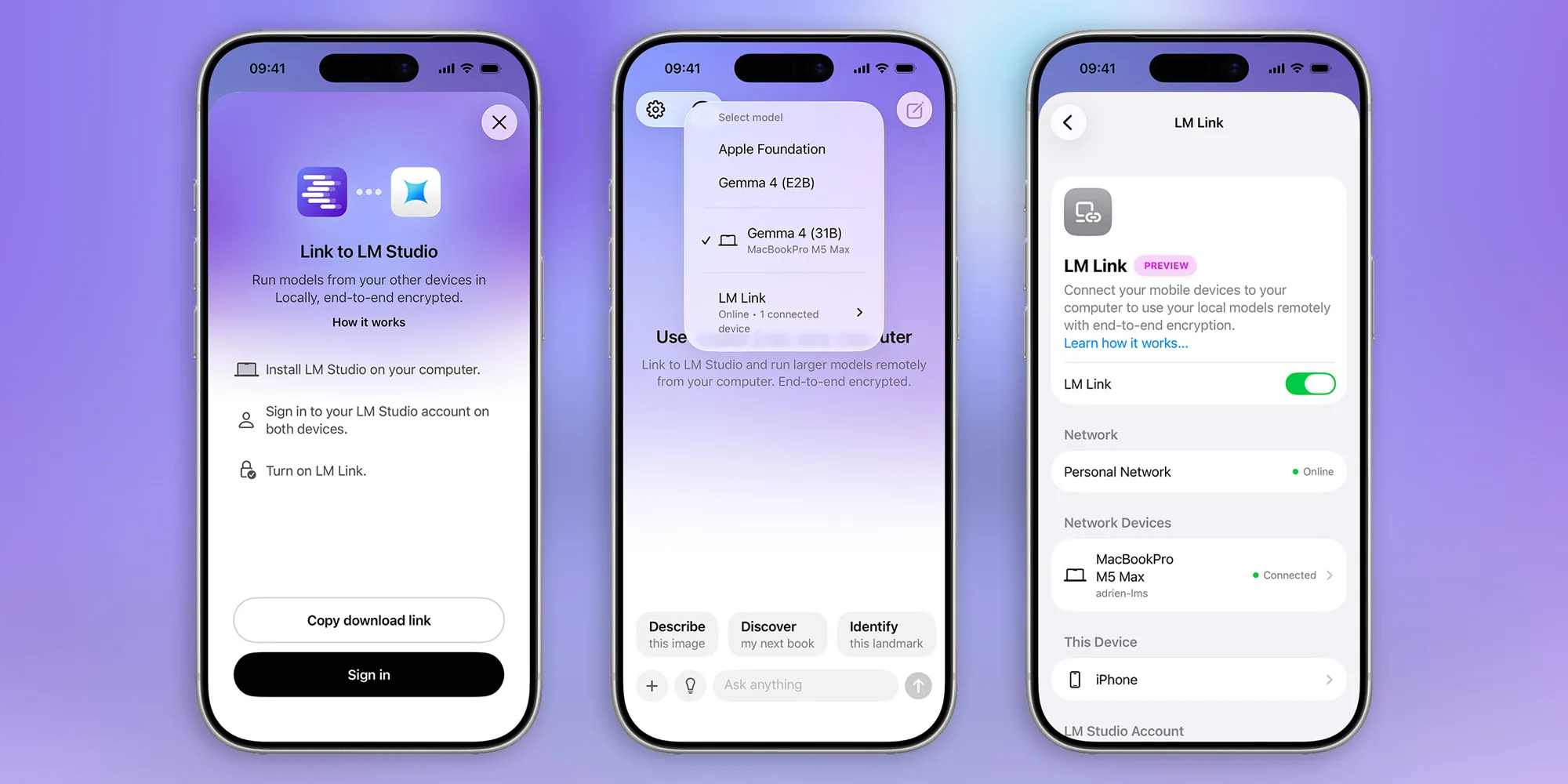
Setup requires an LM Studio account — you’ll sign in on both your Mac and your iPhone, activate LM Link, and that’s essentially it. The connection uses what LM Studio describes as “custom Tailscale mesh VPNs,” and the company is careful to clarify that this is an entirely separate and self-contained implementation. If you’re already running Tailscale for your own networking needs, LM Link won’t interfere with it. That’s a thoughtful detail that suggests the developers have actually thought about their power-user audience, who are exactly the kind of people likely to already be running a Tailscale setup at home.
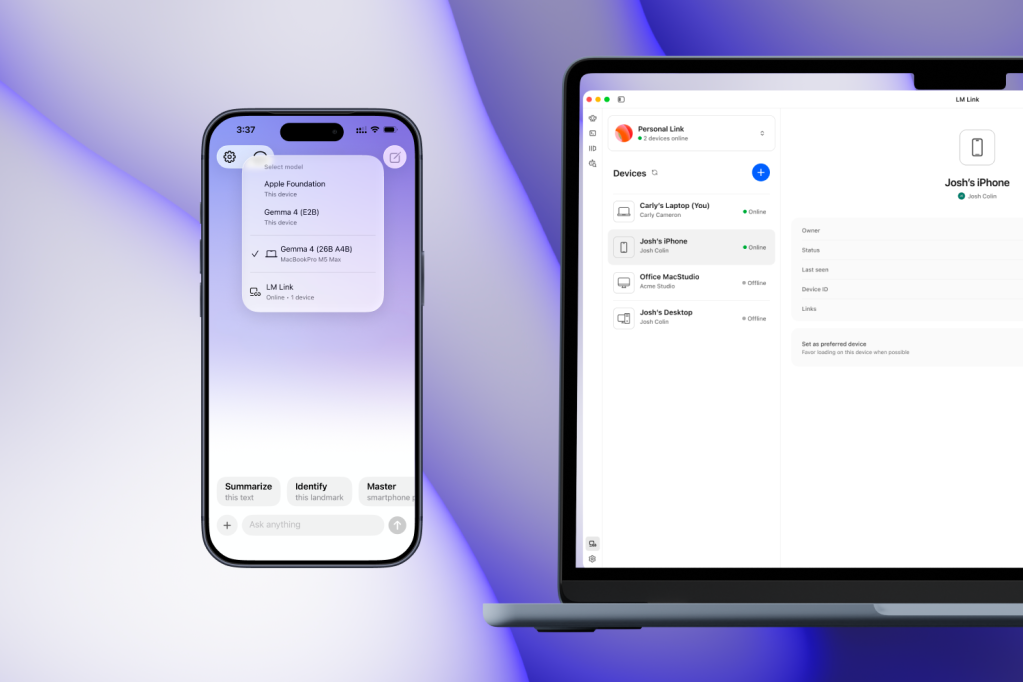
Once connected, local AI on iPhone through LM Link works with any model you’ve installed on your Mac — including, notably, the built-in Apple Intelligence foundation model. Performance will naturally depend on your Mac’s hardware. Someone running a 64GB M3 Max is going to have a noticeably snappier experience than someone on a base M1 MacBook Air, but that’s no different from using the models directly on the Mac itself. The iPhone is just the interface; your Mac is doing all the heavy lifting.
The Privacy Angle Is the Real Story Here
There’s a broader context worth stepping back to consider. Cloud AI is extraordinarily convenient, but convenience has always come with trade-offs. Every prompt you type into ChatGPT or Claude is processed on a remote server, potentially logged, and used in ways that vary by provider and their current terms of service. That’s fine for plenty of use cases. But there are professionals — lawyers, journalists, doctors, researchers, founders working on unannounced products — for whom sending sensitive data to a third-party server is genuinely not acceptable.
Local AI on iPhone through LM Link answers that problem in a way that cloud alternatives structurally can’t. The data flows only between your own devices. LM Studio describes it plainly: “Your devices are never exposed to the public internet.” That’s not marketing fluff — it’s a direct consequence of how the Tailscale-based networking layer works. For the privacy-first crowd, that’s a compelling pitch that no amount of OpenAI’s privacy policy updates can fully replicate.
A Growing Ecosystem Built for Apple Silicon
LM Studio’s timing here is sharp. The local AI space on Mac has exploded over the past 18 months, driven almost entirely by Apple Silicon’s unified memory architecture, which allows even consumer-grade machines to run models that would have required a dedicated GPU rig just two years ago. A 16GB M2 MacBook Pro — the kind of machine an enormous number of professionals are already carrying — can now handle solid 7B and 8B parameter models at reasonable speeds. Step up to 32GB or 64GB of unified memory and you’re running 30B+ models with room to spare.
Google’s recent release of a 12-billion-parameter version of Gemma 4, specifically optimized to run on Macs with 16GB or more of memory, is a good indicator of where the industry is heading. The model makers are paying attention to this audience. And LM Studio, which has built one of the cleanest interfaces for discovering, downloading, and fine-tuning local models on Mac, is well-positioned to capture that growing user base. Features like local AI on iPhone through LM Link are exactly the kind of additions that turn an occasionally-used utility into a core part of someone’s daily workflow.
A Few Rough Edges Still Need Smoothing
It wouldn’t be a preview feature without some caveats. The most notable current limitation is connection persistence — specifically, what happens when the Locally AI app on your iPhone ducks to the background for a moment. Step out to grab a document, do a quick web search, then return, and you may find the connection has dropped and needs to re-establish itself. It’s not a dealbreaker, but it interrupts the kind of seamless back-and-forth workflow that local AI on iPhone is clearly designed to enable.
LM Studio’s developers acknowledge the issue and say it’s a byproduct of how the secure connection is built. They’re actively working on reducing reconnection latency and keeping the session alive longer during brief background interruptions. For a preview feature, that’s the kind of rough edge you’d expect — and the transparency about it is refreshing rather than concerning. These are solvable engineering problems, not architectural flaws.
Free for Now — But Pricing Is Coming
LM Link is free during its Preview period, which is the right call for a feature that needs real-world usage data to mature. LM Studio says it will introduce paid plans after the preview wraps, though the specific pricing tiers haven’t been announced yet. The company has signaled there will be a free tier alongside paid options, which suggests they’re not planning to put the whole feature behind a paywall — but the details will matter.
The stakes are real. LM Studio’s entire appeal is built on the premise that local AI should be accessible and user-controlled. If LM Link ends up requiring a premium subscription for anything beyond basic use, it risks undermining that positioning. Competitors like Ollama offer powerful local model management with no subscription required whatsoever — though without the polished iOS integration that local AI on iPhone via LM Link now brings to the table. How LM Studio prices this will say a lot about whether it sees LM Link as a product differentiator or a new revenue lever.
Either way, the direction of travel is clear. Local AI on iPhone is no longer theoretical — it’s available to download right now. And as Apple Silicon continues to get faster, as model makers optimize more aggressively for consumer hardware, and as more users start treating privacy as a genuine requirement rather than a nice-to-have, the case for running your own models locally and accessing them from wherever you are only gets stronger.

